
A wedding website builder is the small piece of tech that quietly does a lot of heavy lifting. It collects RSVPs, holds your gift registry, shares directions to the venue, and answers the same twenty questions your guests would otherwise text you at midnight. The good news is that in 2026 you can set the whole thing up in one evening, with no coding, no designer, and no half-finished template you abandon two weeks before the big day. This guide compares what actually matters when you pick a wedding website builder, and where the popular options tend to trip up.
Here's the short version before we dig in. The best wedding website builder is the one that gets RSVP, a registry link, and the venue details live fast, then lets you fix the shuttle time at 11pm without emailing anyone. Everything else is decoration. Pretty decoration matters at a wedding, sure, but not more than guests actually knowing where to be and when.
What a wedding website builder actually needs to do
Strip away the confetti animations and a wedding site has a short, honest job list:
- RSVP. A form guests can fill in two taps, with meal choice, dietary notes, and a plus-one field.
- Event details. Date, time, dress code, and a map or link to the venue.
- Schedule. Ceremony, reception, and any next-day events, so out-of-towners can plan.
- Registry. A clear place to find your gift list or cash fund.
- Your story and photos. The part that makes it feel like yours, not a form.
- A way to reach you. For the guest whose question the FAQ didn't cover.
That's it. A site that does those six things well beats a gorgeous site that buries the RSVP button under a full-screen video. Keep that order of priorities in mind and picking a wedding website builder gets much simpler.
Tip: Before you fall in love with a theme, do one test: can a 70-year-old relative find the RSVP button in five seconds on their phone? If not, the prettiest template in the world is working against you.
The one-evening setup, realistically
The reason "one evening" is possible now is that AI builders skip the blank-page problem. Instead of dragging blocks around, you describe the wedding and the builder generates a full site: hero section, story, schedule, RSVP, registry, and a gallery, all in a matching style.
With a tool like Forgelo, you type something like "wedding website for Maya and Daniel, garden ceremony on May 18th in Bandung, reception the same evening, RSVP with meal choices, and a link to our registry." A few moments later you have a full first draft to react to. From there you edit by describing changes: "make the RSVP deadline April 20th," "add a shuttle section," "swap the header photo." No code, no design software, no learning a drag-and-drop grid at midnight. If you want the full mechanics of that process, our walkthrough on how to build a website with AI breaks it down step by step.
The honest catch is that the first draft is a starting point, not the finish line. You'll still spend an hour writing your actual story, picking real photos, and double-checking the venue address. That hour is the wedding work. The website plumbing, the part that used to eat a weekend, is what gets compressed into minutes.

RSVP that you can actually trust
If a wedding website builder only nails one feature, make it RSVP. This is where cheap tools quietly fail, and where the pain lands squarely on you three weeks before the date when you're chasing headcounts for the caterer.
A trustworthy RSVP does four things: confirms attendance, captures meal choice, records dietary needs and plus-ones, and gives you a clean, running total you don't have to tally by hand. The trap is builders that dump every response into an inbox you never open, or a spreadsheet you have to refresh constantly.
This is the part I'd argue matters most and gets ignored most. A wedding RSVP isn't really a form, it's a mini CRM for the most stressful headcount of your life. With Forgelo, the RSVP form hands each reply to WhatsApp: when a guest presses submit, their WhatsApp opens with the answers already typed out, and one tap sends "we're coming, chicken for two, one vegetarian" straight into your chat, not into a portal you forget exists.
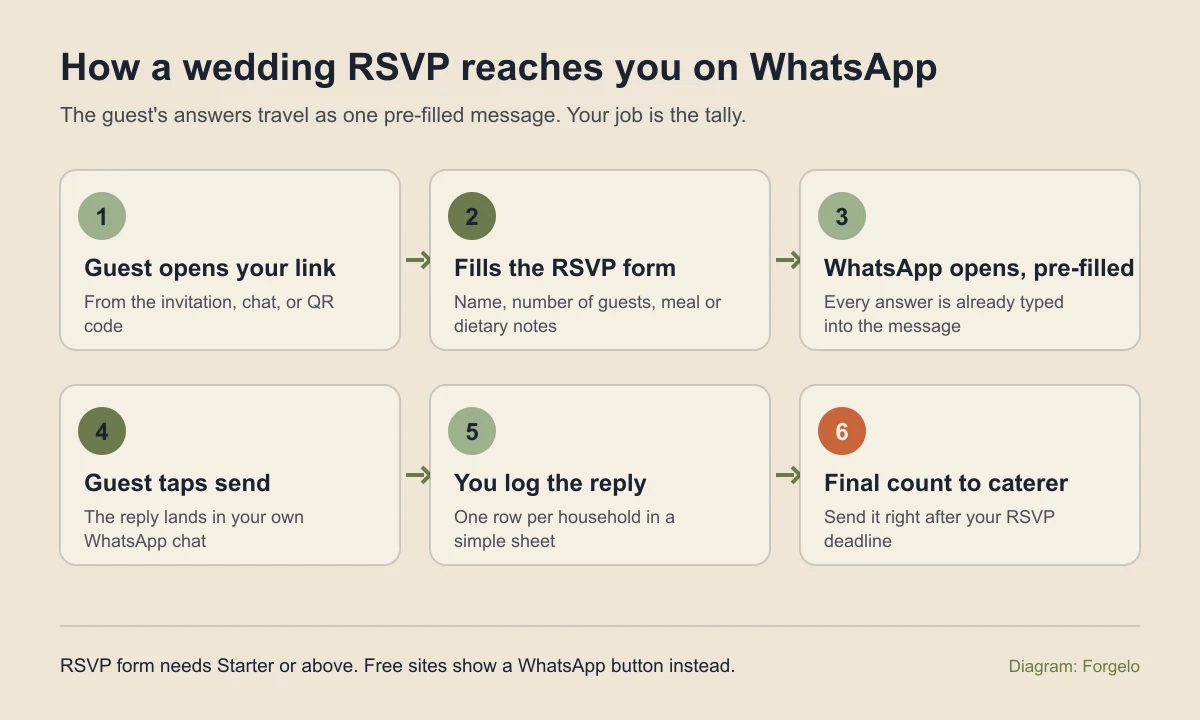
Be clear about what that does and does not do. Forgelo does not keep a guest dashboard for you, so the running total lives wherever you log replies. A shared sheet with one row per household (name, number attending, meal, dietary note) takes ten minutes to set up and makes the caterer call easy. The RSVP form is a paid feature that starts on the Starter plan; on the Free plan the site shows a WhatsApp button, and guests type their answers themselves. If you want to understand why routing beats collecting, our piece on how to turn visitors into WhatsApp leads makes the same case for businesses, and the logic is identical for a guest list.
Note: Set an RSVP deadline about three weeks before the wedding and put it in bold near the button. Caterers and venues need final numbers, and a soft "let us know" gets ignored. A hard date, visible everywhere, is the single biggest reason people actually respond on time.
Gift registry without the awkwardness
Registries are where couples overthink the tech. You do not need a wedding website builder with a native store or checkout. In most cases the cleanest approach is to link out to the registries you already have.
Create a clearly labeled registry section with a few buttons: one for a store wishlist, one for a homeware list, one for a cash fund or a bank transfer note if that's the custom where you're marrying. Each button opens the tool that already handles the money and the shipping. Your website's only job is to point guests to the right place without making them ask you directly, which is the awkward part everyone wants to avoid.
The reason this beats an all-in-one store is fees and fragility. Native registry checkouts add cuts and one more account to manage, and if the payment integration hiccups on the day gifts roll in, that's a problem you did not need. A tidy list of links has nothing to break. Simple wins here, and it costs nothing extra.
Free wedding platforms vs an AI website builder
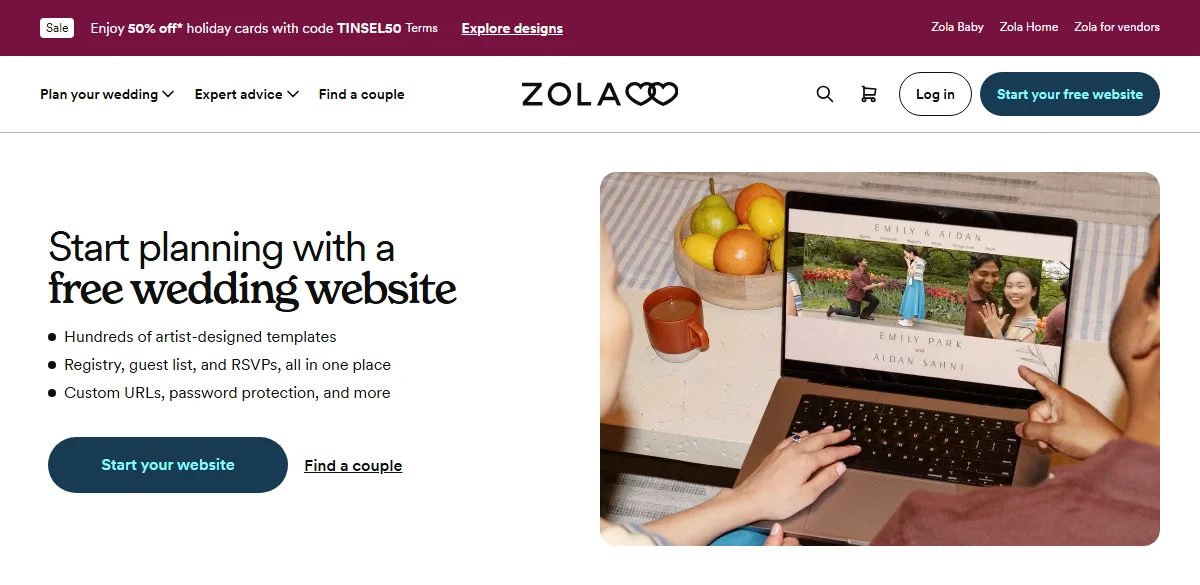
Before paying for anything, know that the big wedding platforms give the website away. Zola's wedding website page promises a free site with registry, guest list, and RSVPs in one place, plus custom URLs and password protection. Joy says its websites, planning tools, and registry are free, and its RSVP asks guests about meals by default. The Knot offers a free site that links any registry.
So why would anyone use a general builder? Three honest reasons. Free platforms are built around their own registry and US-style gift habits, which fit less well when guests send money by bank transfer or e-wallet. Their pages share a recognizable platform look and URL. And their RSVP lives in a dashboard, while many couples, especially in Indonesia, already run the whole wedding through WhatsApp.
| Option | What it costs | Best fit |
|---|---|---|
| Zola, Joy, The Knot | Free website, per each official page | US-style registries, couples happy with a platform dashboard |
| Forgelo Free | $0: 1 website, 5 AI generations and edits per day, Forgelo subdomain, badge | Trying an AI draft, info-only site with a WhatsApp button |
| Forgelo Starter | $9 per month (Rp 149rb): 3 websites, 30 AI edits per day, RSVP form to WhatsApp, 1 custom domain | RSVP replies in WhatsApp, your own domain, no badge |
Forgelo prices come from the pricing page. If your registry already lives on one of the free platforms, their site is the path of least resistance. If your guests live in WhatsApp, the routing is the reason to build your own.
Set it up tonight, step by step
Here is the order that works when you only have one evening:
- Gather the facts first. Names, date, ceremony and reception times, venue address, dress code, RSVP deadline, and registry or bank details. Ten minutes with a note app saves an hour of edits.
- Write one rich prompt. Describe the couple, the events, the tone, and the sections you want. Mention RSVP and the registry by name so the draft includes them.
- Fix facts before style. Check every date, time, and address on the draft against your note before touching colors or fonts.
- Swap in real photos. Two or three good ones beat a gallery of twenty.
- Test the RSVP on your own phone. Submit a fake reply and confirm it reaches the right WhatsApp number.
- Share the link in your invitation, save-the-date message, or a QR code on printed cards.
What to look for in a wedding website builder
Not every tool weighs these the same way. Here's the comparison I'd actually run before committing, framed around jobs rather than brand names.
| What matters | Why it matters | The good sign to look for |
|---|---|---|
| RSVP handling | This is the whole point | Meal choices, plus-ones, and a clear running count |
| Where replies go | You need to see them, not hunt | Notifications to WhatsApp or email, not a hidden portal |
| Edit speed | Details change late and often | Change anything by describing it, in minutes |
| Time to launch | You have a deadline that cannot move | A shareable link the same evening |
| Registry flexibility | Customs vary by couple and country | Free links out to any registry or cash fund |
| Cost | It's a one-season site | Free tier or a low monthly fee you can cancel after the day |
| Mobile clarity | Most guests open it on a phone | Big buttons, fast load, no clutter |
Read that table top to bottom and notice what isn't on it: template count, animation libraries, and font pickers. Those sell tools. They don't help your guests show up on time with the right meal.
When a wedding website builder is overkill
Here's the contrarian take, and I'll stand by it. Not every wedding needs a website.
If you're hosting forty local friends and family, everyone's already in one group chat, and there's no registry or meal choice to manage, a website is tech for tech's sake. A pinned message with the date, address, and a maps link does the job. Adding a site there is extra work that impresses no one and creates one more thing to keep updated.
A wedding website builder earns its keep the moment complexity shows up: more than roughly fifty guests, out-of-town attendees who need logistics, meal choices that feed a caterer's order, a registry you'd rather not explain over and over, or multiple events across a weekend. That's when a single link saves you from answering the same questions on repeat. Below that threshold, be honest with yourself and skip it. Nobody hands out awards for a website at a wedding.
Tip: If you're on the fence, start with the RSVP and registry only, share the link, and add the story and gallery later if you feel like it. A minimal site that works beats an elaborate one you're still editing the night before.
After the wedding, and the honest verdict
One overlooked advantage of a subscription-based builder is what happens after the day. You publish, use the site through the engagement and the wedding season, share photos and thank-yous for a few weeks, then cancel the paid plan or take it down. You're not stuck paying for a one-day site all year, and you're not deleting hours of custom work either. If you're weighing the total spend against other options, our guide on how much a website costs puts the numbers in context, and a wedding site sits at the low, short-term end of that range.
So, the verdict. Pick a wedding website builder when your guest list, logistics, or registry have outgrown a group chat, and pick one that treats RSVP as the main event rather than an afterthought. Set it up in an evening with an AI builder, route replies to where you already look, link out to your registries, and keep the design clean enough that your least tech-savvy guest never gets lost. Do that, and the site quietly handles the boring coordination while you get back to the parts of the wedding that actually deserve your attention. When you're ready to build yours, start with Forgelo and have the first draft live before you finish your coffee.