
If you run a bakery, a plumbing service, or a small studio, you have almost certainly seen the Wix website builder for small business pitched as the easy way to get online. It earned that reputation for real reasons, and it also carries a few catches the ads never mention. This is an honest 2026 review, strengths and weaknesses both, written for owners who care more about getting customers than about winning a design award.
Here is the short version. Wix is a capable, flexible tool that can absolutely produce a good small business site. It is also heavier and slower than most owners expect, and the true cost is not the monthly fee. It is the hours you spend inside the editor. Toward the end, I will show a faster path if that trade sounds like the wrong one for you.
What the Wix website builder for small business gets right
Wix has been around a long time, and it shows in the polish. The drag-and-drop editor is genuinely capable. You can move any element anywhere, resize it, restyle it, and see the result instantly. For a visual thinker who enjoys tinkering, that freedom feels great.
The template library is huge. Whatever your niche, a restaurant, a gym, a photographer, a law office, there is a starting layout built for it. You are rarely staring at a blank page. The app market is another strength. Booking, email capture, live chat, basic online stores, most common small business needs have an add-on ready to drop in.
There is also a real safety net. Wix handles hosting, security, and backups for you, so you are not patching servers or worrying about a site going down. For a non-technical owner, that peace of mind matters. You get a professional-looking result without learning a single line of code.
Tip: If you do choose Wix, pick a template close to your final vision from the start. Rebuilding a layout you dislike is far slower than nudging one you mostly like, and the editor rewards small edits over big overhauls.
Credit where it is due: for owners who like hands-on control and have a free weekend or two, Wix delivers. It is not a weak tool. It is a heavy one, and that difference is the whole point of this review.
Where Wix starts to slow small business owners down
The flexibility that makes Wix powerful is also what makes it tiring. Because you place every element by hand, every element is your responsibility. Getting spacing consistent across pages, keeping fonts aligned, and making the mobile version look right can turn a quick update into an afternoon. The mobile editor in particular is its own separate view, and changes on desktop do not always carry over cleanly.

Then there is the ongoing work. A small business site is never really finished. You add a service, change your hours, run a holiday promo, swap a photo. On Wix, each of those is a manual trip into the editor. None of them is hard on its own, but they add up, and the owner is usually the one doing them at 11pm.
Here is the contrarian take, and it is the most important line in this review. For most small businesses, the biggest cost of Wix is not the subscription. It is the accumulated hours you personally spend building and maintaining the thing. If your time is worth anything to your business, and it is, that hidden cost often dwarfs the monthly bill. We break down the full picture of what a site really costs in our guide on how much a website costs.
One more limitation worth knowing early: Wix sites live on Wix. You cannot export your site and move it to another host later. Your content and domain are yours, but the site itself is locked in. That is fine if you are happy staying, and a real friction if you ever want to leave.

Wix website builder for small business: pricing in plain terms
Wix pricing is straightforward on the surface and sneaky underneath. The plans are monthly, billed in US dollars, which is worth noting if you earn in another currency and watch exchange rates.
The free plan exists, but it shows Wix branding and puts your site on a wix.com subdomain. For a hobby page that is fine. For a business that wants to look credible, it is not, so nearly everyone upgrades to a paid plan to get a custom domain and drop the ads. From there, cost climbs with what you need: more storage, e-commerce features, professional email, and premium apps all push the total higher.
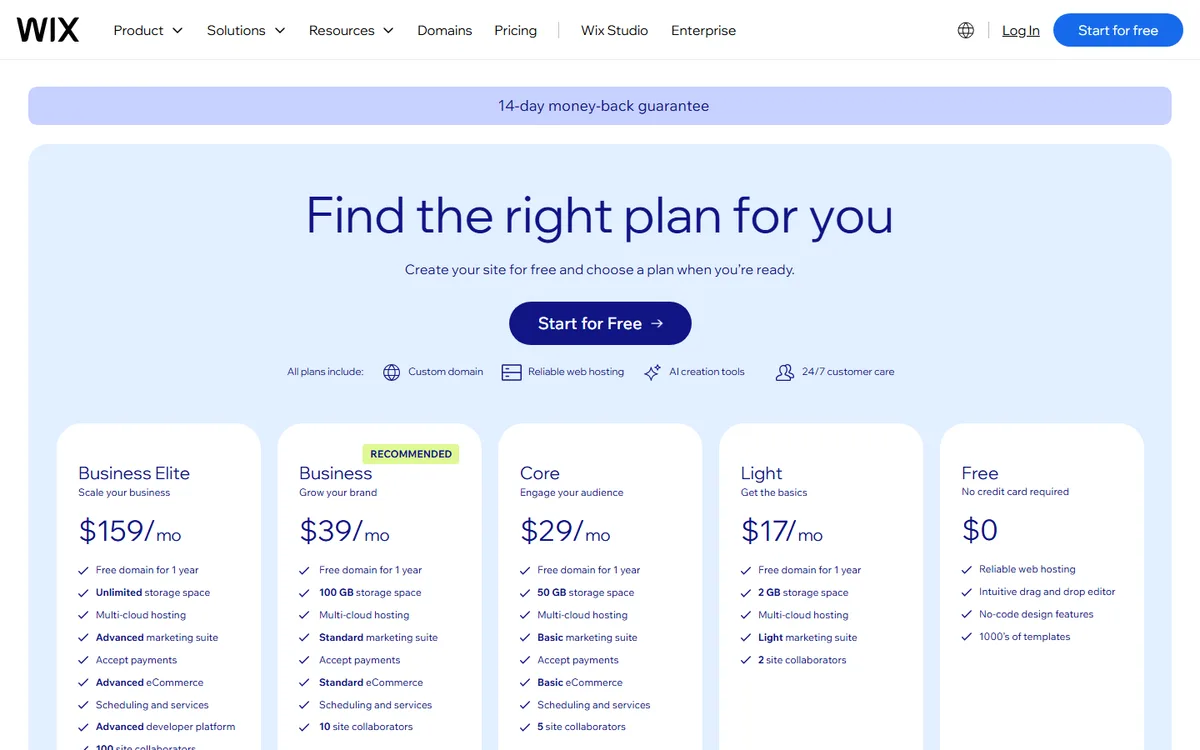
Note: When you compare Wix to any alternative, price the whole stack, not the headline plan. Add the domain, any paid apps you rely on, and the plan tier that actually removes limits you will hit. The real monthly number is usually higher than the one on the pricing page.
None of this makes Wix a bad deal. It makes it a deal you should add up honestly before you commit, the same way you would price any tool your business depends on.
Wix vs an AI-first builder: a side by side
The core difference in 2026 is not features. It is the method. Wix asks you to build. An AI-first builder asks you to describe. Here is how that plays out for a small business owner.
| Factor | Wix website builder | AI-first builder |
|---|---|---|
| How you build | Drag and drop every element yourself | Describe your business, get a full site |
| Time to first draft | A weekend or more | Minutes |
| Making edits | Manual, element by element | Type the change in plain language |
| Mobile version | Separate editor to manage | Handled automatically |
| Lead capture | Add and configure an app | Form built in, routes to you |
| Learning curve | Real, the interface is deep | Minimal, you already know how to type |
| Portability | Locked to Wix | Varies by builder |
Neither approach is objectively "better" for everyone. If you love design work and want pixel control, Wix rewards that. If you would rather spend those hours on your actual business, the AI approach was built for you. If you want the deeper head-to-head, our Forgelo vs Wix comparison goes feature by feature.

A faster way to get a small business site online
Here is where the alternative earns its place. With an AI-first tool like Forgelo, you describe your business in a sentence or two, and you get a finished, publish-ready site in a few minutes. Not a template to fill in, an actual first draft with your sections in place.
Editing works the same easy way. Instead of hunting through menus, you type what you want. "Make the headline punchier." "Add a three-tier pricing section." "Move the booking button above the fold." The change happens, and you move on. That removes the exact friction that makes Wix feel like a chore for busy owners.
For service businesses, the lead form detail is the one that pays off. On Forgelo, form submissions land straight in your WhatsApp, so an inquiry from a customer at 9pm reaches you where you already reply, not in an inbox you check twice a week. If turning site visitors into chats is your goal, that is worth reading more about in our piece on turning visitors into WhatsApp leads.
SEO basics come built in, you can publish to a free subdomain or connect a custom domain, and pricing sits at 9, 19, or 39 dollars a month. If you run an agency, there is an Agency plan so you can build and manage client sites from one account, with full white label on the roadmap. You can see the tiers on the pricing page.
Tip: The fastest way to decide is to try both on the same brief. Give Wix and an AI builder the same description of your business and a one-hour limit. Whichever gets you to a site you would actually publish tells you which tool fits how you work.
I am not going to pretend Forgelo replaces Wix for every case. If you need deep custom design or a very specific app that only Wix offers, Wix may still be your answer. But for the common small business goal, a clean site that explains what you do and brings in leads, the describe-and-edit approach gets you there with a fraction of the effort.
Five questions to answer before you commit
The right builder depends less on feature lists and more on how your business actually runs. Answer these honestly before you sign up for anything.
- Who will update the site? If it is you, between customers, the editing method matters more than the template library. If a staff member or freelancer will handle it, ask them which tool they already know.
- How often will it change? A site that changes once a year can live with a slower editor. One that needs new promos, prices or photos every month needs edits that take minutes, not an evening.
- Where should inquiries arrive? Decide before you build. If your customers message you, check how the form reaches WhatsApp in each option rather than assuming it will.
- How many pages do you really need? Most small businesses need a home page, services, about and contact. Paying for depth you will not use is a common way to overspend.
- How much time can you give it this month? Be realistic. A builder that needs two weekends is a poor fit for an owner who has two evenings.
Your answers usually point clearly to one side. If they do not, run the one-hour test above with the same brief on both tools.
How to decide: the bottom line
Choose Wix if you enjoy hands-on design, want granular control over every element, and have the time to build and maintain the site yourself. It is a mature, capable platform, and plenty of small businesses run just fine on it.
Choose an AI-first builder if your priority is speed, you would rather describe changes than drag boxes, and you want your time back for running the business. For most owners, especially service businesses and new ventures, that is the better trade.
Whatever you pick, the worst outcome is stalling. A live, decent site that captures leads beats a perfect one you never finished because the editor wore you down. Get something real online, watch what customers respond to, and upgrade when your business tells you to.