Yes, you can connect a custom domain to an AI website without touching code. In Forgelo it takes four steps: open your project and go to the Domain tab, type your domain in the Custom domain panel and click Connect, add the DNS record the panel shows at the company that manages your domain, then click Verify. Once DNS is correct, the status changes from Pending to Active and SSL is issued automatically. Custom domains are available from the Starter plan.
This guide walks through those exact screens, explains the difference between the A record and the CNAME option, and covers what to test before you share the new address. If you have not built the site yet, start with our guide to building a website with AI or the overview of what an AI website builder does. The screenshots below come from the live Forgelo dashboard.
What a custom domain does for an AI website
A custom domain is the address people type to reach your site, such as northstarstudio.com. Your AI website builder hosts and renders the site, while the domain registrar manages the address. DNS is the directory that tells browsers where that address should go. These are separate pieces, even when one company sells all of them together.
That separation is useful. You can buy a domain from one provider and build with another. You can also move the site later without changing the brand address, provided you update the DNS records carefully. Our explainer on what a domain is covers the difference between the address, the hosting layer, and the pages visitors see.
A custom domain also gives your site a stable identity. Every Forgelo site first goes live on a free subdomain such as yourname.forgelo.com, which is fine for testing and early feedback. A short branded address is easier to say, print, remember, and place on a business card. It does not guarantee search rankings, yet it makes the destination clearer for visitors and gives your marketing one consistent home.

Before you connect the domain
Check four things first, because they decide whether the connection goes smoothly.
Your plan. Custom domains start on the Starter plan. Starter includes one custom domain across your whole account, and Pro and Business raise that limit. On the Free plan, the Domain tab shows the message "Custom domains are available on the Starter plan and up" with a See plans link instead of the Connect form. If you hit your plan's limit, the panel tells you so in the same place. Review the current Forgelo pricing before you decide, because plan limits can change.
A published site. Your domain serves the published version of the site. If the project is still a draft, publish it first with the Publish button at the top of the project page. A domain pointed at an unpublished site shows a 404 page that says "This domain is not connected to an active site."
Root domain or www. Forgelo connects one custom domain per site. Decide whether visitors should use the root domain (yourbusiness.com) or a subdomain (www.yourbusiness.com). The root domain is shorter to say and print. If you also want the other version to work, most registrars offer a free domain forwarding setting that can send it to the address you connect.
Your existing DNS. If the domain already serves another website, the new record will replace where it points. Take a screenshot of the current DNS records before you change anything. If the domain runs email, note the MX, SPF, DKIM, and DMARC records and leave them in place. Forgelo only needs one website record, not a new mail setup.
No domain yet? Buy one from any registrar you trust, such as Namecheap, GoDaddy, Cloudflare, or a local provider. The Domain panel mentions that buying a domain inside Forgelo is coming soon, so for now it is registered separately and always stays in your name.

Step 1: Open the Domain tab and click Connect
From your dashboard, open the project you want to put on the domain. The project page has four tabs across the top: Editor, Blog, Domain, and Settings. Click Domain.
The Custom domain panel asks: "Have your own domain? Connect it to your site. One custom domain per site." Type the address exactly as you want visitors to use it, for example yourbusiness.com or www.yourbusiness.com, and click Connect. You do not need to type https://, because Forgelo removes it for you, and you should not add a path such as /home.
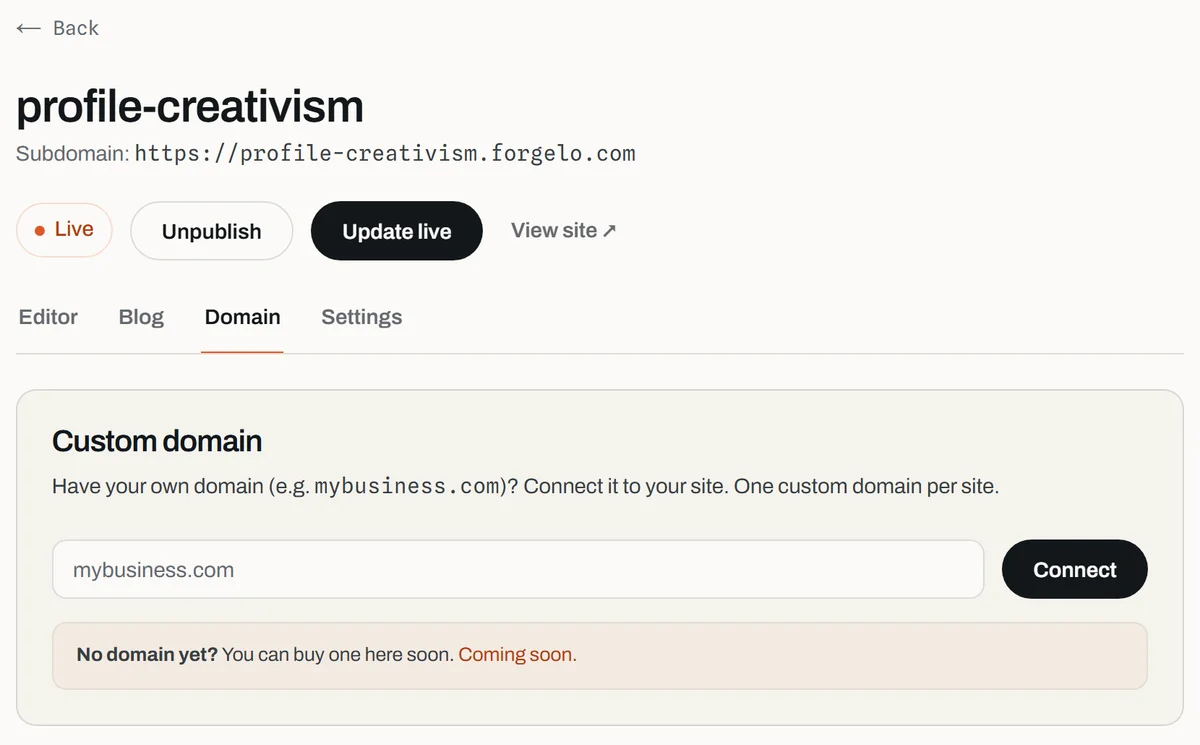
If the domain is valid and your plan allows it, the panel switches to a row showing your domain with the status Pending. If you see an error, check for a typo, a missing extension such as .com, or a space in the field.
Step 2: Add the DNS record Forgelo shows you
Under the Pending status, Forgelo prints the exact instructions for your domain. The record type depends on what you entered:
- Root domain (
yourbusiness.com): add an A record with host@and the IP address shown in the panel. - Subdomain (
www.yourbusiness.com): add a CNAME record with your subdomain as the host and the target value shown in the panel.
Click a value in the panel to copy it. Always use the value your own panel shows rather than one from a tutorial, because the recommended record is fetched for your specific domain.
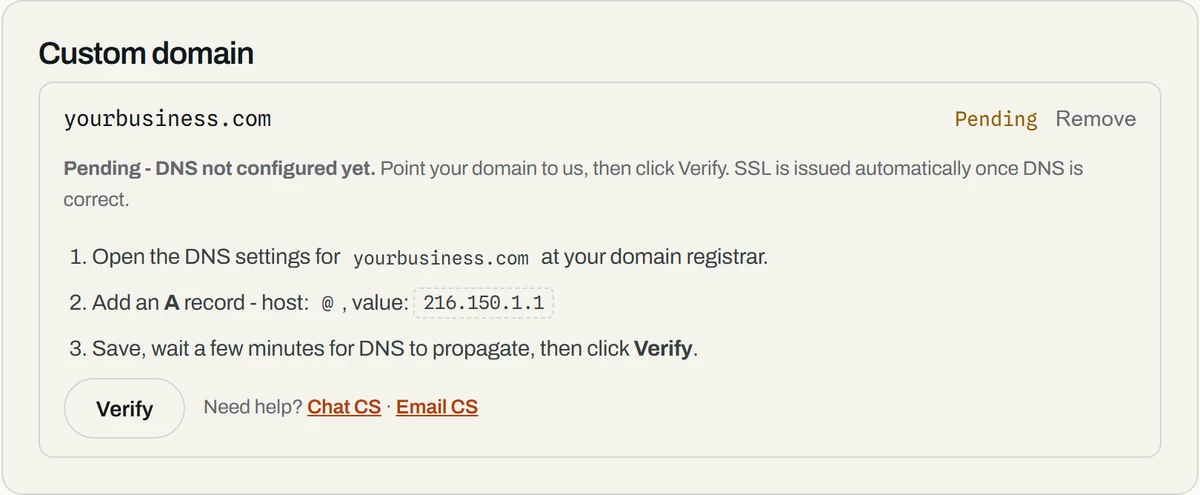
Now sign in to your registrar or DNS provider and open DNS management, sometimes called the zone editor. Add the record without changing the value. Many dashboards add your domain to the host field automatically, so if Forgelo says www, type www, not www.yourbusiness.com. Cloudflare's official DNS record guide explains the common fields if your provider uses unfamiliar labels.
Two things commonly block verification. First, an old A record or CNAME for the same host from previous hosting; remove the leftover so only the new record answers. Second, if your DNS runs on Cloudflare, set the record to DNS only (grey cloud) while verifying, because a proxied record can stop verification and certificate issuance.
Step 3: Click Verify and wait for Active
Save the record at your registrar, wait a few minutes, then go back to the Domain tab and click Verify. Forgelo checks your DNS again. When the record is correct, the status changes from Pending to Active, the domain turns into a clickable link, and SSL is issued automatically, so there is no certificate to buy or upload.
If it still says Pending, do not delete and recreate the record every few minutes. DNS answers are cached by resolvers, and some registrars take longer than others. Changes usually appear within minutes but can take up to 24 to 48 hours. You can click Verify as often as you like, and there is no penalty for retrying. The panel also has Chat CS and Email CS links under "Need help?" if you get stuck; send your domain name and a screenshot of your DNS records. Our help article on troubleshooting custom domain DNS covers the checks support will ask about.
To disconnect a domain later, click Remove next to it in the same panel. The site stays live on its forgelo.com subdomain, and on Starter the slot becomes free for another domain.

Step 4: Check the website after the domain is Active
A domain is not fully ready just because one request returns a page. Open https://yourbusiness.com in a private browser window and confirm the padlock shows without a certificate warning. Google explains why HTTPS matters for site security. If you set up registrar forwarding for the other version, test that too.
Then test the visitor journey, not just the top of the page. Click through the navigation, check the services or pricing sections, and send a test enquiry through the contact form. On paid plans, Forgelo's lead form can send enquiries to WhatsApp, which suits teams that answer new customers from a phone. Make sure your real WhatsApp number is set in the editor.
Check the page on a phone and a desktop. Look for a clipped hero, buttons that are hard to tap, missing images, and links that still point to the old subdomain. The no-code website builder guide has a broader checklist for non-developers who want to review a site without browser tools.
Finally, look at the basics that help search engines understand the site: a clear page title, a useful description, one main heading, and content that says what the business actually does. Our guide to website SEO basics covers the decisions an AI builder cannot guess unless you provide them.
Common DNS and domain problems
The status stays Pending. Compare the record at your registrar with the panel character by character. A registrar may treat @, a blank host field, and the full domain differently. Also make sure you edited the DNS provider your nameservers actually point to. Changing records at the registrar does nothing if the nameservers point to another service.
It works on one network but not another. This is usually caching. Compare a mobile connection with your home connection, wait, then click Verify again. Avoid adding a second record while the first is still resolving.
Email stopped arriving. Restore the mail records from your screenshot or your email provider's documentation. The website record and the MX records do different jobs. If you are unsure, stop editing and ask your email provider for the exact records.
The www version does not open. Forgelo connects one domain per site, so only the address you entered is served. Either connect the version you prefer or add registrar forwarding from the other version.
The Domain tab shows an upgrade message. Your plan does not include a custom domain, or you have used all the domains your plan allows. Upgrade from the See plans link, or remove a domain you no longer use from another project.
Should you connect a domain immediately?
Connect it when the core information is accurate and you are ready to share the site. You do not need perfect copy. You do need a working contact path, real business details, a clear offer, and a mobile check. Stay on the free subdomain while you collect feedback, then move to the custom address once the first version is useful.
An AI website builder removes most of the build work, especially when you can generate the first draft from one sentence and change individual sections by prompt. Forgelo is designed around that loop: describe your business, get a complete site in a few minutes, then ask for a new headline, a revised services section, or a clearer call to action without rebuilding the page. The custom domain is the final address layer, not a replacement for good content.
Final launch checklist
Before you announce the new address, confirm all of these items:
- Your plan includes a custom domain and the project is published.
- The domain was added in the Domain tab of the correct project.
- The A record or CNAME matches the value shown in the panel exactly.
- Old conflicting records for the same host were removed.
- Existing email records were left in place.
- The status shows Active and HTTPS loads without a warning.
- Navigation, images, the contact form, and key buttons work.
- Any forwarding for the www or root version works.
- Analytics and search properties use the new address.
- Your public profiles, email signature, and printed materials are updated.
For more on choosing the address itself, read what a domain is and the small business website essentials. Review how AI generates a website and how it works before you publish, and see the help article on connecting a custom domain for a short version of these steps.