
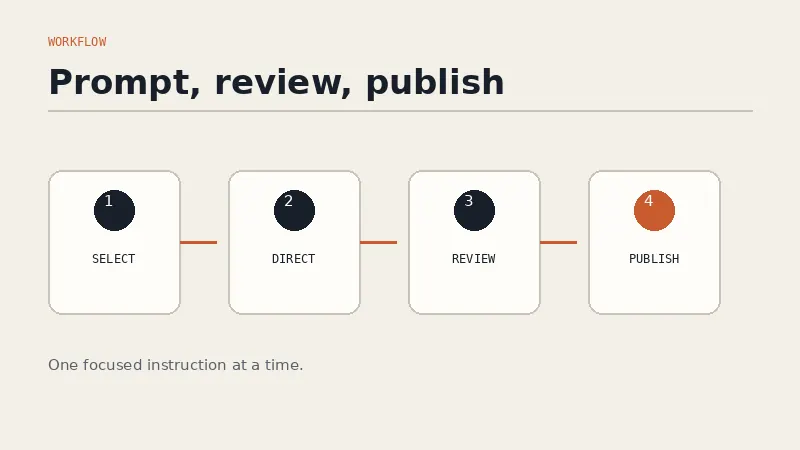
To edit a website by prompt is to choose a section, describe the result you want in ordinary language, and let an AI website editor make the change. Instead of opening code or arranging blocks one by one, you can write, “Make this hero more specific to independent accountants and change the button to Book a consultation.” You then review the updated section, refine it if needed, and publish when it is accurate.
The important shift is not that AI can produce a first website draft. It is that the website remains editable after that first draft. A business owner can change an offer, sharpen a headline, add a service, or reorganize an FAQ without turning each revision into a small development project.
This does not remove judgment from website work. It moves your effort from implementation to direction. You still decide who the page is for, what it should say, what evidence is credible, and what action matters. The editor handles the mechanical work of translating that decision into a section.
On this page
- What it means to edit a website by prompt
- How the prompt editing workflow works
- How to write prompts that produce useful edits
- How to review an AI website edit before publishing
- Where prompt editing works best and where it does not
- Frequently asked questions
What it means to edit a website by prompt
Prompt-based website editing replaces a sequence of interface operations with a description of intent. In a conventional visual builder, changing a service section may involve adding a block, selecting a layout, moving columns, opening typography controls, rewriting labels, and checking responsive settings. In a prompt-based editor, the starting instruction might be:
Replace this three-card service section with four services for startup finance teams. Give each service a short outcome-led heading and one sentence of detail. Keep the existing colors and button style.
The prompt captures both content and presentation constraints. A capable editor interprets the instruction, updates the selected section, and leaves unrelated parts of the site alone. That last point matters. Website owners often avoid improving one weak section because they do not want to risk breaking five approved ones.
There are three distinct ideas in this workflow:
- Selection: You identify the section that needs work, such as the hero, features, pricing, testimonials, FAQ, or contact area.
- Direction: You explain what should change and why, using the language of your business rather than the language of web development.
- Review: You treat the output as a proposed edit, not an unquestionable final answer.
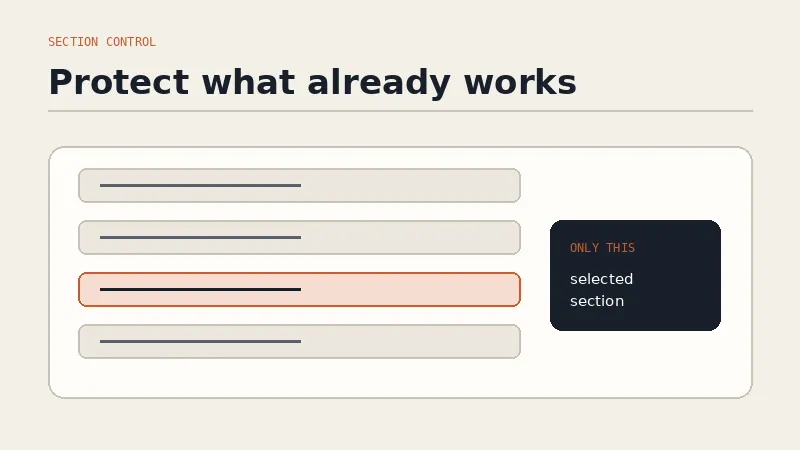
This is different from asking a general chatbot to write a paragraph and manually pasting the result into a site. The editing context includes the actual section and its role in the page. It is also different from regenerating an entire website. Section-level control lets you preserve what already works.
Forgelo is built around this approach. Its official features page explains that you can click a section, describe what should be different, and rebuild that part while leaving the rest alone. If you want the wider category context first, read the AI website builder guide. If your main priority is avoiding technical tools altogether, the guide to making a website without coding explains the broader no-code route.
The same prompt-driven approach scales up from one section to a whole site. If your current website feels dated rather than slightly off, see how an AI website redesign works end to end.
How the prompt editing workflow works
A reliable workflow starts with diagnosis, not prompting. Read the page as a visitor and identify the exact problem. “I do not like it” is difficult to act on. “The headline names the product but does not explain who it helps” gives you a clear editing target.
Use this five-step process.
1. Choose one section and one primary goal
Select the smallest meaningful area that can solve the problem. If the offer is unclear above the fold, start with the hero. If visitors understand the offer but hesitate, improve proof, process, pricing context, or the FAQ. Avoid changing the whole page before you know which part is failing.
Give the edit one primary goal. Examples include making the audience explicit, reducing jargon, showing a clearer outcome, answering an objection, or strengthening the next action. One goal does not mean one tiny text change. It means every requested change should point in the same direction.
2. Add the business context the editor cannot infer
State facts that must shape the section. Include the audience, service, location, differentiator, required terms, and desired action when relevant. For example:
Rewrite this hero for a bookkeeping firm serving restaurants in Austin. Emphasize monthly reporting and cash-flow visibility. Use a calm, practical tone. The main action is Schedule a 20-minute call.
The prompt gives the editor useful boundaries without prescribing every word. It also reduces the chance of generic copy that could belong to any firm.
3. Protect what already works
Say what must stay unchanged. You might preserve the layout, colors, image, existing customer quote, price, or legal wording. A constraint such as “Keep the current visual hierarchy and do not alter the testimonial text” can be as valuable as the requested change.
This habit makes iteration safer. It also helps you distinguish a content problem from a design problem. If the section only needs clearer wording, there is no reason to redesign it at the same time.
4. Review the section in page context
A strong isolated section can still weaken the full page. After the edit, read the section before it and the section after it. Look for repeated claims, sudden changes in tone, conflicting buttons, and gaps in the argument. The page should feel like one guided sequence rather than a collection of individually polished blocks.
5. Refine with a narrow follow-up
Do not restart if the result is close. Give a focused second instruction: “Keep this structure, shorten each description to 12 words, and replace abstract claims with concrete deliverables.” Small follow-ups preserve the useful parts of the first result while correcting the weak ones.
How to write prompts that produce useful edits
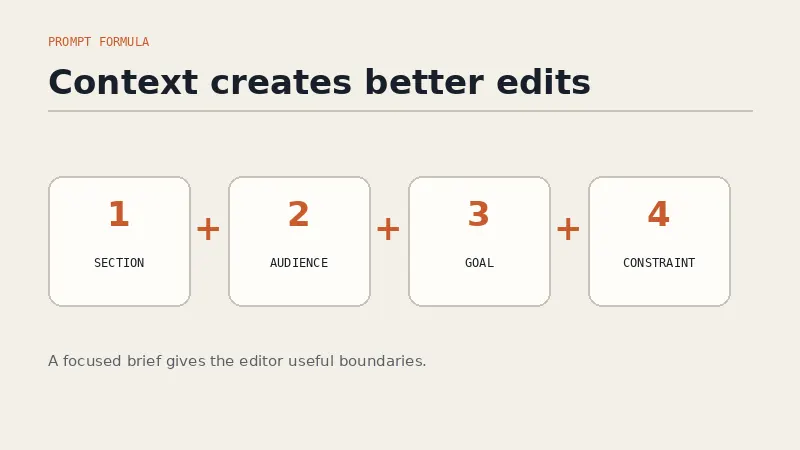
The best editing prompts are briefs in miniature. They describe the job, provide the necessary facts, and define the boundaries. A simple pattern is:
Change + audience + goal + required details + tone + constraints.
Here is that pattern in practice:
Turn this process section into four numbered steps for first-time home sellers. Explain what happens from valuation to closing. Keep each step under 30 words, use reassuring language, and keep the current section title.
The instruction is effective because it answers the questions an editor would otherwise need to ask. It identifies the format, reader, scope, length, tone, and preserved element.
Use prompts suited to the section you are editing:
| Section | Weak instruction | Stronger instruction |
|---|---|---|
| Hero | “Make this better.” | “Rewrite the hero for operations leaders at 20 to 100 person companies. Lead with fewer manual handoffs, avoid hype, and use Request a demo as the button.” |
| Services | “Add more services.” | “Add payroll setup and monthly reporting to this services section. Use four equal items, start each heading with the outcome, and keep descriptions under two sentences.” |
| Proof | “Make us credible.” | “Reorganize this proof section around the three supplied customer quotes. Do not invent names, results, certifications, or numbers. Add a neutral heading about customer experience.” |
| FAQ | “Improve the FAQ.” | “Add questions about onboarding time, cancellations, and data migration. Answer only from the details supplied below and flag any missing answer instead of guessing.” |
| CTA | “Make it convert.” | “Change the final CTA for visitors who are not ready to buy. Invite them to book a short fit call, explain what the call covers, and remove urgency language.” |
Several habits improve results across all sections.
First, provide source material when accuracy matters. If a section includes prices, product capabilities, opening hours, service areas, or policies, put the approved facts in the prompt. Explicitly say not to add unsupported details. AI can organize facts well, but it should not become the source of those facts.
Second, use positive direction. “Sound professional” is broad. “Use short sentences, concrete nouns, and a calm advisory tone” is easier to apply. “Do not be generic” is less useful than “Name the audience, the deliverable, and the next step.”
Third, request one meaningful revision at a time. A prompt that asks for a new audience, a new offer, a new layout, a new color palette, and a new conversion path makes review harder. Separate strategic changes from cosmetic ones so you can tell which decision improved the page.
Finally, do not over-direct every sentence. A prompt is not code in disguise. Give the editor enough room to solve the section while being precise about facts and outcomes.
How to review an AI website edit before publishing
Prompt editing makes changes faster, but faster editing makes review more important. Use a repeatable checklist rather than relying on whether the new section feels polished.
Accuracy: Verify every price, date, location, capability, name, quote, credential, and result. Remove invented specifics. If a claim cannot be confirmed from an approved source, rewrite it as a modest description or leave it out.
Message: Ask whether a first-time visitor can identify the audience, offer, value, and next step. Clear copy usually beats clever copy. Remove phrases that sound impressive but do not explain anything.
Continuity: Compare the edited section with the rest of the page. Use consistent terms for the product, service, and customer. Confirm that the same action is not labeled “Get started,” “Contact us,” and “Book now” without a reason.
Search structure: Preserve a logical heading hierarchy and descriptive links. Google’s SEO starter guide recommends organizing content clearly and using concise, relevant anchor text that helps people and search engines understand the destination. Editing by prompt does not guarantee search visibility, but it can help you maintain clear page structure when the prompt and review are disciplined.
Accessibility: Check that images have useful alternative text, controls have clear names, and buttons are practical to use. Do not encode meaning through color alone. For interactive target sizing, the W3C’s official WCAG 2.2 target size guidance explains the 24 by 24 CSS pixel minimum criterion and its exceptions. A prompt can request a larger button, but the preview is where you confirm the result.
Mobile layout: Preview the edited page at narrow widths. Look for clipped text, awkward line breaks, crowded buttons, oversized headings, and columns that no longer stack sensibly. Google uses the mobile version of site content for indexing and ranking, according to its mobile-first indexing best practices, so mobile review is not an optional final polish.
Conversion path: Click every link and button affected by the edit. Confirm that the form, booking page, WhatsApp action, checkout, or email destination works. Then ask whether the button label accurately describes what happens next.
A useful final test is to read only the headings, then only the buttons. The headings should tell a coherent story. The buttons should offer a clear path without surprise. If either sequence is confusing, refine the section before publishing.
Where prompt editing works best and where it does not
Prompt editing is especially useful for websites that change with the business. A service company can add an offer. A consultant can reposition for a narrower audience. A restaurant can update a seasonal menu section. A startup can test a new headline. An agency can prepare client revisions without rebuilding a page manually.
It is also a good fit for non-developers because the input is intent. You can say what the business needs without knowing which component, spacing token, or responsive rule implements it. That makes ownership more practical after launch. The person closest to the offer can make a correction without creating a ticket for every sentence.
The approach is less suitable when the requested change is really a software feature. A prompt such as “Add a secure customer portal with role-based permissions and billing” describes an application, not a content section. Complex authentication, regulated data flows, unusual integrations, and custom transactional logic still require technical planning, testing, and often specialist development.
Prompt editing also cannot supply missing business judgment. It cannot decide whether a discount is financially sound, verify a legal claim, approve a medical statement, or know which customer promise your team can reliably fulfill. It can help express a decision. It should not quietly make the decision for you.
Use this boundary:
- Use prompt editing for structure, copy, presentation, section order, calls to action, and clear updates based on approved facts.
- Use direct expert review for legal, medical, financial, security, compliance, and other high-stakes claims.
- Use development work for custom behavior that extends beyond the builder’s supported website components.
The new way to build is not a one-sentence request followed by blind publication. It is a shorter loop: identify the problem, prompt the selected section, inspect the result, and refine. For a straightforward business website, that loop gives non-developers a level of day-to-day control that previously required either technical skill or someone else’s availability.
Frequently asked questions
What does it mean to edit a website by prompt?
It means selecting a website section and describing the desired change in plain language. The editor applies the change to that section, after which you review and refine the result. The rest of the page should remain intact when the builder supports section-level editing.
Do I need coding skills to edit a website with prompts?
No. You need to understand your audience, offer, facts, and goal, but you do not need to write HTML or CSS. Prompt editing translates business direction into an implemented website change.
Can I edit only one section instead of regenerating the whole site?
Yes. Forgelo lets you click the relevant section and prompt that part specifically. This is useful when most of the page is already approved and only the hero, offer, proof, FAQ, or CTA needs work.
What makes a good website editing prompt?
Name the section, audience, primary goal, required facts, preferred tone, and constraints. State what must remain unchanged. Focus each prompt on one coherent job, then use narrow follow-ups to refine the result.
Will prompt editing hurt my website SEO?
Not inherently. Search problems can arise if you publish inaccurate, repetitive, thin, or poorly structured output. Review headings, internal links, page intent, factual accuracy, and mobile presentation after every meaningful edit.
What should I check before publishing an AI edit?
Verify facts, brand voice, heading structure, links, button destinations, accessibility, mobile layout, and the conversion path. Read the edited section in context with the sections around it. Publish only after the complete page still feels accurate and coherent.