Affordable website design for small business is one of those phrases that used to make people wince, because "affordable" and "good" did not always travel together. For years, a cheap site meant a slow template stuffed with stock photos, and a proper site meant a five-figure agency invoice. That gap has closed faster than most owners realise. Today you can get a clean, professional website for less than a phone bill each month, and you can build it yourself in an afternoon. This guide breaks down what "affordable" really costs, with published numbers, where the money goes, and how to get a site that looks hired without paying hired-hand rates.
Here is the honest starting point. The problem was never the price of design. It was the price of custom labour. Once you remove the manual hours, a small business site becomes cheap to produce and still looks the part. That is the shift worth understanding before you spend anything.
What affordable website design for small business really costs
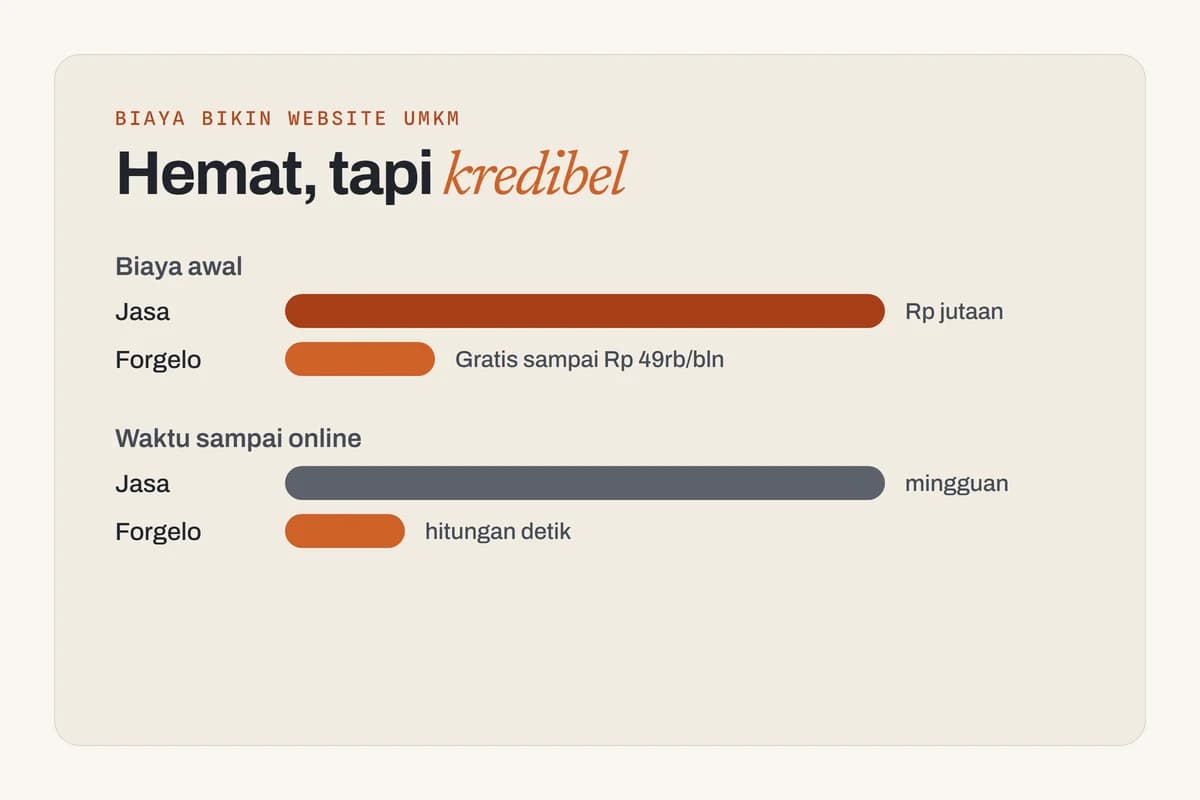
People compare one sticker price against another and stop there. Look at the full picture instead: upfront cost, ongoing cost, and who keeps the site running afterwards. The figures below come from two current cost guides, the Forbes Advisor website cost guide and the GoDaddy website cost guide, both updated for 2026, plus our own pricing page.
| Route | Published starting price | Ongoing cost | Source |
|---|---|---|---|
| Professional designer, optional | $1,500 and up | Hosting and apps $15 to $150 a month | Forbes Advisor |
| Web designer, small business site | $640+ one-time | About $120 to $150+ a year for the platform | GoDaddy |
| DIY build on a builder or WordPress | $0 to $450 to build | Builder plans from $119.88 a year | Forbes Advisor, GoDaddy |
| Squarespace subscription | No build fee | $25 to $139 a month | Forbes Advisor |
| Forgelo AI website builder | $0 on the Free plan | $9, $19, or $39 a month | forgelo.com/pricing |
Two things jump out. First, the design fee is a one-off, but every route carries a running cost for hosting, a builder plan, or both. Second, the gap between "hire someone" and "do it with a tool" is not small. It is the difference between hundreds or thousands of dollars on day one and a monthly fee you can cancel.
Tip: Before you compare prices, write down how often you expect to change your site. If the answer is "constantly," ongoing edit costs matter more than the upfront fee, and that quietly changes which option is actually cheapest.
Read the starting prices the right way
Every number in that table is a floor, not a quote. GoDaddy's "$640+" and Forbes Advisor's "$1,500 and up" both carry a plus sign for a reason: pages, custom features, copywriting, and revisions push the figure up. GoDaddy also notes that small businesses can expect to pay between $145 and $640+ a year to create and maintain a website, which is a useful reality check on the low end.
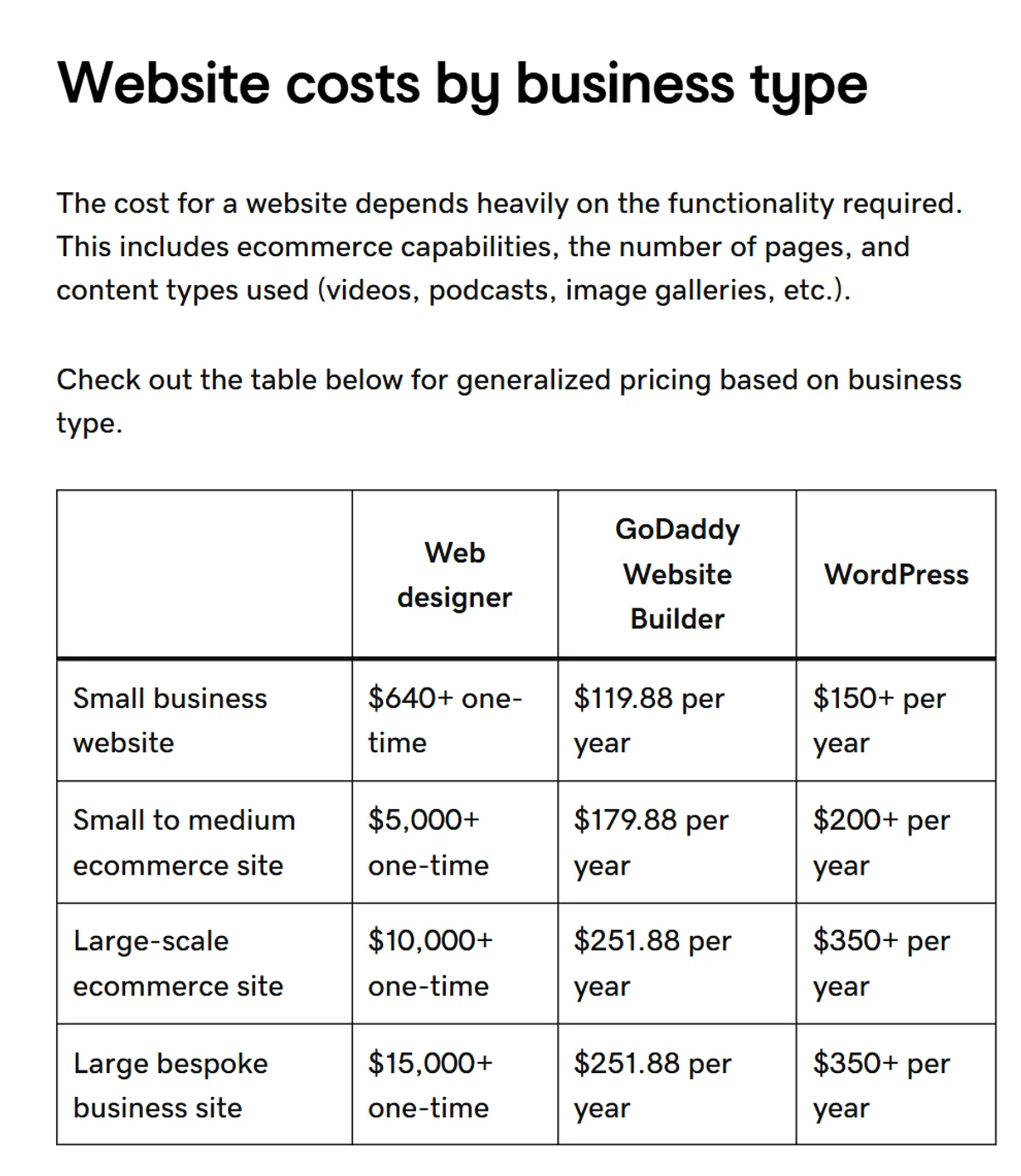
The builder prices are floors too. An entry plan is fine for a five-page service business, but add online booking, a store, or premium apps and the monthly figure climbs. Forbes Advisor notes that e-commerce features usually start around $15 to $30 a month on top. If you only need to be found and contacted, you can stay at the bottom of every range.
Cheap and affordable are not the same thing
Here is a contrarian take that will save you money: the cheapest option is often the most expensive one. A one-off bargain gig where a stranger disappears after delivery, a free site you cannot edit without upgrading, a template you fight for a weekend and abandon. Each carries a hidden bill paid in redone work and lost time.
Affordable is a value judgement, not a small number. A plan that costs a bit each month but covers hosting, edits, and updates is more affordable than a "free" tool that traps your content or a one-time build that charges you every time you want to move a button. When you shop, ask what the price includes over a year, not just what it says on the label. Our guide on how much a small business website costs walks through that math in detail.
A first-year budget, worked through
Abstract ranges are hard to plan with, so here is one business run through three routes. Picture a home bakery that needs a single page: what it bakes, a gallery, prices, an order button, and its location. The numbers use only the published floors above, so real quotes will usually be higher, never lower.
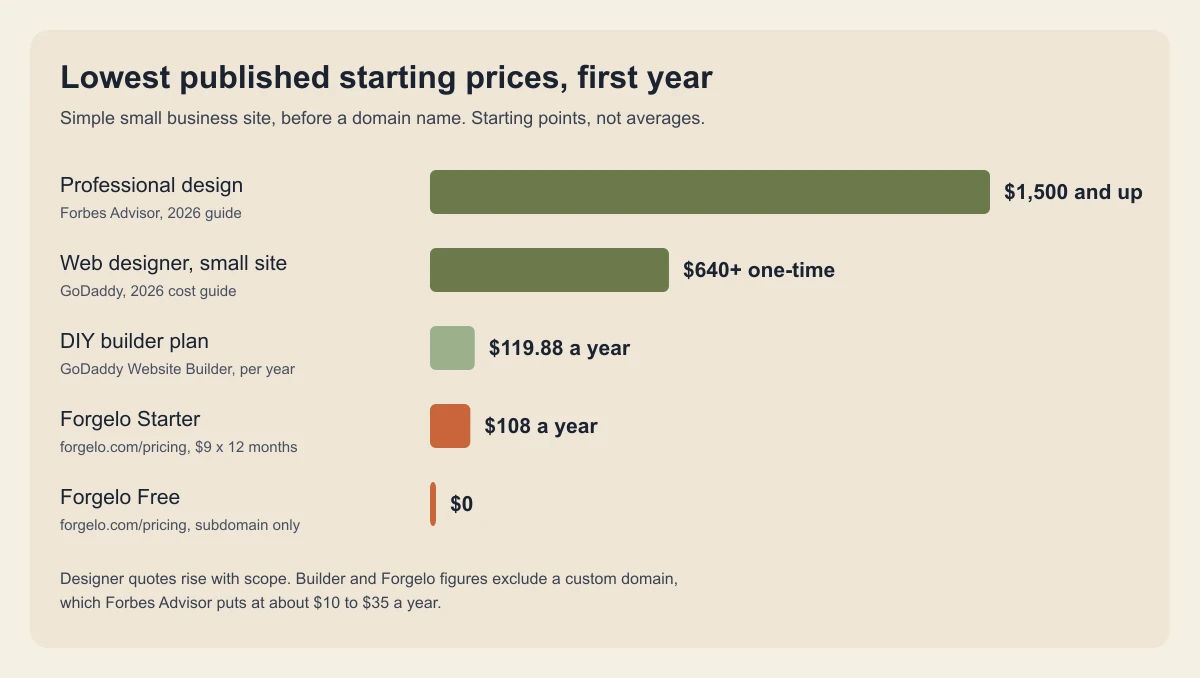
Route A, hire a web designer. GoDaddy's floor of $640 for the build, plus a builder or hosting plan of roughly $120 to $150 a year, plus a domain. Call it about $770 to $825 in year one before any change requests. Every later edit is a new message and often a new invoice.
Route B, build it yourself on a drag-and-drop builder. A plan from $119.88 a year in GoDaddy's guide, plus a domain, so roughly $130 to $155 in cash. The real cost is your time: learning the editor, choosing a template, writing every word, and fixing the mobile layout.
Route C, an AI website builder. On Forgelo, the Free plan costs $0 and publishes to a Forgelo subdomain, which is enough to test the idea. The Starter plan is $9 a month, so $108 for the year, and adds a custom domain connection, WhatsApp lead forms, and no badge. Add a domain and you land near $120 to $145, with the copy and layout drafted for you.
The point is not that one number wins. It is that the designer route costs several times more in year one, and the gap widens every time you need a change. If your site changes often, that second effect matters more than the first.
Hidden costs that turn cheap into expensive
The sticker price rarely covers everything. These are the line items that show up later, with published figures so you can plan for them:
- Domain renewal. Forbes Advisor estimates $10 to $35 a year. A "free domain" offer usually covers year one only.
- Copywriting. GoDaddy lists professional website content at about $0.35 per word. A modest five-page site with 1,500 words is roughly $525 if you hire it out.
- Business email. Forbes Advisor puts most entry plans at around $1 to $26.40 per user per month, though free options exist.
- Premium templates and apps. Templates range from free to well over $1,000, and paid apps add their own subscriptions.
- Maintenance. GoDaddy suggests budgeting up to $500 or more a year for updates, security, and content changes on a typical site.
An AI builder removes some of these by design. The copy is drafted for you, hosting is part of the plan, and edits happen inside the same subscription instead of on a separate invoice. The domain and email remain separate on almost every platform, including ours.
The four ways to get a small business website
Each route fits a different owner. Be honest about which one you are.
Full agency. You are paying for a team, strategy, and a fully custom result. It is the right call for an established business where the website is a major revenue channel. For a new plumber, bakery, or bookkeeper, it is usually overkill you cannot justify yet.
Freelance designer. A good freelancer brings taste and judgement for less than an agency. The trade-offs are timeline and the change tax: after launch, every tweak means an email and often a fee. If you update rarely, this can work well. If you tinker, the bills add up.
DIY drag-and-drop builder. Cheap in money, expensive in patience. You are the designer now, and the blank canvas is not always kind to people who do not enjoy layout work. Great if you have time and taste, frustrating if you just want the thing done.
AI website builder. You describe your business in a sentence and get a full site back, then refine it by typing what you want. It is the most affordable route that still looks professional, because the design work is done for you from patterns that already convert. The catch is at the very top end of "make it look like nothing else on earth," where a human designer still edges ahead.
Note: If you are torn between a freelancer and a builder, start with the builder. Launch this week, get real customers, and you will brief a designer far better later because you will know what actually works rather than guessing.
How an AI website builder makes pro design affordable
This is where the price of "professional" really drops. With Forgelo, you describe your business in one sentence and a finished, publish-ready site appears in a few minutes. Not a blank template. A real site with copy, sections, and a design already in place. From there, editing is the part that makes it affordable to own, not just to buy: you type the change you want and it happens. "Make the headline shorter." "Add a pricing section." "Move the contact form up." No code, no design software, no waiting on anyone.
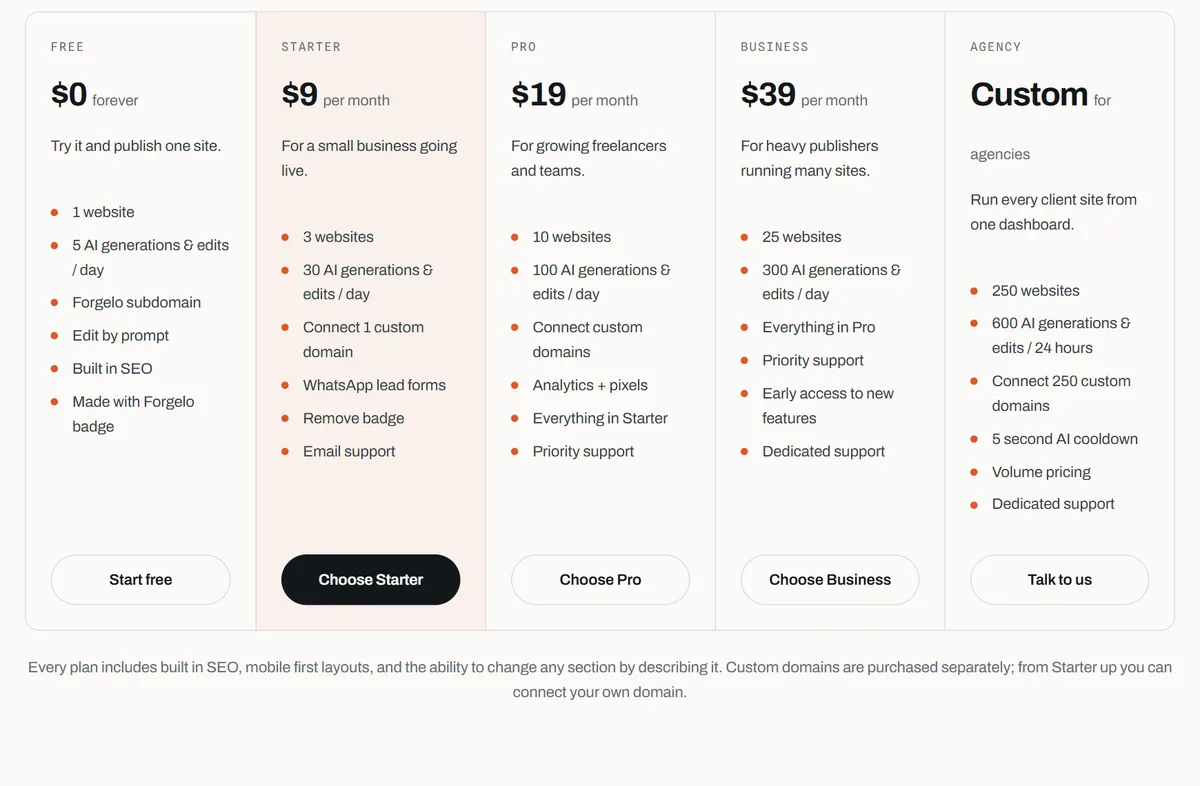
The features that used to cost extra are part of the plans. On Starter and above, lead forms route straight to your WhatsApp, so an enquiry from a bakery customer or a home-repair lead lands where you already reply. SEO basics are built in on every plan, and our primer on website SEO basics covers what that means in plain terms. Edits run on a daily allowance rather than per-change fees: 5 AI generations and edits a day on Free, 30 on Starter, 100 on Pro, and 300 on Business. Agencies can manage client sites on a custom Agency plan, with full white label still on the roadmap.
What you should never cut to save money
Going affordable does not mean going bare. Some things are worth protecting even on the tightest budget, because they are the parts that actually bring in customers. Cut here and you save a little today and lose sales quietly for months.
- A real domain. Your own name, not a long free URL that looks like a placeholder. It costs little and buys instant credibility.
- Mobile-friendliness. Most visitors arrive on a phone. A site that breaks on mobile is worse than no site.
- Clear copy. People need to understand what you do and what to do next within seconds. This is free to get right and expensive to get wrong.
- A working way to capture leads. A form, a WhatsApp button, a phone number that is easy to tap. A pretty site with no way to contact you is a brochure, not a tool.
Save money on custom illustration, elaborate animation, and bespoke fonts. Those are nice, not necessary. The essentials above are the opposite. Our checklist on small business website essentials covers the non-negotiables in more depth.
Five questions to ask before you pay anyone
Whatever route you pick, these questions expose the real price in under ten minutes:
- What exactly is included for the price? Pages, copy, images, hosting, and how many revision rounds.
- What does a change cost after launch? Get the per-edit fee or the monthly allowance in writing.
- Who owns the domain and the content? It should be you, registered in your name.
- What happens if I stop paying? Ask whether you can export your content or move the domain.
- What is the total for year one and year two? Add the build, the plan, the domain, and expected edits.
If a provider cannot answer these clearly, that alone tells you something. If a tool lists the answers on its pricing page, you can compare it in minutes.
Affordable website design for small business: a simple decision guide
Match the tool to your situation instead of chasing the lowest number.
- Just starting, tight budget, want it live fast: an AI website builder. Launch this week and start getting found.
- Comfortable with layout and have spare time: a DIY builder can work, if you genuinely enjoy the process.
- Rarely update and want a hands-off custom look: a trusted freelancer, budget allowing.
- Established, website is your main revenue channel: an agency investment can pay for itself.
For most small businesses, freelancers, and solo operators, the builder route wins on both price and effort, which is why it has quietly become the sensible default. You keep control, you keep costs predictable, and you can always upgrade later once the business tells you to.
The bottom line
Affordable website design for small business no longer means settling for something that looks it. The manual labour that made good sites expensive has been automated away, and what is left is a clean, professional result you can own for a small monthly cost. Compare the routes on total first-year value, not the sticker, protect the fundamentals that actually win customers, and skip the extras you do not need yet.
The worst move is waiting for the perfect budget. A live, decent site earns real customers while a perfect one sits in your head. Start where you are, launch something honest, and let the money you saved go toward growing the business instead.