
For a website to show up on Google, three things have to happen. First, Google has to find your pages. Second, Google has to index them. Third, Google has to judge a page relevant for a specific search. Many new website owners blur these three stages together, then panic when their site is not showing after one day.
The short version: a new website does not automatically appear for every search. It has to be crawlable, have clear pages, be in a sitemap, not be blocked by robots rules, and have content that is genuinely helpful. Even then, ranking takes time. This guide walks through the right steps from the start, without promising instant rankings.
Indexing and ranking are different
Indexing means Google has stored your page in its search database. Ranking means your page appears at a certain position when someone types a keyword. A page can already be indexed but not yet rank for the keyword you want.
A simple example: your new article about "product photography in Austin" may already be indexed. When you search the article's full title, the page shows up. But when you search "product photography", the page is not on the first page yet, because the competition is much broader.
Understanding this difference matters. If the problem is indexing, the focus is the technical side of how pages get discovered. If the problem is ranking, the focus is content quality, relevance, internal links, authority, and consistency.
Make sure the website is publicly accessible
The first step sounds obvious: open your website in a normal browser, not only from your dashboard. Make sure the home page returns HTTP 200, not a 404, a 500, or a login page. If the public cannot open your website, Google cannot read it either.
Check the mobile version too. Google uses mobile-first indexing, which means the mobile version matters a great deal. If the desktop page looks good but the mobile page is a mess, your search experience can suffer.
For a new website, make sure no "noindex" setting is left over from development. Plenty of sites do not appear because they still carry a tag telling Google not to index the page.
Create a proper sitemap
A sitemap is a list of the important URLs on your website. Google can find pages through internal links, but a sitemap gives it a clearer map. It usually lives at yourdomain.com/sitemap.xml.
A sitemap does not guarantee rankings, but it helps with discovery. For a small website, the sitemap should include the home page, service pages, key articles, and any other page you actually want found.
If your sitemap contains 404 URLs, staging URLs, or pages you do not want indexed, clean it up. A tidy sitemap makes debugging much easier.
Connect Google Search Console
Google Search Console is a free tool from Google that shows how Google reads your website. Once your domain is verified, you can submit a sitemap, inspect URLs, see indexing status, and track the queries that start producing impressions.
For a new website, Search Console gives you more useful answers than guessing with manual searches. You can see whether a page has been discovered, when it was last crawled, whether the canonical is correct, and whether there are robots issues.
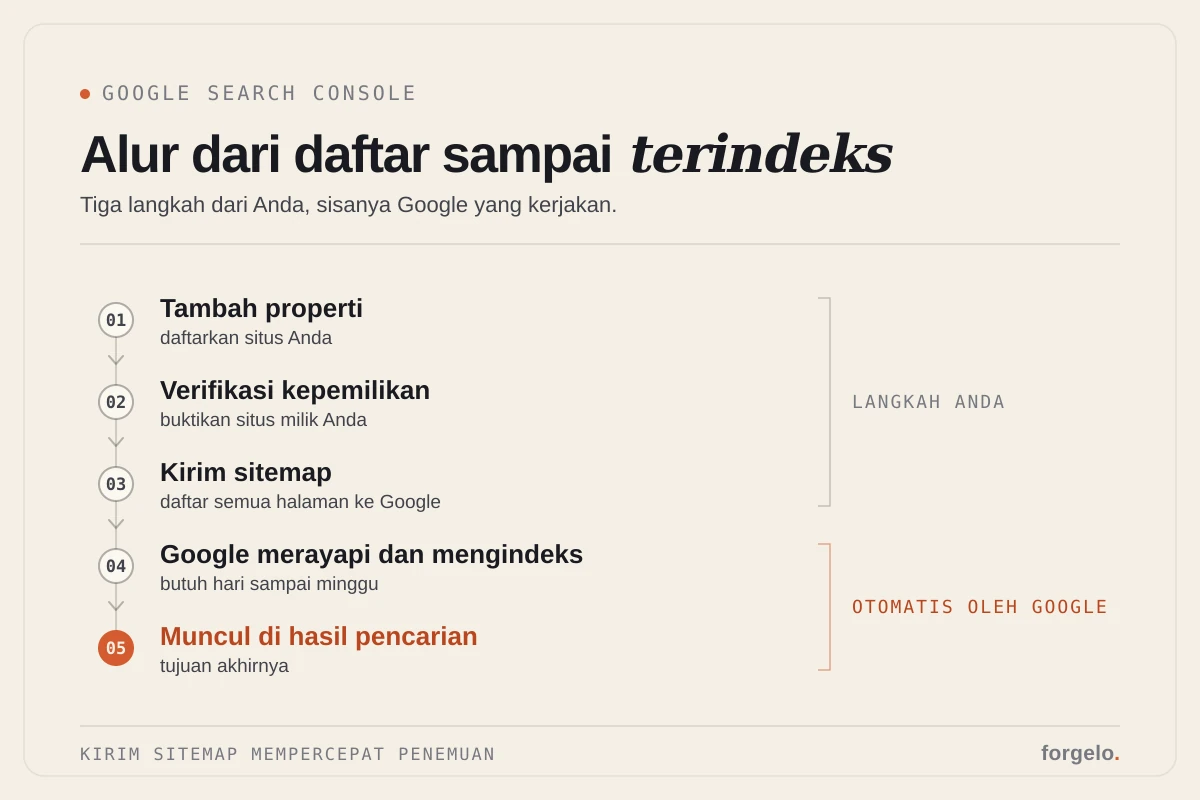
After you submit your sitemap, do not refresh every hour. Google still runs on its own crawl schedule. You can, however, use URL Inspection on important pages and request indexing when a new page is genuinely ready.
Give your pages a clear structure
Google needs to understand what a page is about, and a clean structure helps. Every important page should have one H1 that states the topic, H2s for the main sections, and paragraphs that answer visitors' questions.
Do not build a home page that is only a slogan. Explain who you are, what you offer, who it is for, your location if relevant, proof, and how to get in touch. The clearer a page is for people, the easier it is for search engines to understand its context.
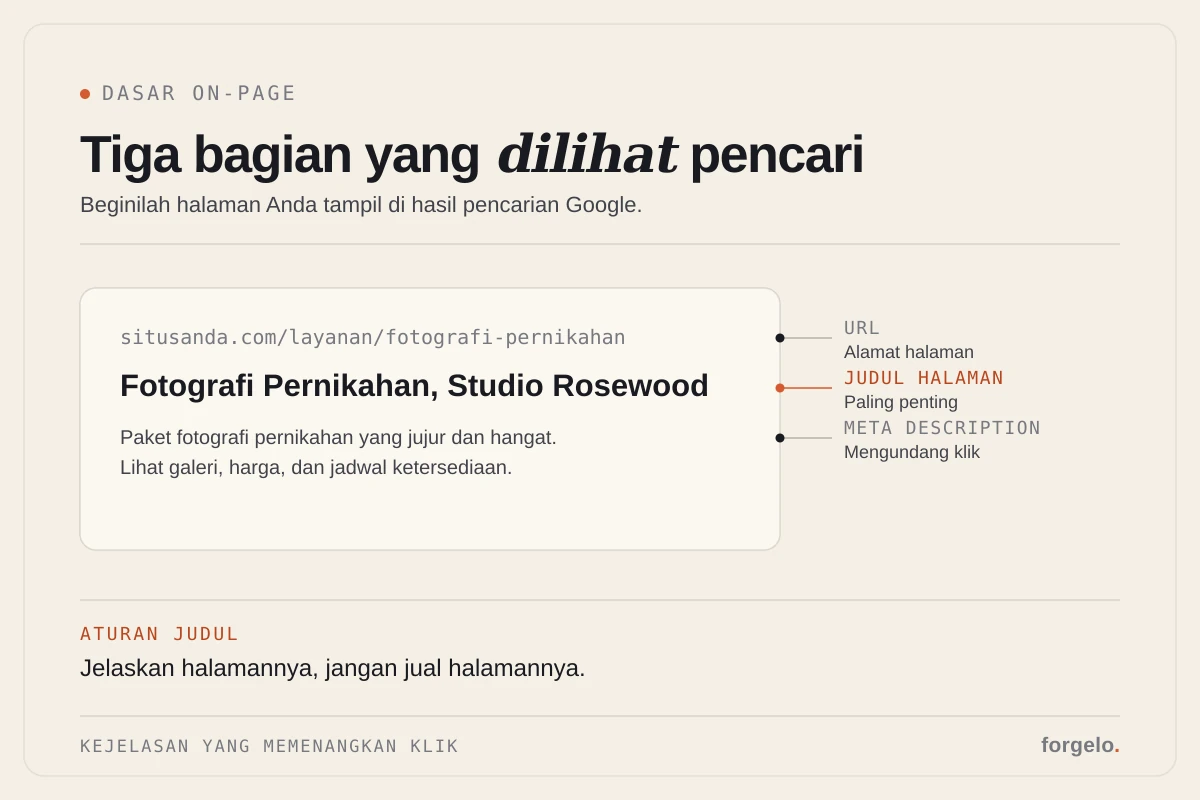
Page titles matter too. A title tag like "Home" or "Welcome" does not help. A title like "Family Dental Clinic in Leeds | Clinic Name" is far more informative.
Write content that answers real searches
A website can get indexed without strong content, but it will struggle to rank. To start appearing for non-brand searches, you need pages that answer specific needs, for example service pages, educational articles, pricing guides, FAQs, and short case studies.
Do not write only for search engines. Write for the potential customer who is unsure. What are they looking for? What are they worried about? What do they need to know before buying? Answers like that are more useful than generic paragraphs stuffed with keywords.
If your website sells services, create specific service pages. If you sell local products, explain your service area. If you want educational traffic, write articles that genuinely help.
Build internal links
Internal links help Google find pages and understand how topics relate. From the home page, link to your main service pages. From articles, link to relevant pages. From service pages, link to FAQs or guides that help potential customers decide.
Internal links help visitors too. Someone reading about domains may need a guide to domains and hosting for beginners. Someone reading about SEO basics may be ready to see how to build an SEO-ready website with Forgelo.
Do not pile on links for the sake of it. Pick links that genuinely help with the next step.
Earn outside signals the sensible way
For ranking, Google also looks at signals from outside your site. Backlinks, brand mentions, business profiles, relevant directories, and reviews can all help. For a new website, though, do not start with aggressive backlink tricks. Start with sensible official profiles: Google Business Profile, your brand's social media accounts, relevant local directories, and partners who actually know your business.
If you create useful content, keep internal links tidy, and your brand starts getting mentioned elsewhere, those signals grow in a healthier way.
How long until you see results?
For a unique brand name, a website can show up fairly quickly once it is indexed. For specific, low-competition keywords, you may start seeing impressions within a few weeks. For general, competitive keywords, it takes months.
That is normal. A new site has no history yet, few links, and little behavioral data. Do not measure SEO by one manual search on day one. Measure it in Search Console: impressions, queries, pages that are starting to be discovered, and average position over time.

Quick checklist for getting your website on Google
Make sure the website is live and publicly accessible. Make sure a sitemap exists. Connect Search Console. Submit the sitemap. Inspect your important URLs. Make sure pages are not set to noindex. Write clear titles and meta descriptions. Create content that answers real searches. Add internal links. Build your brand's profiles in relevant places.
This checklist will not produce instant rankings, but it closes the basic gaps that often leave a new website completely invisible.
How Forgelo helps
Forgelo helps on the foundation side: pages can be published quickly, the structure is clean, basic metadata is in place, a sitemap is prepared, and pages are mobile-friendly. That makes the first steps lighter.
SEO still needs clear content, though. You still need to explain your business, write specific service pages, and create content that answers potential customers' questions. A builder helps set the stage. Content and consistency are what get that stage found.
How to check whether a page is indexed
The cleanest method is URL Inspection in Google Search Console. Enter the page URL and see whether it is in Google's index. There you can also see the canonical Google chose, the crawl status, and whether the page is allowed to be indexed.
A manual search with the site: operator can help, but do not treat it as your only evidence. site: results are sometimes incomplete or lag behind. Search Console is closer to the real source of data. If Search Console says a page is indexed but you still do not see it for your main keyword, the problem is probably ranking, not indexing.
If a page is not indexed yet, do not rush to create lots of new pages. First check that the page is live, not set to noindex, not blocked by robots rules, has internal links, and is in the sitemap. After that, request indexing for the pages that matter.
What to do once pages start appearing
Once a page starts getting impressions, read the Search Console data. Which queries trigger the page? Do they match what the article is meant to cover? Is the average position still far down? Are the title and meta description compelling enough to earn a click?
Use that data for small improvements. If the queries differ from your target, add a section that answers that search intent. If there are impressions but few clicks, improve the title and description. If the page ranks for a query that is too broad, write a more specific supporting article and connect them with internal links.
SEO for a new website is not a one-time submission. It is a process of reading signals, making pages clearer, and building your topics consistently.
Conclusion
Getting your website on Google is not a single secret button. The process runs in order: the website goes live, gets crawled, enters the sitemap, gets indexed, and then starts competing for rankings. If the early stages are not in place, rankings will not come.
Start with the foundations you can control today. Publish clear pages, submit your sitemap, check Search Console, and create content that genuinely helps. After that, give Google time and keep improving your pages based on the data that comes in.