A no code landing page builder lets you launch a focused campaign page without touching a line of code, without hiring anyone, and often within an hour. That is the whole promise, and for most small teams running a promo, an event signup, or a product waitlist, it holds up well. The catch is that these tools are not interchangeable. Some are built for split testing at scale, some for one-page simplicity, and some for turning a plain description into a finished page in a few minutes.
Here is the unpopular opinion up front: for a campaign page, the fanciest builder is rarely the right one. A page that ships today and points people at your inbox beats a perfectly optimized page you are still tweaking next month. Below are seven no code landing page builders worth trying, what each is genuinely good at, and how to match one to the campaign you actually have.
Why a no code landing page builder is usually the smart move
A landing page has one job: get a visitor to do a single thing. Book a call, join a waitlist, grab a discount, register for an event. Because the goal is narrow, you rarely need the weight of a full website or a custom build. A no code landing page builder gives you exactly the surface you need and nothing you don't.
The practical wins are hard to argue with. You skip developers and their timelines. You skip hosting setup, because the tool handles it. You get mobile layouts that just work, and you can change your headline at 11pm the night before a launch without emailing anyone. If you are new to this, our guide on how to make a website without coding walks through the mindset shift, and it applies to single pages too.
Tip: Before you compare tools, write your one sentence goal and your one call to action. If you cannot state them plainly, no builder will save the page. Clarity first, software second.
The 7 no code landing page builders worth trying
There is no single best tool here, only the best fit for your goal, your budget, and how much you enjoy fiddling. Here is an honest look at seven strong options.
1. Forgelo
Forgelo is an AI website builder that treats the blank page as the enemy. You describe your business in one sentence, and it returns a live, publish-ready page in a few minutes. Editing is the part that feels different: you change anything by typing the change in plain language, like "make the headline punchier" or "add a three-tier pricing block," instead of dragging boxes around. Lead forms route straight to your WhatsApp, SEO basics are built in, and you can publish to a free subdomain or a custom domain. Pricing runs $9, $19, and $39 per month, and there is a custom Agency plan for studios, with full white label on the roadmap. It shines when speed and low friction matter more than pixel-perfect custom design.
2. Carrd
Carrd is the champion of simple. If you want a clean one-page site, a link hub, or a tiny landing page with almost no learning curve, it is hard to beat on price and ease. You will not find heavy marketing features or deep analytics, and that is the point. For a personal project, a coming-soon page, or a solo campaign, Carrd does the job without asking much of you.
3. Unbounce
Unbounce is built for people who obsess over conversion rates. Its strength is testing: run variations of a page, route traffic intelligently, and see which version wins. If you are spending real money on ads and every percentage point of conversion matters, that toolkit earns its keep. It carries a steeper price and a bit more complexity, so it fits marketers running ongoing paid campaigns more than someone launching one promo.
4. Leadpages
Leadpages sits comfortably in the lead-capture lane. Its template library is tuned for opt-ins, and it makes building forms, pop-ups, and alert bars straightforward. For coaches, course creators, and service businesses whose whole goal is collecting emails or bookings, it is a dependable, approachable pick. The design ceiling is lower than a designer-grade tool, but for lead gen that is rarely the bottleneck.
5. Instapage
Instapage aims higher up the market. Its focus is post-click optimization: matching each ad to a personalized page, then measuring what happens. Teams running many campaigns across many audiences get real value from that personalization. For a small business with one promo, it is more firepower than you need, and the pricing reflects its enterprise leanings.
6. Wix
Wix is the flexible generalist. Drag-and-drop editing, a massive template library, and an app market mean you can build a landing page today and a full store next month without switching tools. That flexibility is a double edge: more options means more decisions and a bit more time. If you want room to grow well beyond a single page, Wix gives you the runway.
7. Framer
Framer comes from the design world, and it shows. If you want animation, fine visual control, and a page that looks like a designer touched it, Framer delivers. The trade-off is a steeper curve; it rewards people who care about craft and are willing to learn. For a brand where the page itself is part of the pitch, that polish can be worth the extra effort.

At a glance: the 7 compared
| Tool | Best for | Setup feel | Standout strength |
|---|---|---|---|
| Forgelo | Launching fast from a description | Minutes | Page in a few minutes, edit by typing, WhatsApp leads |
| Carrd | Simple one-page projects | Very fast | Low price, minimal learning curve |
| Unbounce | Conversion testing | Moderate | A/B testing and smart traffic routing |
| Leadpages | Lead capture | Fast | Opt-in focused templates and pop-ups |
| Instapage | Ad-to-page campaigns | Moderate | Personalization and post-click optimization |
| Wix | Flexible, room to grow | Moderate | Huge template and app library |
| Framer | Design-led pages | Moderate to advanced | Animation and designer-grade control |
No column is the automatic winner. A solo founder testing an idea and a marketing team burning ad budget want very different things, and that is fine.
What they cost: prices from the official pages
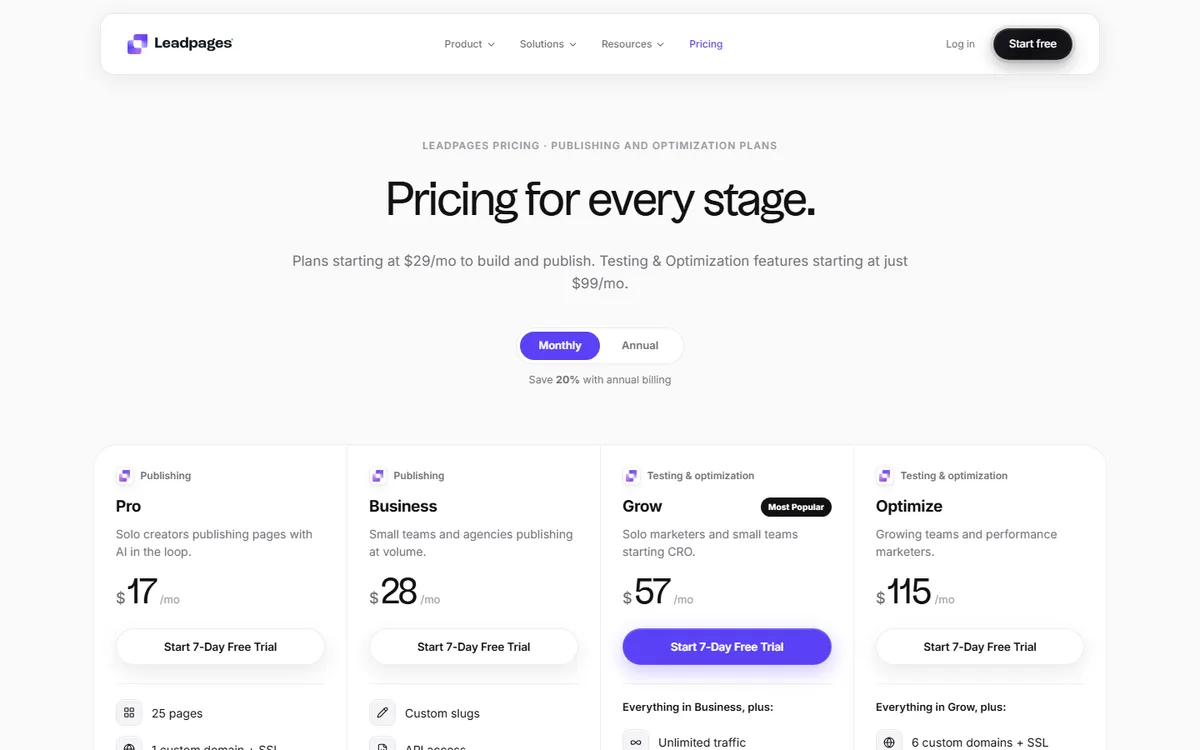
Landing page tools love to change plan names and prices, so we opened each vendor's own pricing page on 23 October 2026 instead of trusting old roundups. The table shows the entry plan each page displayed that day, on monthly and on yearly billing where the page offered a toggle. Prices can move after this date, so confirm on the vendor page before you buy.
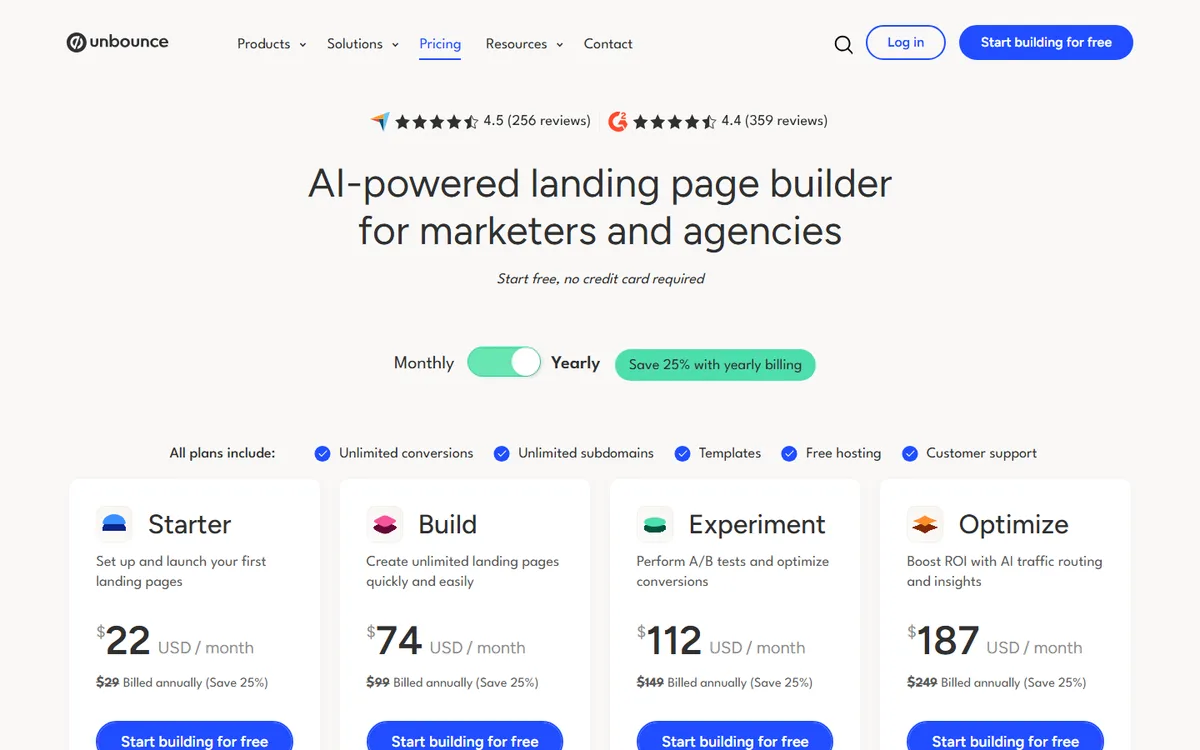
Table: entry plans displayed on official pricing pages, 23 Oct 2026 (sources: Unbounce, Leadpages, Instapage, Carrd, Wix, Forgelo).
| Tool | Entry plan | Monthly billing | Yearly billing | Free plan or trial |
|---|---|---|---|---|
| Forgelo | Starter | $9/month | Not offered | Free plan: 1 site on a Forgelo subdomain |
| Carrd | Pro Lite / Pro Standard | Not offered | $9/year / $19/year | Free for up to 3 sites |
| Unbounce | Starter | $29/month | $22/month | Start free, no credit card |
| Leadpages | Pro | $17/month | $13.58/month | 7-day free trial |
| Instapage | Create | $99/month | $79/month | 14-day free trial |
| Wix | Light | Not shown | $17/month | Free plan |
Framer is not in the table because we did not capture its pricing page for this snapshot, so check it directly rather than relying on a number we cannot show you.
The spread is wide. A yearly Carrd plan costs less than a single month of most dedicated tools, while Instapage asks $99 a month before any experimentation features. That gap is the clearest sign of who each tool is built for. If you are not going to run A/B tests every week, paying for a testing suite is paying for a gym you never visit.
A launch checklist for your first campaign page
Whatever tool you pick, the same short checklist separates pages that convert from pages that just exist. Run through it before you send a single ad click.
- One headline that names the outcome. "Book a free roof inspection this week" beats "Welcome to our company."
- One call to action, repeated. Put the same button near the top and again after your proof section. Remove links that lead away from the goal.
- Proof close to the button. Two or three short testimonials, a client count you can back up, or a photo of real work.
- A form that asks for the minimum. Name and phone or WhatsApp is enough for most local offers. Every extra field costs submissions.
- A test submission from your own phone. Confirm the lead actually arrives where you reply, then delete it.
- A tracking basics pass. Add your analytics or ad pixel before launch, not after the budget is spent.
How to choose for your specific campaign
Start with the goal, not the feature list. Ask three questions and the shortlist shrinks fast.
- How soon do you need it live? If the answer is today, a describe-and-generate tool like Forgelo or a template-first tool wins. If you have a week, you can afford a builder with a learning curve.
- How often will you edit it? Campaign pages change constantly: new dates, new offers, fresh copy. If you plan to tweak weekly, pick something where edits take seconds, not a support ticket.
- Where do your leads need to land? If you close over chat, a page that sends submissions to WhatsApp is worth more than any animation. If you live in email, prioritize a builder with clean form-to-inbox flow.
Note: Match the tool to how you work, not to the longest feature list. A powerful builder you never open loses to a simple one you actually update.
Budget matters, but less than people fear. Most of these tools cost less than a single hour of a freelancer's time each month. The bigger cost is the wrong fit: paying for enterprise testing you never run, or fighting a design tool when you just needed a form. If you want a broader view of AI-driven options, our roundup of the best AI website builders covers tools that go beyond a single page.
Landing page vs full website
One honest caveat before you commit. A landing page is a sprint; a website is the marathon. If your only need is one promo, one launch, or one ad destination, a single page is the cleaner, cheaper choice. Do not build a ten-page site to sell one thing.
But if you already know you need an about page, services, testimonials, and a place to publish content, jumping to a full site now saves you a migration later. The good news is that the line is blurring. Tools like Forgelo let you start with a single page and expand into a full site without rebuilding, so you are not locked into your first decision. You can see real numbers on pricing if you want to plan for both.
The bottom line
A no code landing page builder removes the two things that stall most campaigns: cost and delay. The seven tools above all deliver on that promise, just with different personalities. Carrd keeps it dead simple. Unbounce and Instapage reward heavy testers. Leadpages leans into lead capture. Wix and Framer give you flexibility and polish. Forgelo bets on speed and edit-by-typing, with leads that land in your WhatsApp.
Pick the one that fits the campaign in front of you, publish it this week, and improve it from real visitor behavior. The best landing page is not the one with the most features. It is the one that is live, clear, and pointed at a single action while your competitors are still choosing a template.