The HubSpot landing page builder is one of the most capable tools of its kind, and also one of the easiest to over-buy. If you already run your marketing inside HubSpot, it feels like a natural extension of the CRM you open every day. If you are a small business that just needs a few pages that load fast and capture leads, it can feel like renting a whole warehouse to store one shelf. This review walks through both sides honestly, so you can tell which situation is yours before you commit to a plan.
Here is the short version. HubSpot's landing page builder is genuinely good at what it does, especially when your pages feed a CRM you already trust. The catch is that several of the features marketers care about most sit in the higher paid editions. For a lot of smaller teams, that is more platform than the job needs. We will cover what the tool does, what each edition costs according to HubSpot's own pages, where it fits, where it becomes overkill, and a lighter alternative worth considering.
What the HubSpot landing page builder actually is
HubSpot files its free landing page builder under Content Hub, its content and CMS product. You get a drag-and-drop editor, a library of mobile-optimized templates, and forms that drop submissions straight into a HubSpot contact record. Because it lives inside the wider platform, a page you build can feed reporting dashboards and connect to the same contact data your sales team already works from. HubSpot also lists integration with its Smart CRM tools or with Salesforce among the features that make its landing pages popular.
The free edition lets you build and publish pages, but it carries HubSpot branding. The parts that make HubSpot stand out, such as smart content that changes based on who is viewing, sit in paid editions. The important thing to understand is that HubSpot did not build a landing page tool and bolt a CRM onto it. It built a CRM and made landing pages one of the ways you feed it.

How building a page works, step by step
HubSpot describes its landing page workflow in three stages: create, personalize, and analyze. Here is what each stage includes, based on the product page and the HubSpot Knowledge Base.
- Create. Pick a template from the library or build in the drag-and-drop editor. HubSpot says you can use slash and highlight commands to generate content and add SEO-friendly titles and descriptions (labelled a public beta), then preview how the page looks on different devices before publishing.
- Personalize. Show different content based on a visitor's location, device, lifecycle stage, or a contact detail stored in the CRM. Dynamic forms avoid asking the same question twice.
- Analyze. A central dashboard shows your top-performing pages. You can test page variations against each other and let HubSpot choose the winner, then use custom SEO suggestions to improve each page.
The Knowledge Base adds useful detail on the personalization side. Smart content rules can be based on ad source, country, device type, referral source, preferred language, contact list membership, lifecycle stage, or a query parameter. List membership and lifecycle stage only work for tracked contacts, because HubSpot uses cookies to match visitors to known records. And the article is explicit that a Content Hub Professional or Enterprise subscription is required to add smart content to pages. The same is true for generating pages with HubSpot's AI.

Where the HubSpot landing page builder shines
Give the tool its due, because it earns it in the right hands. When your marketing genuinely runs on HubSpot, the landing page builder stops being a page maker and becomes a connected part of a machine.
- Attribution you can trust. Every form submission ties to a contact record, so you can follow a visitor from first click to closed deal without stitching tools together.
- Personalization. Smart content can show different headlines or offers by country, device, lifecycle stage, or list membership.
- Testing and analytics. Variation testing and reporting are built in, so you are optimizing on data rather than hunches.
- One ecosystem. Email, ads, workflows, and pages sit in the same account, which removes a lot of the glue work that eats a marketing team's week.
Note: The single strongest reason to use HubSpot's landing pages is that you are already paying for HubSpot. If the CRM is your source of truth, keeping pages in the same house is a real advantage, not a nice-to-have.
Picture a B2B software company with a sales team, a content calendar, and a lead-scoring model. For them, a landing page that automatically enriches a contact and drops it into a nurture sequence is worth serious money. That is the buyer HubSpot designed this for.
Where it becomes overkill
Now the honest other side. The same depth that makes HubSpot powerful makes it heavy, and most businesses do not need that weight.
The first issue is price. The free edition is enough to try the editor, but the features people see in the demo, smart content and AI page generation, require Professional or Enterprise. HubSpot lists Professional at 500 dollars a month to start. For a business that needs three or four pages, that is a big monthly line item for capabilities that may never get switched on.
The second issue is complexity. HubSpot has a real learning curve. Building one good page means navigating an interface designed to run an entire marketing operation. If pages are all you need, you are paying a tax in both money and time to use a fraction of the platform.
Tip: Before you buy any tool, write down the exact jobs your landing page has to do. If the list is "explain the offer, look trustworthy, capture the lead," almost any competent builder clears that bar, and most of what you pay HubSpot for never gets touched.
Here is my contrarian take. A landing page builder that requires you to adopt an entire CRM to unlock its best features is not really a landing page builder. It is a CRM with landing pages attached. That is a great deal if you want the CRM. It is a bad deal if you were only ever shopping for pages.
HubSpot landing page builder pricing in plain terms
HubSpot's Content Hub page lists four editions. The table below copies the starting prices and headline features exactly as that page showed them when we checked in October 2026. Prices are in US dollars, subject to tax, and can change, so confirm on HubSpot before you buy.
| Edition | Starting price listed by HubSpot | Headline features listed | Realistic fit |
|---|---|---|---|
| Free | 0 dollars a month, no credit card | Build landing pages, create blog posts with AI, basic SEO tips | Testing the editor |
| Starter | From 10 dollars a month per seat (new-customer discount, regular 20 dollars) | Remove HubSpot branding, add website pages, personalize content | Small teams already in HubSpot |
| Professional | From 500 dollars a month, 3 seats included | Remix content, define brand voice, podcasts; smart content on pages (per Knowledge Base) | Marketing teams with a budget and a strategy |
| Enterprise | From 1,500 dollars a month, 5 seats included | Manage multiple sites, content approvals, customize the CMS | Larger organizations running at scale |
The pattern is consistent: the entry point is cheap, and some of the features you saw in the demo live two editions up. HubSpot also offers a 14-day free trial of its content tools if you want to test the paid features first. If you want to sanity-check the total cost of getting online any other way, our guide on how much a website costs lays out where the money really goes.
Who it is genuinely right for
Rather than a verdict, use two lists. Find yourself on one of them.
HubSpot's landing page builder makes sense when:
- You already run your marketing inside HubSpot and treat it as your source of truth.
- You have a marketing team, or at least one person whose job is marketing operations.
- You need real personalization, attribution, and testing, and you will use them.
- Your budget is built for a platform, not a single tool.
It becomes overkill when:
- You are a small business, freelancer, or local shop that needs a few solid pages.
- You want to edit your own pages quickly without training on a platform.
- Leads should land in your inbox, your phone, or WhatsApp, not a CRM you do not have.
- Predictable, low cost matters more than deep marketing automation.
Questions to ask before you choose
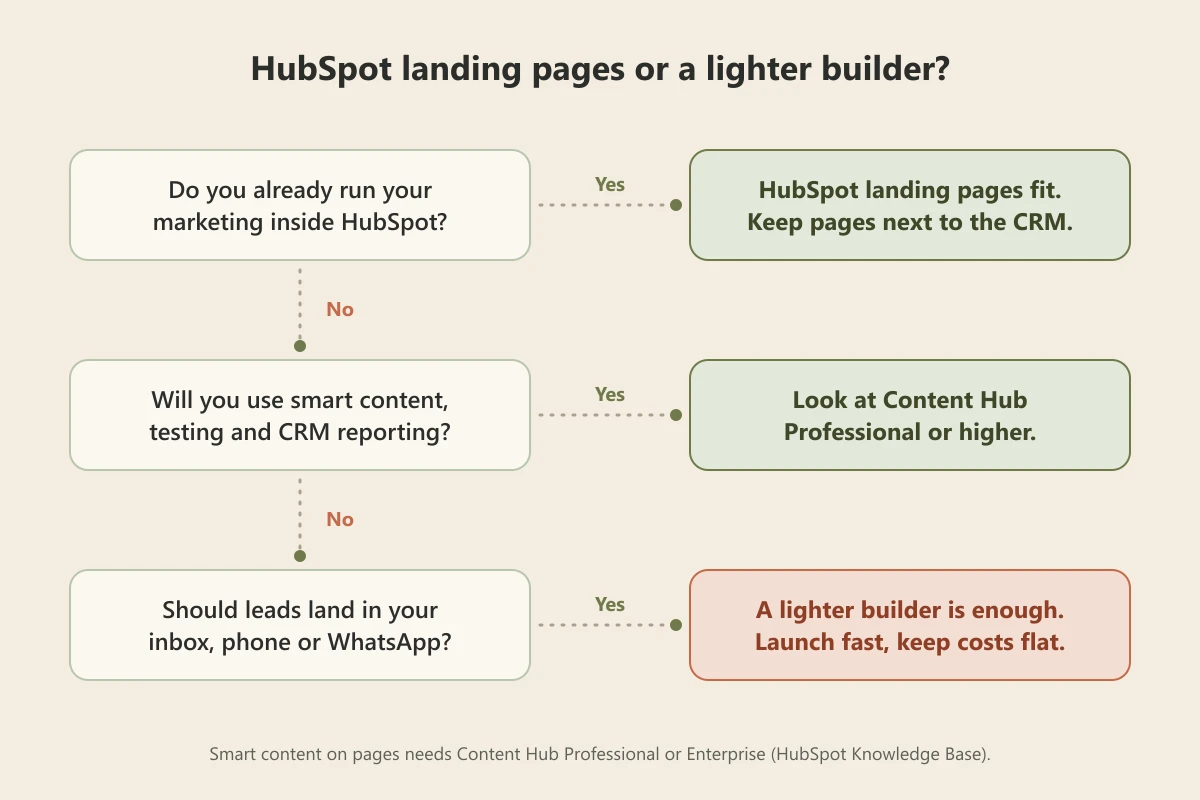
If you are still on the fence, walk through these questions in order. They take ten minutes and save a lot of money.
- Where do your contacts live today? If the answer is HubSpot, its landing pages add value on day one. If the answer is a spreadsheet, a WhatsApp chat list, or your email inbox, you would be adopting a CRM just to use a page builder.
- How many pages do you need in the next six months? One offer page and one contact page is a very different job from dozens of campaign pages for different segments.
- Who will build and edit the pages? A marketing operations person can learn HubSpot. A busy owner who updates the page between customers needs something they can change in a sentence.
- Will you actually run personalization and tests? Testing needs enough traffic to produce a winner, and smart content needs segments worth targeting. If neither is realistic yet, do not pay for them yet.
- What is the monthly budget for this one job? Compare it with the editions table above, and remember that the features that tempt you most sit in Professional or higher.
If most of your answers point to "simple pages, few editors, leads to my phone," the decision is easy. Our explainer on the difference between a landing page and a website is also worth a read if you are unsure whether you need one focused page or a full site.
A lighter alternative when you just need pages that convert
If you landed on the second list, the good news is that a converting landing page has never required an enterprise platform. Most small businesses do not have a landing page problem. They have a "get something good live this week" problem, and a lighter tool solves that faster.
Forgelo is an AI website builder aimed squarely at that gap. You describe your business in a sentence, and it generates a full, publish-ready page in a few minutes. When you want a change, you type it in plain language, "make the headline shorter," "add a three-plan pricing section," and the page updates. There is no interface to master and no CRM to adopt first. Our guide to the AI landing page builder approach shows what that looks like in practice.

The parts small businesses actually care about are handled by default. Lead forms route straight to your WhatsApp, so inquiries arrive where you already reply, an approach we break down in turning visitors into WhatsApp leads. SEO basics come built in. You can publish to a free subdomain or connect a custom domain, and agencies get an Agency plan for client work, with full white label on the roadmap. Pricing is flat and public at 9, 19, and 39 dollars a month, which you can see on the pricing page. If you want to compare the broader field first, our roundup of the best AI website builders is a fair place to start, and if you are set on a dedicated landing page tool, our Unbounce landing page builder review covers that lane too.
The bottom line
The HubSpot landing page builder is not overpriced or overbuilt for the buyer it was made for. If you live in HubSpot and want pages that plug into a serious marketing engine, it is an excellent fit and the connection to your CRM is worth paying for. The mistake is buying that machine to do a job a much simpler tool handles just as well.
Be honest about which one you are. If you need attribution, personalization, and testing at scale, HubSpot earns its keep. If you need a clean page that loads fast, explains your offer, and sends leads somewhere you will see them, you can be live today for a fraction of the cost, and grow into something heavier only if the business ever asks you to.