
Type "square website builder" into a search bar and you land on a tool made by a payments company, not a web design company. That framing matters. Square, now part of Block, built its online site tool to sell things, take payments, and sync with the same system that runs a shop's card reader and register. If you already swipe cards with Square, its website builder can feel like a natural extension. If you do not, it is worth asking whether a payments-first platform is really the shortest path to the site you actually need.
This is an honest review, not a takedown. The Square website builder does real work well, and for the right business it is a smart, low-cost choice. For plenty of others it is heavier than it needs to be. Let me walk through what it does, what it really costs, where it shines, where it frustrates, and when a different kind of tool, an AI website builder, fits better. Prices and plan details below were checked on Square's official pages on 23 October 2026.
What the Square website builder actually is
Square bought Weebly in 2018 and reshaped it into Square Online, the product most people mean when they say the Square website builder. Square has since renamed Square Online to plain "websites" and, in the FAQ on its online store page, says only the name changed. You pick a theme, then edit it in a section-based visual editor: add a block, drag it into place, change the text, publish. The headline feature is not the design. It is the plumbing. Products, inventory, orders, and payments all run through the same Square account that powers in-person sales, so a coffee shop can sell a bag of beans online and over the counter without keeping two sets of stock.
For restaurants there is online ordering with pickup and delivery. For retail there is a straightforward store with a trusted checkout. That commerce backbone is the real product. The website is the storefront wrapped around it, which is exactly why judging it purely as a "website builder" misses the point.
Where the Square website builder is strong
Credit where it is due. A few things here are genuinely good, and a fair review has to say so plainly.
The free tier is real, not a demo. You can publish a working site without paying a monthly fee, and Square says free hosting and an SSL certificate are included, which lowers the risk of starting. Payments are built in, so you are not bolting on a separate checkout or wrestling with a plugin. If you run a physical shop, the unified inventory is the standout: one place to manage stock whether a sale happens online or at the register. Every plan includes pickup, local delivery, and shipping options that would otherwise need extra software. And because it is Square, the checkout experience is polished and familiar to buyers, which quietly helps conversions.
Note: The strongest reason to use the Square website builder has almost nothing to do with the website. It is the payment and inventory system behind it. If that system is already how you run your business, the site is a convenient add-on rather than a separate decision.

How to set up a Square website, step by step
If you decide Square is right for you, the setup follows the path Square describes in its own FAQ. Here it is in order, with the decision points that matter.
- Create a free Square account. Your website, catalog, and payments all hang off this one account, so use the business details you will sell under.
- Choose the site type. Square offers a single ordering page or a multi-page ecommerce website. A cafe taking pickup orders can live on one page; a shop with many categories needs the multi-page option.
- Set your fulfillment methods. Decide between pickup, local delivery, and shipping before you add products, because it shapes your checkout.
- Add products or sync your point of sale. If you already sell in person with Square, your items can sync automatically instead of being typed in twice.
- Publish, then decide on a domain. On Square Free you publish on a Square-provided address. Connecting your own domain requires Square Plus or higher, so budget for that before you print it on signage.
Most owners finish a basic version in an afternoon. The slow part is not the editor; it is photographing products and writing descriptions, which no builder does for you.
The catches worth knowing before you commit
No tool is all upside, and a fair square website builder review has to name the friction too.
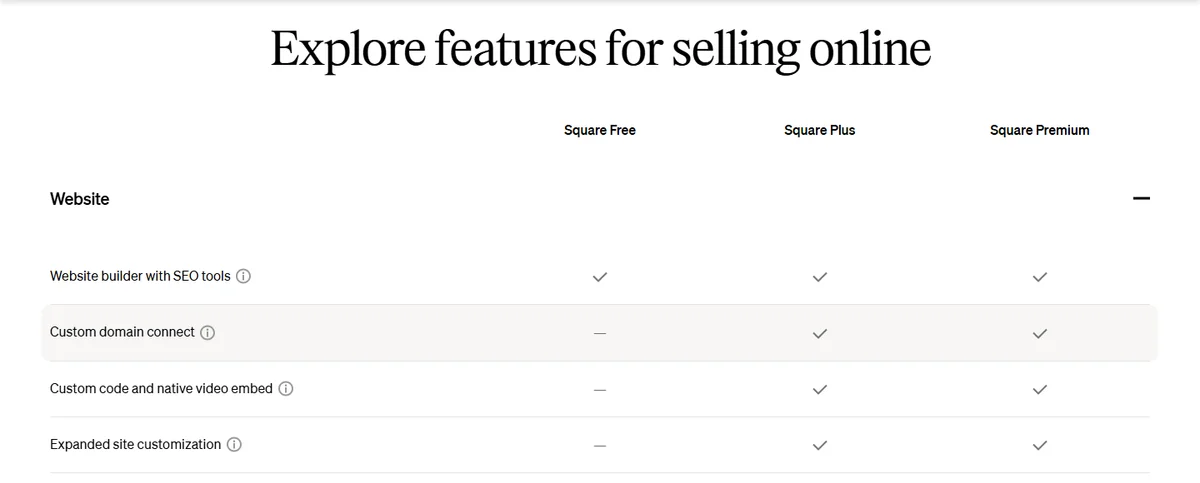
Editing is still manual. You move sections and adjust settings by hand, which works but is slower than describing a change and letting the tool make it. On the free plan, Square's comparison table shows no custom code, no native video embed, and no expanded site customization, so a distinctive brand can feel boxed in. A custom domain also requires a paid plan, so "free" rarely stays free once you get serious. Every sale carries a payment processing fee, which is normal for commerce but adds up and belongs in your math. And the biggest one people miss: Square only onboards businesses in a handful of markets. Its own country selector lists the United States, Canada, the United Kingdom, Ireland, Australia, Japan, France, and Spain. If you are outside those, the core advantage, seamless payments, does not apply to you at all.
Here is a plain side by side so the trade-offs are easy to see.
| Factor | Square website builder | AI website builder (Forgelo) |
|---|---|---|
| Best for | Shops already using Square for payments | Fast small business and service sites |
| How you edit | Drag sections, adjust settings | Type the change in plain language |
| Time to first draft | An afternoon of setup | A few minutes from a prompt |
| Lead capture | Store checkout focused | WhatsApp lead forms from the Starter plan |
| Custom domain | Square Plus ($49/mo) and up | Starter ($9/mo) and up, plus a free subdomain |
| Availability | Payments only in 8 supported markets | Works anywhere you can reach the web |
Square website builder pricing, in plain terms
The pricing model is "free to start, pay to grow," and Square publishes it clearly. These are the self-serve tiers on its official plans page, all priced per location.
| Square plan | Monthly price | Online processing fee | In-person fee | Website features called out |
|---|---|---|---|---|
| Square Free | $0 | 3.3% + 30¢ | 2.6% + 15¢ | Builder with SEO tools; pickup, delivery, shipping |
| Square Plus | $49 | 2.9% + 30¢ | 2.5% + 15¢ | Custom domain, expanded customization, QR ordering |
| Square Premium | $149 | 2.9% + 30¢ | 2.4% + 15¢ | Real-time shipping rates, advanced reporting, 24/7 support |
| Square Pro | Custom | Custom | Custom | For businesses processing over $250,000 a year |
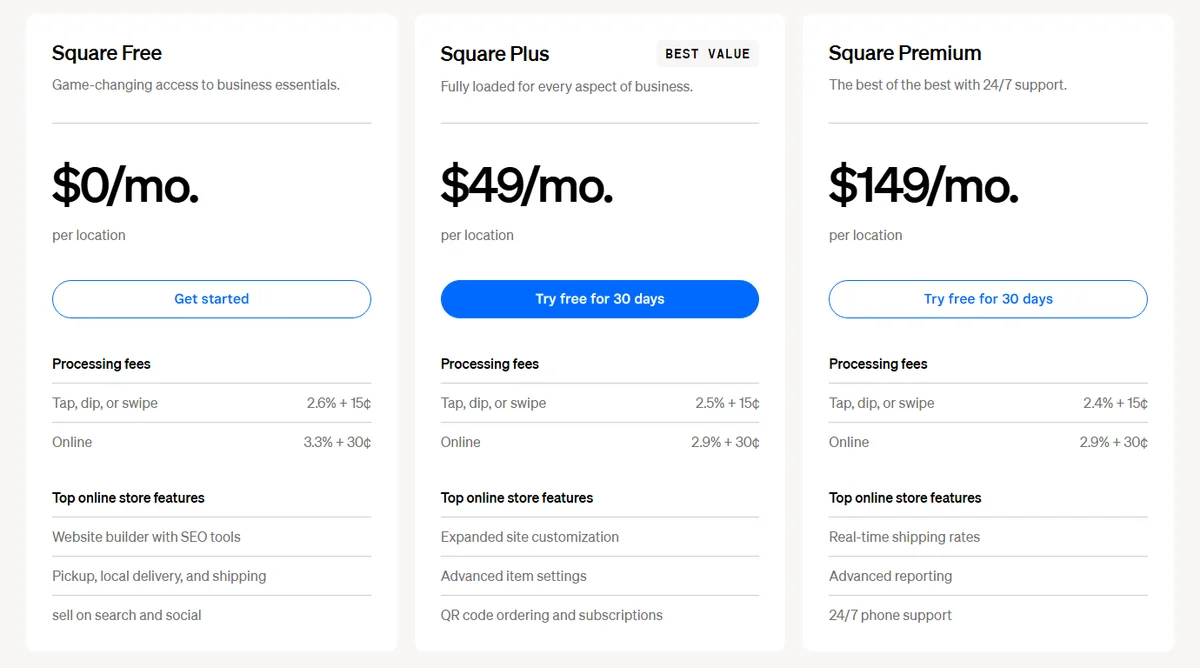
A worked example makes the fees concrete. Say you take 100 online orders a month at an average of $40. On Square Free, each order costs $1.32 plus 30 cents, so about $162 a month in fees. On Square Plus, each order costs $1.16 plus 30 cents, about $146, but you add the $49 subscription, for $195. The lower rate only pays for the plan once online sales pass roughly $12,250 a month (0.4% of that is $49). Below that, you upgrade for the custom domain and features, not to save money.
Compare that with a flat, predictable subscription. Forgelo runs at 9, 19, and 39 US dollars per month, and that covers hosting, built in SEO, and a daily quota of AI edits by prompt (30, 100, or 300 per day depending on the plan). There is no per-sale fee, because Forgelo is not a payment processor. If you want to see how these numbers stack up over a year rather than a single month, our guide on how much a website costs does the full breakdown.
Tip: Judge any website builder on its total cost over twelve months, not the headline price. Add the custom domain, the paid tier you will inevitably need, and any per-sale fees. Square Plus alone is $588 a year before a single transaction; that may be fine for a busy store, but it is a lot for a site that mostly answers "what are your hours?"
Who the Square website builder fits
Let me be direct about who should use it. The square website builder is a strong pick if you run a retail shop or restaurant, you already take payments through Square, and you want your online and in-person sales to share one inventory and one checkout. In that setup, the tight integration saves real time and the free start is a genuine perk. A bakery adding online pickup, a boutique listing its shelves, a cafe taking order-ahead: these are exactly who it was built for.
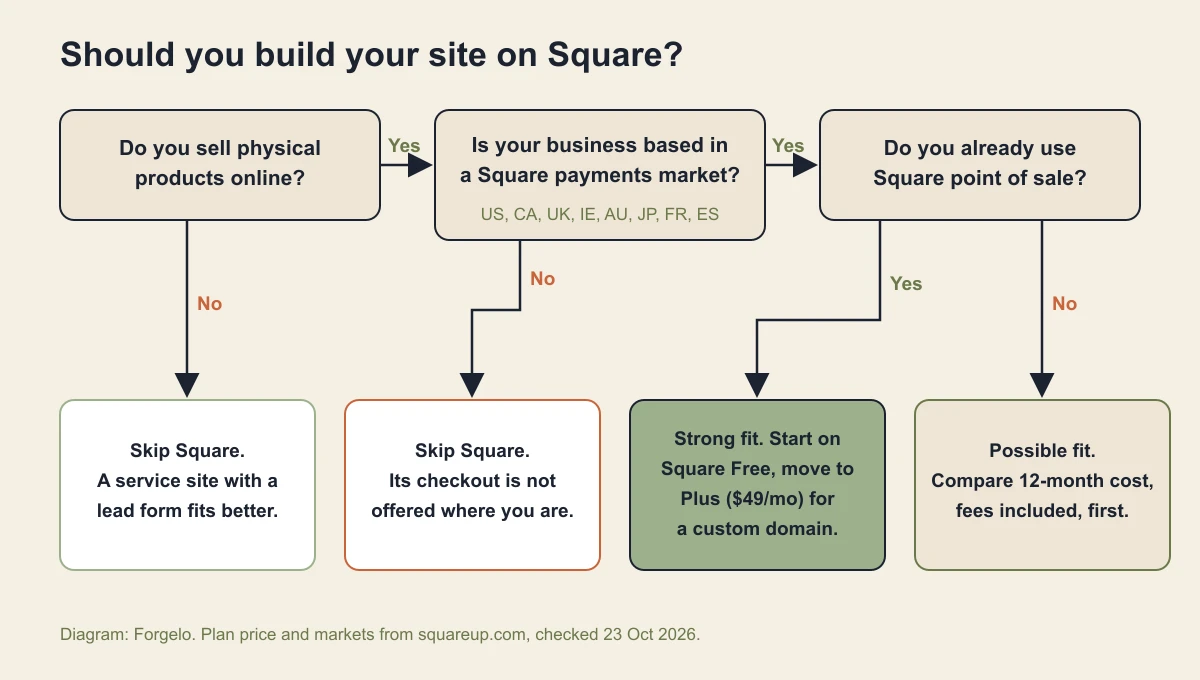
Here is my contrarian take. Most small businesses that reach for a website do not actually need an online store. They need a clear site that explains what they do and turns a visitor into a message or a call. A plumber, a consultant, a dentist, a wedding photographer: none of them are moving inventory. For them, a commerce-first builder is a powerful engine wired to solve a problem they do not have. The overhead stays invisible right up until you are clicking through store settings you will never use.
When an AI website builder makes more sense
If you are a service business, a freelancer, or a local shop whose real goal is inquiries rather than online checkout, a different approach fits better. Instead of picking a template and arranging sections, you describe your business in a sentence and get a finished, publish-ready site in a few minutes. Every later change is a prompt: "make the headline punchier," "add a services section," "move the contact form up." No settings maze, no rebuild, no waiting.
The lead path is the part that matters most for a service business. On Forgelo's paid plans, the contact form routes straight to your WhatsApp, so an inquiry lands where you already answer customers instead of sitting in an inbox you check twice a day. SEO comes built in so you can be found, you publish free on a subdomain or connect a custom domain from the Starter plan, and agencies get an Agency plan for client work, with full white label on the roadmap. If getting messages is the point, our piece on how to turn visitors into WhatsApp leads explains why that beats a generic contact page.
To be clear, this is not "AI good, Square bad." If you genuinely sell products and live in the Square ecosystem, stay there. But if you have been forcing a commerce platform to act like a simple business site, you are paying in complexity for nothing. It is worth comparing your options honestly, which is exactly what our roundup of the best AI website builders is for.
A quick checklist before you choose
Run through these five questions with a pen. They take two minutes and save a rebuild later.
- What does a sale look like? A cart and card payment points to Square. A phone call, booking, or chat points to a lead-focused site.
- Where is the business registered? If it is not one of Square's eight markets, its checkout is off the table.
- Do you need your own domain on day one? On Square that means at least $49 a month; on Forgelo it starts at $9.
- How often will you change the site? Weekly menu, price, or promo changes favour a tool where you type the edit.
- What will year one cost in total? Add subscription, domain, and fees at your expected sales, then compare.
The takeaway
The Square website builder earns its place for one clear audience: businesses already running on Square that want a matching online store with shared inventory and built-in payments. For that group it is convenient, cheap to start, and well integrated. For everyone else, especially service businesses and anyone outside Square's payment markets, it can be more machine than the job requires. Match the tool to what you actually sell. If that is products through Square, use it with confidence. If it is your expertise and you just need inquiries flowing in, an AI builder will get you there faster and with far less to manage.