If you have shopped around for a way to build a site without touching code, you have almost certainly landed on Webflow. The Webflow no code website builder has a strong reputation among designers, and it earns a lot of it. But "no code" and "easy" are not the same thing, and that gap is exactly where a lot of small business owners get stuck. This is an honest review of what Webflow does well, where it quietly asks more of you than the marketing suggests, and how a faster AI-first approach compares.
Here is the short version. If you love design, have time to learn, and want pixel-level control over every element, Webflow is one of the best tools on the market. If you run a business and just need a clean site that gets found and captures inquiries, Webflow can absolutely do that, but you may spend a weekend building what a plain sentence could produce in a few minutes. Let's walk through the honest trade-offs.
What the Webflow no code website builder actually is
Webflow is a visual design tool. Instead of writing HTML and CSS by hand, you drag elements onto a canvas and style them with controls. Underneath, it is still building real web structure: containers, flex layouts, classes, breakpoints for mobile. Webflow also ships a content management system for blogs and portfolios, hosting on a fast global network, and an animation engine that designers genuinely love.
Here is the part the phrase "no code" can hide. Webflow does not hide the mechanics of a web page. It surfaces them. You will meet the box model, padding versus margin, flexbox alignment, and the idea of reusable classes. You are not writing code, but you are learning how code thinks. For a designer that is a gift. For a plumber who wants a five-page site by Friday, it is a curriculum. If your goal is simply to make a website without coding as fast as possible, it is worth knowing that going in.
What Webflow does brilliantly
Credit where it is due, because Webflow earns plenty.
First, design freedom. There is almost no ceiling. If you can picture a layout, you can usually build it in Webflow without compromise. Custom hover states, scroll animations, unusual grids, precise spacing. This is the tool designers reach for when a template just will not do.
Second, output quality. Webflow produces clean, fast, standards-based sites, and its hosting is quick and reliable. A well-built Webflow site loads fast, which is good for both visitors and search.
Third, the CMS. For content-heavy sites like a magazine, a large portfolio, or a growing blog, Webflow's collections are flexible and powerful. You define a structure once and populate it many times.
Fourth, the ecosystem. Webflow University is one of the best free learning resources in the industry, and the community of designers, templates, and freelancers around it is huge.
Tip: If you are a freelance designer or an agency, Webflow is a legitimate professional weapon. The learning curve you pay once becomes a service you can sell many times. For that audience, the depth is the whole point.
Where the Webflow no code website builder gets hard
Now the honest half.
The learning curve is the headline. "No code" removes the syntax, not the thinking. You still decide every layout, every breakpoint, every class. A lot of first-time users open Webflow expecting a template picker and instead find a professional canvas staring back at them. That is not a flaw, it is the design, but it is a mismatch for people who wanted a quick site, not a new skill.
Then there is the blank-canvas tax. Even with templates, you are the designer. Nobody writes your headlines, decides your page order, or tells you the pricing section belongs above the fold. Webflow gives you a superb workshop, but you are still the one who has to build the furniture.
Time is the quiet cost. A polished custom site in Webflow is a project measured in evenings or a full weekend, and that is before you write a word of content. For an established brand that is fine. For someone testing whether a business idea even has legs, it is a lot to spend before the first customer shows up.
Note: Here is the contrarian take. For most small businesses, "no code" is not actually the bottleneck. Designing the whole thing yourself is. Removing code but leaving you alone with a blank canvas solves the wrong half of the problem. That is the real reason so many people abandon a half-built site.

Webflow pricing: the part that surprises people
People see a low number on the pricing page and assume that is the total. It rarely is. To publish a real custom site on your own domain, you need at least a paid site plan (Basic or higher), teams add a workspace plan on top, and the CMS and higher content limits sit on the more expensive tiers. Add a premium template or a freelancer to build it, and the true cost climbs.
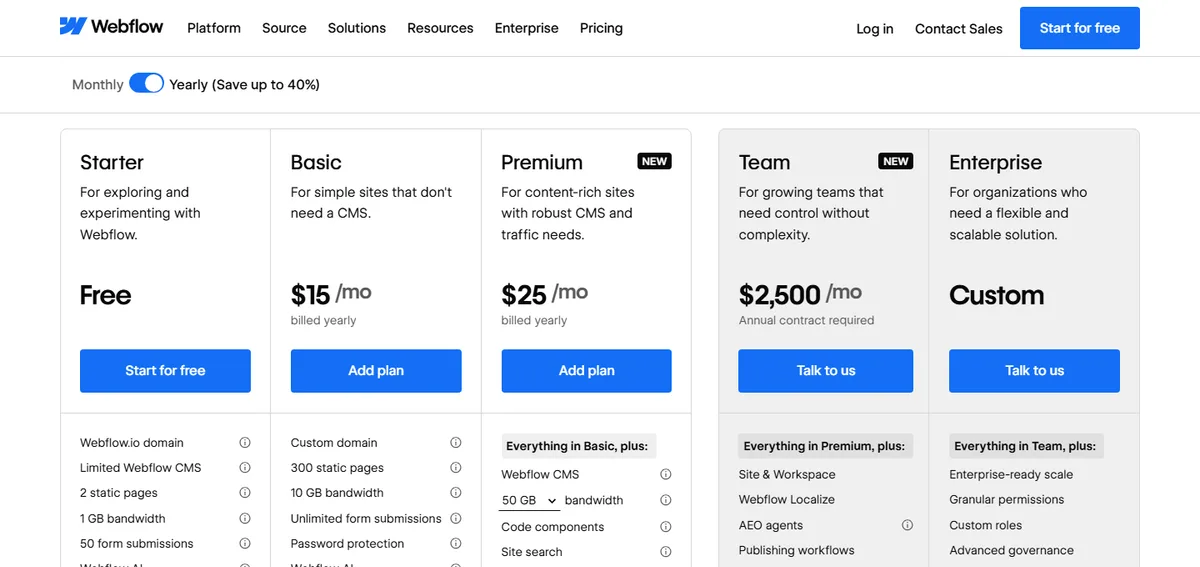
None of that is unfair. You are getting a professional platform. But it is worth comparing the full picture, not the headline, especially against a flat low monthly fee. We break down the real numbers in our guide on how much a website costs, and the lesson is always the same: look at the total over a year, not the sticker.
Webflow vs an AI-first builder: a quick comparison
The clearest way to see the trade-off is side by side.
| Factor | Webflow | AI-first builder (Forgelo) |
|---|---|---|
| How you build | Visual canvas, you design every element | Describe your business in one sentence |
| Learning curve | Real, days to weeks to feel fluent | Minutes, you type changes in plain words |
| Time to first live site | A weekend or more for a full custom site | Around a few minutes to a first draft |
| Design ceiling | Very high, pixel-level control | High for standard business sites |
| Editing later | Back to the canvas yourself | Edit by prompt, "make the hero shorter" |
| Lead capture | Forms, then wire up where they go | Forms route straight to WhatsApp |
| Entry price | Higher once you add a paid site plan | Starts at 9 dollars per month |
The two tools answer different questions. Webflow asks, "how much control do you want?" An AI builder asks, "how fast do you want to be live?" Neither answer is wrong. With Forgelo, you type a sentence about your business, get a full site in a few minutes, and change anything later by describing it. Built-in SEO, a free subdomain to launch on or your own custom domain, and lead forms that land in your WhatsApp are included, not extra projects.
If you want to see how AI builders stack up against each other, our roundup of the best AI website builder options compares the leading tools on speed, control, and price.

When Webflow is the right call, and when it isn't
To be fair to Webflow, here is where it clearly wins:
- You are a designer or agency and control is the point.
- Your brand needs a truly custom look that no template can approximate.
- You have a content-heavy site with a real CMS structure to manage.
- You want to learn a professional skill you can reuse or sell.
- You have the time to build and the patience to iterate.
And here is where a small business is usually better served by an AI-first tool:
- You need to be live this week, not this month.
- You would rather run your business than learn web design.
- Your needs are standard: clear pages, get found on Google, capture leads.
- You expect to update the site often and want to do it in minutes.
- You are testing an idea and do not want to spend big before it proves out.
Most cafes, clinics, tradespeople, and solo consultants live squarely in the second list. A fast, clean site that explains the offer and routes inquiries to your phone wins real work, and it does not require a design degree to maintain.
A one-evening test before you commit to Webflow
You do not have to guess whether Webflow suits you. Before paying for a site plan, give it one honest evening with your own business, not a tutorial project.
- Rebuild your home page. Start from a template close to your style and replace the content with your real headline, services and photos. Note where you get stuck.
- Make one change on mobile. Adjust a heading or an image so it looks right on a phone without breaking the desktop layout. This is where the box model and breakpoints become real.
- Add a contact form. Then check where submissions go and how you would be notified. Find out what it takes to get them to the channel you actually answer.
- Count the hours. Multiply the evening by the pages you still need, plus the content you have not written yet.
- Ask who maintains it. If the answer is you, picture changing your prices in six months. If it is a freelancer, factor in their rate and response time.
If the evening felt like fun, Webflow will likely reward you. If it felt like homework, a tool that builds the first draft for you is probably the better fit.
The bottom line
Webflow is a genuinely excellent no code website builder, and calling it anything less would be dishonest. If you value design control above all and you are willing to learn, few tools match it. But "no code" does not mean "no effort," and for a business owner who mostly needs to be found and to capture leads, the effort can outweigh the payoff.
If control is your priority, Webflow deserves a serious look. If speed and simplicity matter more, describing your business to an AI and publishing in a few minutes is hard to beat. You can compare plans on our pricing page and decide which trade-off fits the way you actually work. The worst move is neither: a live, decent site beats a perfect one that never gets built.