
Search for the top website builder and you get fifty listicles that all crown a different winner. That is your first clue: there is no single best platform for everyone. The right pick depends on what you sell, how fast you need to launch, what you can spend, and whether you want to edit the site yourself or hand it off. In this guide we look at 10 platforms across the three things that actually matter, speed, price, and results, so you can stop reading rankings and start matching a tool to your business.
Here is the honest framing before we start. A "top website builder" is not a trophy, it is a fit. A local bakery, a freelance photographer, and a fast-growing online store need very different things. What follows is a plain comparison, plus where an AI website builder changes the math for most small businesses.
How we judged these top website builders
Most rankings measure the wrong things. Template count and font choices look impressive in a review but rarely decide whether your business gets customers. We stuck to three questions a real owner asks.
Speed to launch: how long from "I need a site" to a live page you are not embarrassed by. Price over a year: not the headline number, the real total once you add a domain, hosting, and the features you actually need. Results: does the finished site do its job, load fast, explain your offer, and turn a visitor into a message or a sale.
Note: The most recommended website builder in a blog post is often the one paying the biggest affiliate commission, not the one that fits your work. Treat every ranking, including this one, as a starting point and test the finalists yourself.
The 10 platforms at a glance
Here is the quick view. "Edit style" matters more than people expect, because it decides how painful every future change will be.
| Platform | Best for | Edit style | Entry price on the official page (23 Oct 2026) |
|---|---|---|---|
| Forgelo | Fast small business launches | Type the change in plain language | Free plan, Starter 9 USD per month |
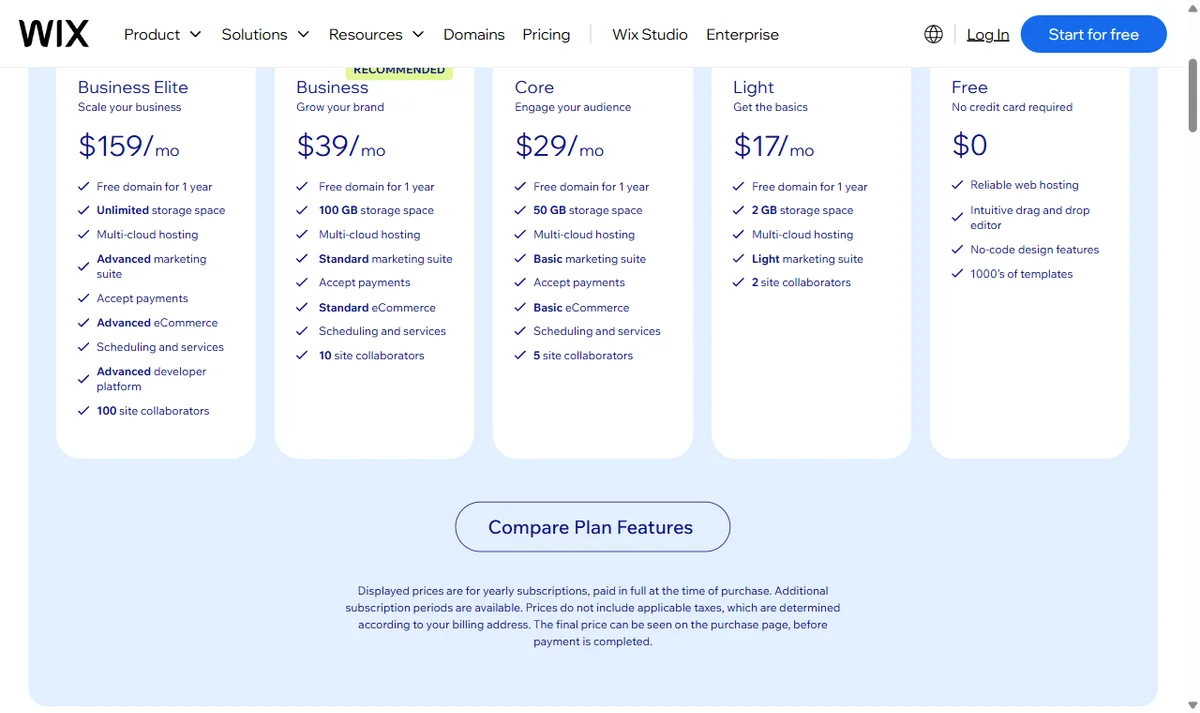
| Wix | All-purpose flexibility | Drag and drop editor | Free plan, Light 17 USD per month (yearly) |
| Squarespace | Design-led brands | Section based editor | 14-day trial, Basic IDR 166,000 per month (annual) |
| Shopify | Serious online stores | Store admin plus themes | 3-day trial, Basic 22 USD per month (yearly) or 25 USD monthly |
| Webflow | Designers who want fine control | Visual canvas, near code | Free Starter, Basic 15 USD per month (yearly) |
| WordPress.com | Content-heavy sites and blogs | Blocks plus plugins | Free plan, Personal Rp36,000 per month in year one |
| GoDaddy | Bundling site with domain and email | AI builder plus editor | Free start with 50 AI credits per month |
| Hostinger | Budget hosting plus builder | AI plus editor | Premium 2.49 USD per month on a 48-month term |
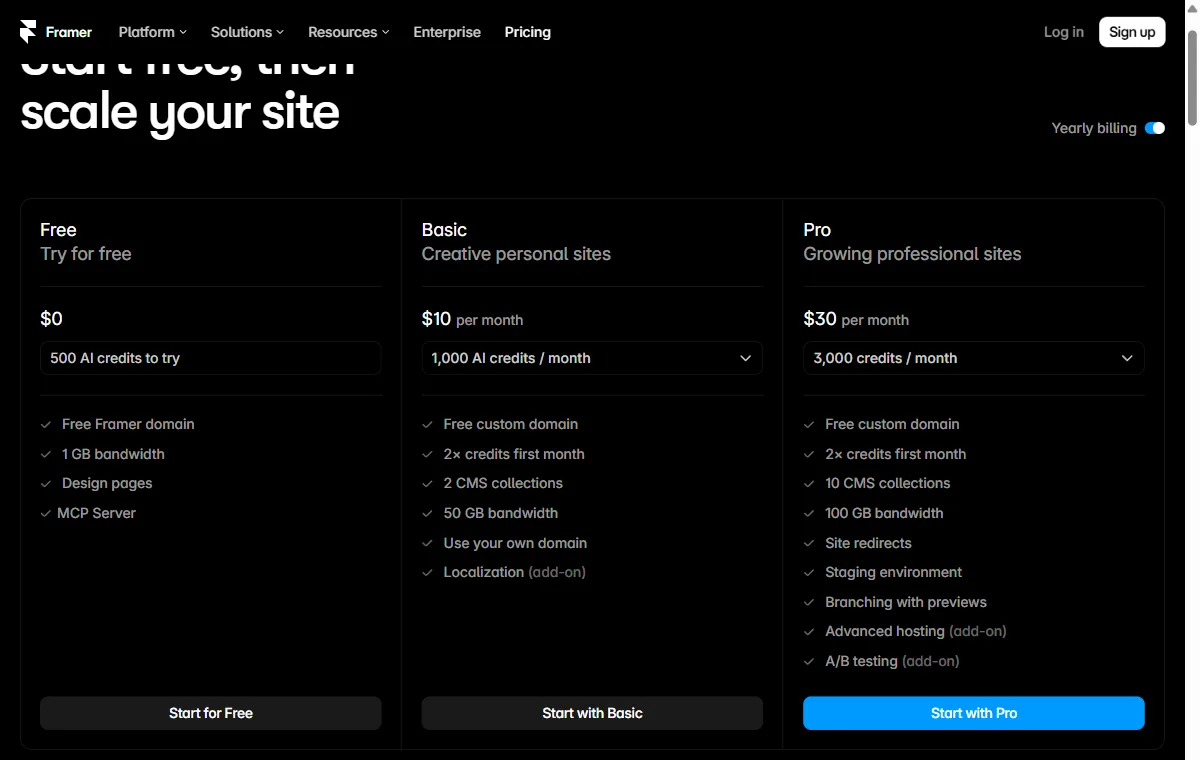
| Framer | Motion and modern layouts | Visual canvas | Free plan, Basic 10 USD per month (yearly) |
| Carrd | One page micro sites | Simple single page editor | Free for 3 sites, Pro Lite 9 USD per year |
No row is the outright winner. Each solves a slightly different problem, which is exactly why "top website builder" has no universal answer.
A word on where those numbers come from. We did not run lab benchmarks on these ten tools. This is a comparison of what each one is built for, plus prices read directly from the official pages on 23 October 2026: Wix plans, Squarespace pricing, Shopify pricing, Webflow pricing, WordPress.com pricing, GoDaddy Website Builder, Hostinger Website Builder, Framer pricing, and Carrd Pro. Squarespace and WordPress.com showed rupiah to our Indonesian connection, and the rest showed dollars. Prices move often, so treat the table as a snapshot and confirm before you buy.

The builders worth knowing, and what each is really for
A short, fair read on where each platform shines. Every one of these has real fans for good reason.
Wix is the generalist. It does almost everything, which is its strength and its cost, since all that flexibility means more choices to make. Great if you enjoy tinkering. Squarespace wins on polish. If your business is visual, its templates make it hard to build something ugly. Shopify is the go-to once selling products is the whole point, with inventory, payments, and shipping built for scale.
Webflow and Framer are for people who want designer-grade control and are willing to learn a real tool to get it. Beautiful results, steeper curve. WordPress remains the heavyweight for content and blogging, endlessly extensible through plugins. Self-hosted, you manage hosting and updates yourself, while WordPress.com (the version priced in the table) handles them for you. GoDaddy and Hostinger lean on bundling, a site plus domain, email, and hosting in one bill, which suits owners who want fewer vendors. Carrd is the specialist for a single sharp page, a link hub or a simple launch, at a price that barely registers.
And Forgelo takes a different path. Instead of a template grid or a drag-and-drop canvas, you describe your business in one line and get a complete, publish-ready site in a few minutes. Every later change is a sentence: "make the headline shorter," "add a pricing section," "put the contact form up top." If you want the deeper breakdown of AI-first tools, our guide to the best AI website builder goes further.
Speed: how fast can you actually launch?
For a new business, speed is not a luxury. Every day without a site is a day someone searches for you and finds a competitor.
Traditional builders are fast to sign up but slow to finish. You pick a template, then spend hours swapping placeholder text, moving blocks, and fiddling with spacing on mobile. It is doable in a weekend, but a weekend is the honest estimate for a decent result, not the hour the ads imply. Store platforms take longer still, because a real catalog needs setup.
AI builders compress that. Describing your business and generating a first draft takes minutes, and the draft already has your sections, copy, and layout in place. You refine from something real instead of starting from a blank grid. That is the practical difference for an owner who needs to be live this week, not next month. If you want the step-by-step, see how much a website costs for the time-versus-money trade-off in detail.
Tip: Whatever platform you choose, get a rough version live before you perfect it. A plain site that is online today beats a beautiful one still in progress. You can always improve it once real visitors show you what needs work.
Price: what you really pay over a year
The sticker price is the trap. A builder that looks cheap can get expensive once you add the parts you assumed were included.
Watch for four common add-ons: removing the platform's ads, connecting your own domain, unlocking enough pages, and accepting payments. On some plans, each of these bumps you to a higher tier. Add hosting where it is separate, and the "cheap" builder quietly doubles. This is why comparing headline prices is close to useless. Compare the plan that actually has everything you need.
For reference, Forgelo runs three paid plans at 9, 19, and 39 US dollars per month (roughly 149, 299, and 599 thousand rupiah), with hosting and built-in SEO included, plus 30, 100, or 300 AI generations and edits per day depending on the plan. WhatsApp lead forms and a custom domain start on Starter. The free plan gives you one site on a Forgelo subdomain with 5 AI generations and edits per day. The point is not that one number wins, it is that predictable pricing beats a low headline with a surprise bill in month two. Check the current pricing before you decide.
What the cheapest paid plan really includes
Reading the fine print on each official page tells you more than the headline number. A few patterns stood out on 23 October 2026.
Billing period changes the price. Wix states that its displayed prices are for yearly subscriptions paid in full. Webflow and Framer quote their monthly figure on yearly billing too. Shopify shows both: Basic is 22 US dollars a month paid yearly or 25 dollars paid monthly.
First-term discounts expire. Hostinger's Premium plan shows 2.49 dollars a month, but only on a 48-month term paid upfront (119.52 dollars), and it renews at 10.99 dollars a month. WordPress.com Personal shows Rp36,000 a month for the first year, then Rp536,400 billed annually. Budget for the renewal price, not the welcome price.
Free plans differ a lot. Wix, WordPress.com, Webflow, Framer, Carrd, and Forgelo all have a free tier with no fixed end date, while Squarespace offers a 14-day trial and Shopify a 3-day trial. WordPress.com says free sites display its ads to visitors, and Webflow's free Starter plan is capped at 2 static pages on a webflow.io address.
Domains are often a first-year perk. Several paid plans, including Wix and WordPress.com, include a free domain for the first year only. After that, you pay the domain renewal on top of the plan.
Results: does the site actually win work?
A pretty site that nobody contacts is a failure with good taste. Results are the only score that pays the bills, and they come down to three unglamorous things.
Load speed: visitors leave slow pages, and search engines rank them lower. Clarity: a stranger should understand what you do and who you help within a few seconds. Capture: there must be an obvious next step, a button, a form, a phone number. Any builder here can hit these if you use it well, and any of them can be misused into a bloated, confusing mess.
Where the finish line matters most is lead capture. Forms that email a dashboard you never check are quietly costing you customers. Forgelo routes lead forms straight to your WhatsApp, so an inquiry lands in the same inbox where you already reply, and you answer in minutes instead of days. That single detail often decides whether a curious visitor becomes a paying one. Our piece on turning visitors into WhatsApp leads covers why that path converts.
How to choose the top website builder for you
Skip the rankings and answer four questions instead.
- What are you building? A simple business site or portfolio favors a fast, low-cost builder. A large store points to a commerce specialist.
- How soon do you need it live? This week means AI generation or a template you barely touch. No rush means you can learn a deeper tool.
- Who will make changes? If it is you, prioritize easy editing above all, because most of your time with a site is spent updating it, not building it.
- What is your real budget over a year? Add the domain, the tier you actually need, and any per-feature fees, then compare the honest totals.
For most owners, a solo operator, a small shop, a service business, the answers line up on a builder that is fast to launch, cheap to run, and simple to edit. That is the case for an AI-first approach, and it is why Forgelo exists. If you are torn between two specific tools, our Forgelo vs Wix comparison shows how the same job feels on each, and if a single page is all you need, our look at Carrd for one-page websites covers that niche.
Before you commit, run a short test of your own. Sign up for the free plan or trial of your two finalists, build the same simple page on both, and time how long it takes to change the headline, add a price, and publish. That one hour tells you more about daily life with a builder than any ranking can, including this one.
The takeaway
There is no universal top website builder, only the one that fits your business today. Judge platforms on speed, honest yearly price, and whether the finished site actually brings in work, not on template counts or review-site stars. Most small businesses are best served by launching fast and cheap, learning what converts, and upgrading only if the business demands it. Pick a finalist or two, get something real online this week, and let your customers tell you what to improve next. You can start with Forgelo in the time it takes to describe your business.