You can build a free website with AI in the time it takes to drink a coffee, and that is not an exaggeration anymore. The process now looks like this: you type one sentence about your business, AI generates a complete website with copy, design, and page structure, and you publish it to a free subdomain. No code, no template gallery to scroll through, no credit card up front. This guide walks you through it step by step, and stays honest about what is free, what is not, and when paying actually makes sense.
One thing before we start. "Free" is the most abused word in the website industry, usually a hook with fine print attached. So let's be plain about it: which part costs zero, which part is an upgrade, and how you can get online today without spending anything.
What it means to build a free website with AI
There are two claims in that phrase, and both deserve a straight explanation.
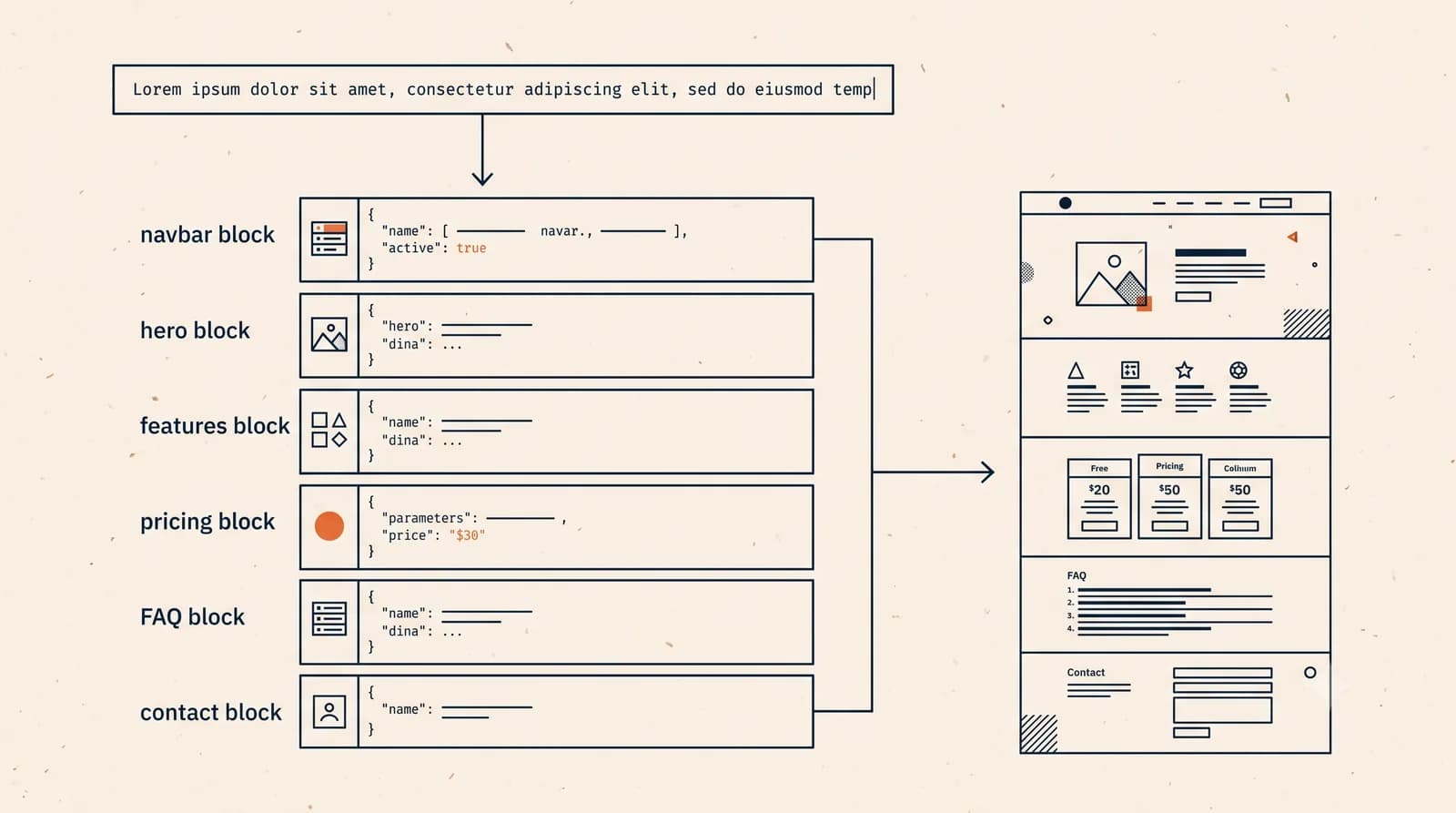
First, "with AI". It means you are not assembling a website by hand. With a tool like Forgelo, you describe your business in one sentence, something like "a mobile dog grooming service in Austin that comes to your driveway". From that sentence, the AI writes your headline, builds your services section, creates a contact page, and picks a design that fits. On Forgelo, this takes a few minutes. If you are curious what is happening under the hood, we explain the whole process in how AI generates a website.
Second, "free". What costs nothing is building the site and publishing it to a subdomain, an address that lives under the platform's domain. You get a live website that anyone can visit and that can capture leads, without paying a cent. What costs money are the things on top: a custom domain (your own yourbusiness.com), plus advanced features for businesses that are getting serious. Forgelo's paid plans start at $9 per month, and the full breakdown is on the pricing page.
In my opinion, this is the only honest version of free. You are never asked to pay for something you have not seen. You build first, look at the result, use it, and pay only when your business genuinely needs more.
Step 1 to 5: from prompt to live in 5 minutes
Here is the full flow. If you know what you want to say, five minutes is a real number.
Step 1: write your business description (1 minute). One sentence is enough, but a good sentence makes the AI's output far more accurate. Cover three things: what you sell, who buys it, and where you operate. Example: "A home bakery in Manchester selling custom birthday cakes and weekly bread boxes, pickup and local delivery."
Step 2: let the AI work (under 1 minute). The AI generates the whole site: headline, service list, an about section, and a contact page. You never pick a template. The structure and copy are built specifically from your description.
Step 3: read it and revise by typing (2 minutes). This is where modern AI builders feel different from the old drag-and-drop era. If something is off, you do not hunt through settings menus. You just type the change you want: "make the headline friendlier", "add a testimonials section", "change the main color to dark green". The site updates to match.
Step 4: wire up your contact channel (1 minute). A beautiful site that nobody can contact is decoration. Make sure your phone or WhatsApp number is in place. On Forgelo, lead form submissions land directly in WhatsApp, so an enquiry sent at 9 pm shows up on your phone immediately instead of sitting in an inbox you check twice a week. We wrote more about that flow in turning visitors into WhatsApp leads.
Step 5: publish (under 1 minute). Hit publish, choose your subdomain name, and your site is live. Send the link to a friend, drop it in your Instagram bio, put it on your business cards.
Tip: Treat the first draft as a starting point that is already 80 percent done, not as the final product. Two or three typed revisions are usually all it takes to make the site feel genuinely yours.

Real examples: three businesses, three prompts
To make this concrete, here are three small businesses and how each would start.
A coffee shop near a university. Prompt: "An independent coffee shop near campus with specialty pour-overs and pastries, open late, popular with students studying." The result: a site with the right late-night study vibe, a menu section, opening hours, and a map. The goal here is not online sales, it is showing up when someone searches "coffee near campus open late".
A plumber who does emergency callouts. Prompt: "An emergency plumbing service covering the north side of the city, available evenings and weekends, upfront pricing." For a callout business, the essentials are a clear service list with starting prices, a service area, and a contact button you cannot miss. Someone with a burst pipe does not read essays. They want to know you cover their area and can come now.
A home bakery. The prompt from step 1 above. Here, an order form that goes straight to WhatsApp earns its keep, because every cake order needs a follow-up conversation about flavors, dates, and delivery.
Three different businesses, one identical pattern: none of them need a fancy website. They need a clear one that goes live fast and routes people to a conversation. If you are still deciding what belongs on yours, our guide to small business website essentials covers the short list.
The honest limits of free
Now the part most articles skip: what you do not get on the free path.
Your address is borrowed. A free subdomain means your web address contains the platform's name. For getting started, that is fine. But if you are printing flyers, running ads, or pitching corporate clients, yourbusiness.com simply looks more serious.
Advanced features are gated. Things like connecting a custom domain and higher capacity sit on paid plans. Forgelo's plans run $9, $19, and $39 per month, with a custom Agency plan for studios managing client sites and full white label on the roadmap.
AI cannot fake your proof. Real photos of your work, genuine customer reviews, an actual phone number someone answers. The AI writes good copy, but the evidence that your business is real has to come from you.
Note: If a platform promises everything free forever with no catch, check two things: whether third-party ads get injected into your site, and whether you can take your content elsewhere. "Free" that locks you in and plasters ads over your brand is often the most expensive option on the list.
Build a free website with AI vs the other free routes
The AI route is not the only way to get online without spending money. Here is the honest comparison.
| Route | Time to live | Skill required | Main drawback |
|---|---|---|---|
| AI website builder | Minutes | Describing your business | Full features need an upgrade |
| Template site builder | Hours to days | Patience with blocks | Results often look generic |
| Free CMS or blog platform | Hours to days | Learning a dashboard | Overkill for a simple business site |
| Link-in-bio page | Minutes | Almost none | Not a real site, weak on Google |
| Coding it yourself | Days to weeks | HTML, CSS, hosting | The learning time is the cost |
Every row has its place. A link-in-bio page is great for creators. Coding it yourself is great if you enjoy the craft. But for a business owner who wants a proper website without stealing time from actual customers, the AI route is the best ratio of result to effort. We compare the whole landscape in our guide to making a website without coding.
Here is an opinion that might be unpopular: most people searching for a free website do not actually need it to be free. They need it to be fast and painless. The proof is how many of them will happily burn three weekends wrestling a template builder to save nine dollars, weekends that could have gone to serving customers. Free is most valuable as a risk-free way to start, not as the finish line.
Making your free website actually earn its keep
A live website is half the job. The other half is making it bring in customers.
Put your location in the copy. "Emergency plumber north Leeds" gets found. "Professional trusted plumbing solutions" does not. People search with place names, and Google matches those against the words on your page. The fundamentals are in our website SEO basics guide.
One page, one job. For a small business, one clear page beats five half-finished ones. A visitor should know within five seconds what you sell, who it is for, and what to click.
Route everything to a conversation. Enquiries convert when they turn into a chat quickly. Make sure your buttons and forms lead somewhere you actually respond, whether that is WhatsApp, a phone call, or a fast email.
Keep it current. A site advertising a Christmas offer in July looks abandoned. Since edits are just typed instructions, there is no excuse for letting it go stale.
Tip: A few days after publishing, search your own business name on Google. If you are not showing up yet, add your website link to your Instagram profile and your Google Business listing. Links from other places help Google discover a new site faster.
The 5-minute checklist before you start
Get these five things ready and the build itself becomes pure execution:
- One sentence describing your business. What you sell, who buys it, where you are.
- An active contact channel. WhatsApp or phone number you actually answer.
- Your three main services or products. With starting prices if you are comfortable showing them.
- Your preferred subdomain name. Short, easy to spell, close to your business name.
- Five uninterrupted minutes. Genuinely, that is it.
Once those are in your head, the rest is momentum. Generate your first draft on Forgelo, type a few revisions, and publish. Building a free website with AI is no longer a question of whether you can. It is a question of when you start, and the cheapest answer to that question is this afternoon.