Flowers wilt in three days, chocolates disappear in five minutes, and the teddy bear ends up buried in a closet. A website for your girlfriend is a different kind of gift: one personal page about the two of you, openable anytime, and still there next year. The good news is you do not need to be a coder or pay for an expensive service. With an AI website builder, you describe the idea in one sentence, the site is generated in a few minutes, then you polish it until it feels right. A realistic estimate: about 30 minutes, taken at an easy pace.
This article covers why a gift like this feels different, ideas for what to put on it, the theme that fits each occasion, and the steps to build it from scratch to live. All of it with no design software and not a single line of code.
Why a website for your girlfriend hits differently
Most gifts get judged by their price. This kind of gift gets judged by the effort, and that is exactly what makes it stick. You are not just spending money, you are spending time to remember dates, choose photos, and write lines only the two of you understand. That effort is not something you can buy in a store.
Three things make this format win. First, it is deeply personal: the content is one hundred percent about your relationship, not a mass-produced product. Second, it lasts: flowers fade, but this link can be reopened during an argument when you both need reminding why you fell for each other. Third, the surprise factor is strong, because almost nobody expects to be handed an entire website.
Here is the honest, slightly against-the-grain part: the value is not in how flashy it looks. You do not need slick animations or expensive effects. One page that is specific and sincere lands far harder than a site full of gimmicks and generic sweet-talk. Honest and simple beats fancy and hollow.
Ideas for a website for your girlfriend that make her smile
The hardest part is usually not the tech, it is deciding what to put on it. Here are ideas that reliably land, so pick the ones that feel most like you two:
- A timeline of your story. From first meeting, to official, to first date, to the silly moment only you remember. Add one photo at each point.
- A photo gallery with captions. Not just a pile of photos, but one line of story behind each one.
- A long letter. The things that are hard to say out loud are often easier to write. This is the place for them.
- A "reasons I love you" list. Specific, not cliche. "The way you laugh at bad movies" beats "you're beautiful" every time.
- Your shared playlist. Name the songs that mean something, plus why.
- A countdown to seeing each other. Essential for long-distance: a timer running to the date you meet again.
- A map of your dates. A list of the places you have been together, each with its memory.
- One big question at the end. For asking someone out or proposing, the whole page becomes a build-up to a single question.
You do not need all of them. Two or three genuinely personal sections are more than enough. Too many just wears her out scrolling and drowns the moment.
The occasion and the theme that fits
The content should match the occasion. An anniversary feels different from an apology, and long-distance has different needs from a proposal. Here is a quick guide so you know where to start:
| Occasion | Theme that fits | Main content |
|---|---|---|
| Anniversary | Our story so far | A timeline of key dates with a photo for each |
| Birthday | Reasons I love you | A personal list plus a photo gallery |
| Long-distance | Countdown to seeing you | A countdown, a map of the distance, a letter |
| Valentine's Day | Letter and playlist | A long note plus your shared songs |
| Asking them out or proposing | The big question at the end | A slow build, then a yes button |
| Saying sorry | An honest apology | A sincere note plus a concrete promise |
Take the row that fits your situation, and let it become the backbone. The rest is just filling in the material.
A simple page structure that works for any occasion
Whatever the occasion, the pages that land best tend to share the same shape: one page, read top to bottom on a phone, in five short blocks. The opening greets her by the nickname only you use. The middle carries the proof (dates, photos, small stories). The ending gives her something to do or feel, such as a countdown, a question, or a plan for the weekend.
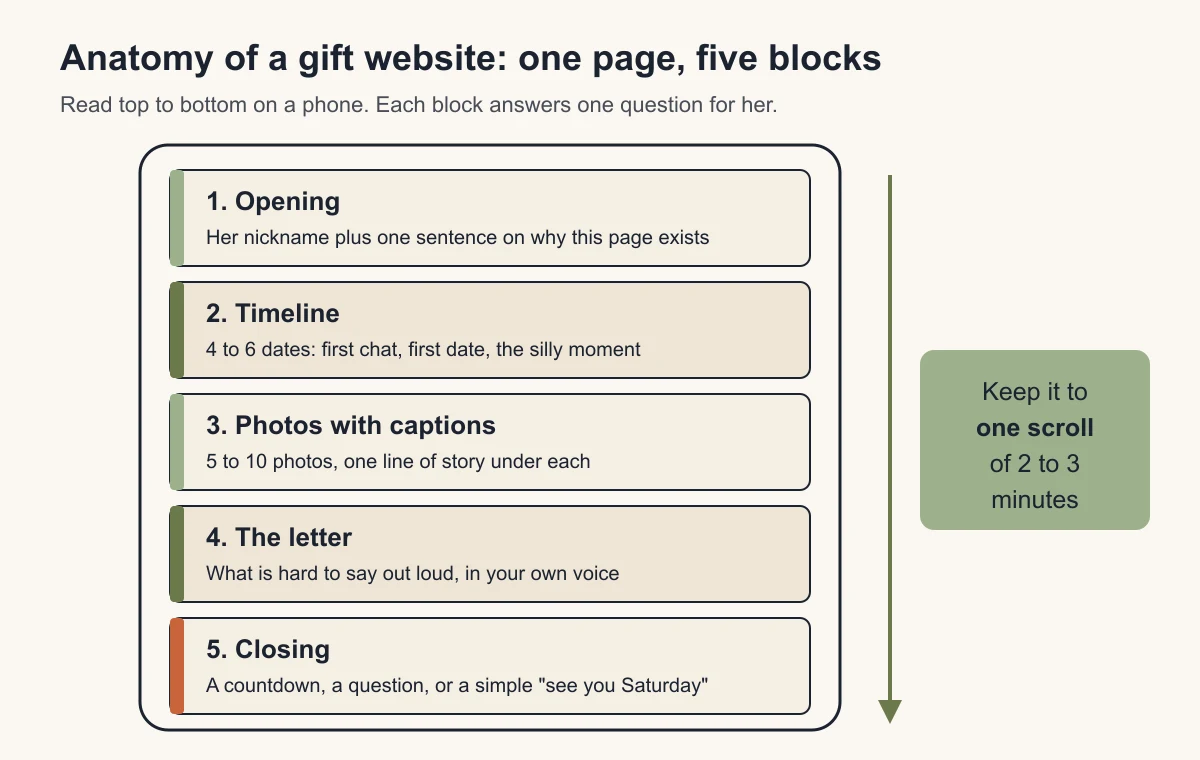
Aim for a page she can finish in two or three minutes. That length feels generous without turning into homework. If you have more material than fits, keep the best and save the rest for next year's version, because a gift page you can add to every anniversary is a nice tradition in itself.
Tip: When you are torn between ideas, pick the most specific one. A memorable surprise is a detail only the two of you know, not a sweet line you could send to anyone.
How to make a website for your girlfriend in 30 minutes
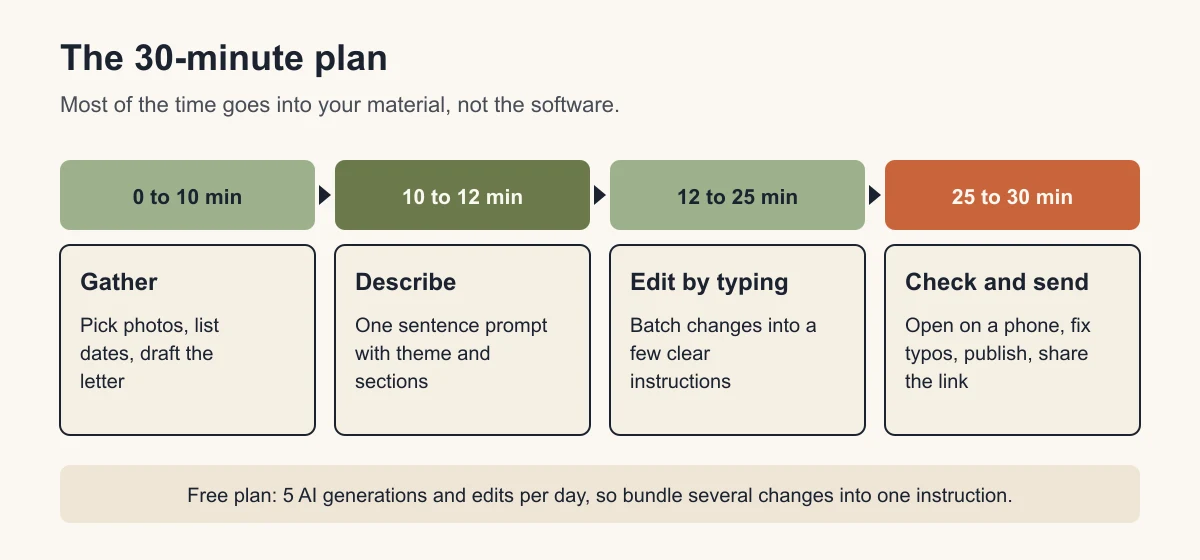
This is the step people dread even though it should be the easiest. The process feels more like a conversation than designing, and you genuinely don't need to code at all. Here is the flow:
- Gather your material first (about 10 minutes). Choose 5 to 10 photos, note the important dates, and rough out what you want to say. Ready material makes the rest smooth.
- Describe it in one sentence. Type something like "an anniversary gift website for my girlfriend, pastel pink, with a timeline of our relationship, a photo gallery, and a letter." in a few minutes, the site appears complete with structure and starter text.
- Edit by typing. Don't like the headline? Type "change the title to For You, Always." Want to add a section? Type "add a photo gallery below the timeline." It works exactly like giving instructions to AI through a prompt, not dragging elements around a complicated editor.
- Publish to a free subdomain. The site goes live at a free address, and you just send her the link. The basic SEO is tidied up automatically, though for a private gift that part matters less than the content.
The part that truly takes time is not technical, it is choosing photos and writing what is in your heart. The software itself only needs a few minutes to build the skeleton.
Make every edit count on the free plan
The Free plan gives you 5 AI generations and edits per day, according to the Forgelo pricing page, and the first build uses one. That is plenty for a gift page if you work in batches instead of sending one tiny change at a time. Write down everything you want to fix after the first build, then send it as a single instruction, like this:
"Change the title to For You, Always. Make the colors softer pastel pink. Move the letter to the bottom, and add a caption under each photo using these lines: ..."
One clear message like that does the work of four separate edits. If you still run short, the quota refills the next day, which is one more reason to start a day or two before the date rather than an hour before.
Note: Don't rush to buy a custom domain for the first surprise. Use a free subdomain, see her reaction, then upgrade to an address like herfirstname.com if you want to make it a more permanent gift. This saves money and frees you to experiment without fear of a wrong move.
Tips to make it heartfelt, not cheesy
The line between sweet and cheesy is thin, and easy to cross. A few things that keep it sincere:
- Write in your own voice. Don't copy-paste romantic lines off the internet. She knows how you talk, and that is exactly what makes it believable.
- Specific beats general. "I love you" is everywhere. "I love how you complain about the show and still watch every episode" only exists in your relationship.
- One honest page is enough. You don't need seven sections of effects. Too long and she stops halfway.
- Avoid autoplay music. A song that suddenly blasts when she opens it in class or at work causes panic, not romance.
- Use photos she likes. A photo you find funny but she finds unflattering can ruin the moment. When in doubt, play it safe.
A slightly contrarian take: many people assume more animation and effects means better. The reality is the opposite. This gift is not a display of design skill, it is about the content. Thoughtful simplicity is far more powerful than a loud look with nothing behind it.
Mistakes that make the surprise fall flat
A few small things can spoil the moment, and all of them are easy to avoid if you know in advance:
- Forgetting to publish. You send the link, she clicks, and a blank page shows up because the site was never made live. Check the link opens on another device first.
- Not checking it on a phone. She will almost certainly open it on a phone, not a laptop. Open it yourself on a phone first and make sure the photos and text look clean on a small screen.
- Too long. The intention is romantic, the result is her stopping at the third paragraph. Tight and sincere beats long and rambling.
- A typo in her nickname. This can make the whole effort look careless. Read it over once more before you send.
- Bad timing. Sending it while she is busy or exhausted makes it fall flat. Pick a time she can sit down and enjoy it.
Keep it private and safe
A website is a public page, even if only one person has the link. Treat it like a post you are comfortable with strangers seeing by accident. Leave out home addresses, her full legal name, phone numbers, and any photo she would not want shared. Nicknames, inside jokes, and favorite places described loosely carry all the feeling without the risk.
Also remember the page may stay online long after the moment. If the relationship changes, or she simply prefers it gone, you can edit or delete the site from your dashboard at any time. Asking her once, after the surprise, whether she wants to keep it up is a small, respectful touch.
Free or paid: what this gift actually needs
For a single surprise page, the free plan covers everything that matters. You only need a paid plan if you want your own address or prefer the page without the Forgelo badge. Here is the honest comparison, based on the plans listed on the pricing page today. If the domain question is new to you, our guide on custom domain vs free subdomain explains the trade-off.
| What you need | Free ($0) | Starter ($9 per month) |
|---|---|---|
| Websites | 1 | 3 |
| AI generations and edits per day | 5 | 30 |
| Address | Forgelo subdomain | Connect 1 custom domain (bought separately) |
| Made with Forgelo badge | Shown | Removed |
| Good for | A one-off surprise | A gift you want to keep for years |
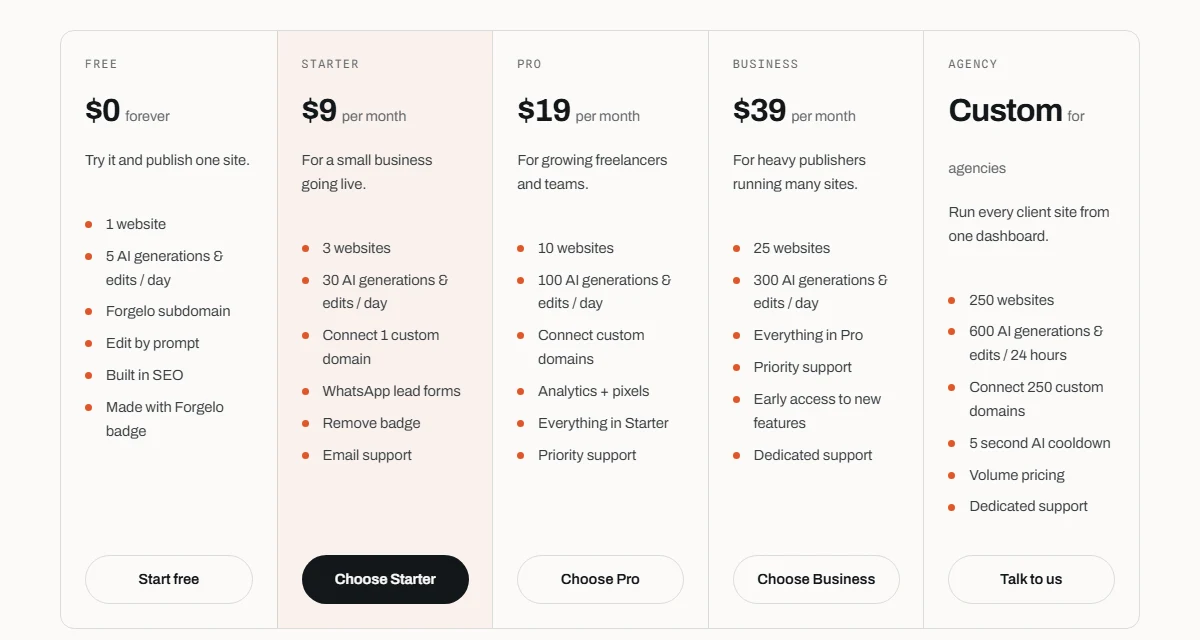
A sensible path is to start free, send the link, and only upgrade if she wants to keep it as a lasting keepsake. You can connect a domain later without rebuilding the page.
Publish, send, and watch her reaction
Once everything is ready, make the site live, copy the link, and choose the right moment to send it. You can leave it on a free subdomain forever, or turn it into a more permanent gift by connecting your own domain on a paid plan (starting at nine dollars a month). If it turns out to be the start of something bigger, like an invitation to an event for two, you can use the same approach to build a website-based digital invitation.
The most important thing about this gift is not how polished it looks, but how personal the content is. With Forgelo, the technical part is done in a few minutes, so all your energy can go toward what truly matters: choosing which memories to tell. If you want to see the plans and how to connect a domain later, check our pricing page. For now, start gathering the photos. Her reaction when she opens that link will be worth far more than any bouquet.