Learning how to make a personal website is less a technical project than a reputation project. The first thing people do after hearing your name, whether it's a potential client, a recruiter, or a business partner, is type it into Google. What shows up there sets the first impression, and you don't want that impression decided by a random social post or, worse, an empty page. A personal website is the one corner of the internet you fully control.
The good news is that building a personal website today is far easier than it was five years ago. You don't need to code, you don't need to hire a designer, and you don't need to wait weeks. This guide covers the concrete steps, what every personal site should include, how to pick a domain for personal branding, and the common mistakes that make a personal website work against you instead of for you.
Why a personal website matters in a "Google-first" world
Picture a hiring manager who just received your application, or a prospective client who just got off a call with you. Their next reflex is the same: open Google, type your name. If all that shows up is a personal social account full of vacation photos, or your name buried among strangers who share it, that opportunity can quietly slip away.
A personal website fixes this in one simple way: it gives Google something clear, professional, and yours to display. This isn't about becoming a celebrity. It's about controlling the narrative. A wedding photographer, a tax consultant, a professor, an architect, a freelance designer, all of them benefit when the people searching for them land on a tidy page instead of a messy set of search results.
Note: Social media is like renting a stall in someone else's market. The rules can change overnight, your reach is set by an algorithm, and accounts can be suspended without explanation. Your own domain is land you own. Build on both, but never rely only on the one you're renting.
How to make a personal website: 6 steps from scratch
The process is shorter than you expect. Here's the order I recommend for most people:
- Decide the goal. Pick one main purpose: win clients, find a job, sell a service, or simply be a digital business card. One clear goal beats ten vague ones.
- Gather your core material. Collect a decent profile photo, one paragraph about yourself, a list of skills or services, and three to five work samples if you have them. This is the part that takes the most time, so do it first.
- Choose a domain name. Ideally your full name. More on this below.
- Pick how to build it. You can use an AI builder, a template platform, or hire someone. The comparison is in the table further down.
- Assemble and publish. Create the pages, fill them with your material, then go live. With a modern approach, this step takes minutes.
- Connect it to Google. Register the site with Google Search Console so it gets indexed quickly and appears when your name is searched.
Notice that five of these six steps are decisions, not technical work. The technical part, the bit that used to be the scariest, is now the lightest.
What a personal website must include
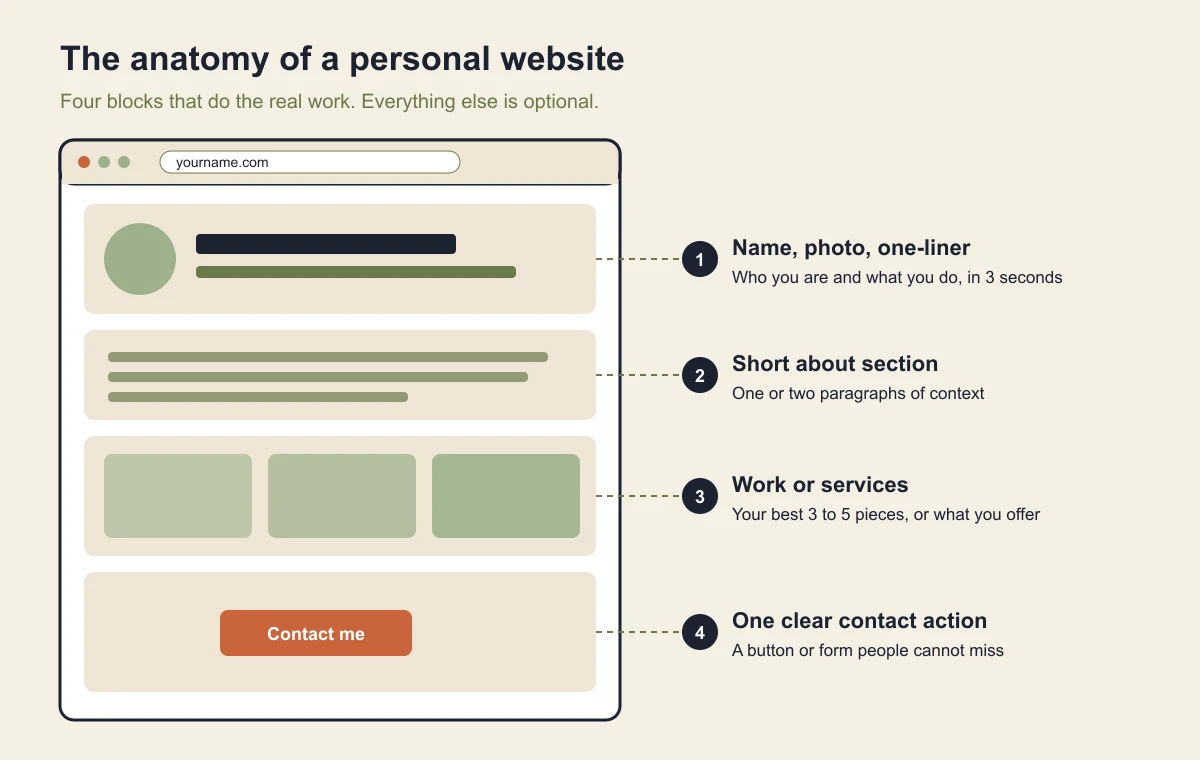
A good personal website is concise, not complete. Don't be tempted to add pages just because you can. The truly essential parts are few:
- Your name and a one-line explainer. Who you are and what you do, in a single line readable in three seconds.
- A human photo. Faces build trust. It doesn't have to be a studio shot, it just has to be clear and friendly.
- A short "about" section. One or two paragraphs. Give context, not a full life story.
- Work or services. Real proof: a portfolio, testimonials, or a list of what you offer.
- A way to contact you. This gets forgotten constantly. A clear contact button turns visitors into opportunities.
Tip: If your personal website leans toward a portfolio, put your best work at the very top and cut the mediocre stuff. Three strong pieces beat ten average ones. If you want a starting point, browse ideas for a free portfolio website and copy the patterns that work.
Here's a take that might be controversial: most people don't need a blog on their personal website. A blog demands regular updates, and an abandoned blog (last post two years ago) actively makes you look inactive. Unless you genuinely will write often, one clear page that stays relevant beats a dusty blog every time.
Choosing a domain name: the key to personal branding
Your domain is your website's address, and for personal branding, the best choice is almost always your full name. If your name is Jane Cooper, aim for janecooper.com. It makes your site memorable and sends a strong signal to Google that this page is genuinely about you.
If the exact name is taken, don't settle for something odd. Add your profession or location instead: janecooper.design, janecopywriter.com, or janeinaustin.com. Avoid numbers and hyphens that are hard to dictate over the phone. If you want to understand how domains work end to end, our guide to how to build a website with AI walks through connecting one.
You can also start free with a platform's built-in subdomain (like yourname.forgelo.com) to test the waters, then attach your own domain once you're sure. The point is, when you're serious about personal branding, your own domain is a small investment with an outsized payoff. Ten dollars a year sounds trivial next to the professional impression it buys you.
How to make a personal website without any coding
This is where everything changed in the last few years. Building a personal website used to mean choosing between equally unpleasant paths: learn to code, wrestle with a builder full of confusing menus, or pay an agency a lot of money. Now there's a fourth path.
With an AI website builder like Forgelo, you just describe yourself in a sentence or two, for example "I'm a wedding photographer in Austin who wants to show a portfolio and take bookings," and a complete, publish-ready site appears in a few minutes. Want to change something? Just type the instruction: "make the color dark green," "add a testimonials section," "move the contact button higher." No code, no design software, no hours of tutorials.
This is also where small but important details happen automatically. On paid plans (from Starter), the contact form on your site can route straight to WhatsApp, so every interested visitor reaches you through an app you already check daily. For freelancers and independent professionals, that's often the difference between a nice-looking site and a site that actually generates work. Basic SEO is built in too, so you're not starting from zero on getting found.
How to make your personal website show up when your name is searched
Publishing is only half the job. A brand new site is invisible until Google has found it, crawled it, and decided it deserves a spot for your name. You can't force that, but you can remove every obstacle. Here's the order that works:
- Put your full name in the page title. The title tag is the blue headline in search results. "Jane Cooper, Wedding Photographer in Austin" beats "Home" or "Portfolio" every time.
- Repeat your name in the main heading and the first paragraph. Google needs plain text that says this page is about you, not only a logo image.
- Link to the site from profiles you already own. Add the URL to LinkedIn, Instagram, your email signature, and any directory you're listed in. Those links help Google discover the page and connect it to the same person.
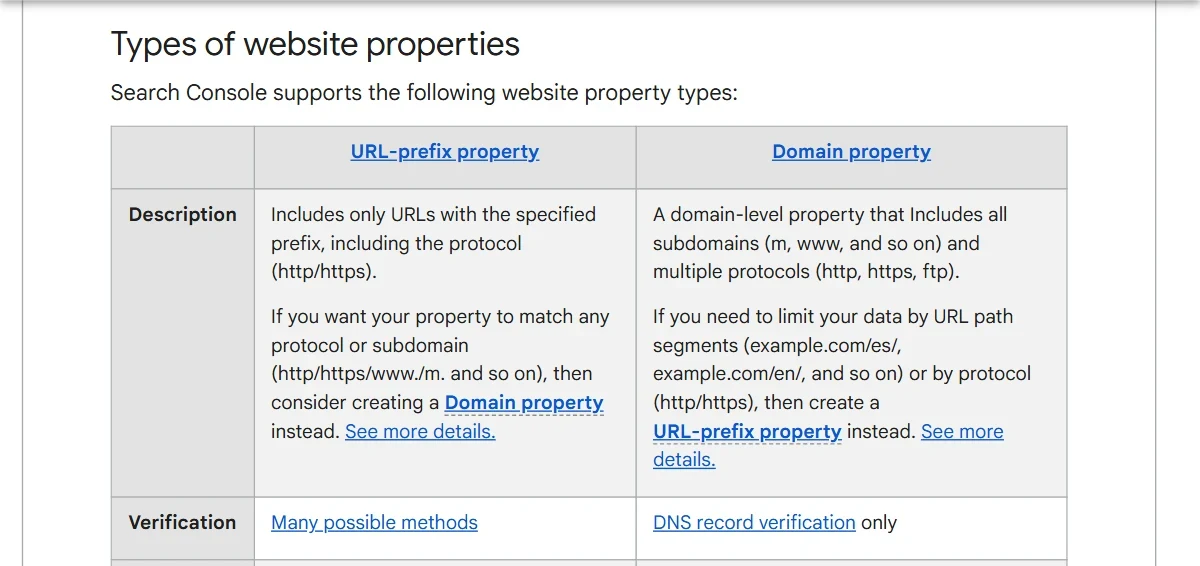
- Verify the site in Google Search Console. Adding it is free. A Domain property needs DNS verification, while a URL-prefix property accepts other methods, according to Search Console Help.
- Submit a sitemap and request indexing. Google's recrawl guide explains both: a sitemap for many URLs, the URL Inspection tool for a single page like your homepage.
- Add Person or ProfilePage structured data (optional). Google documents ProfilePage markup with
sameAslinks to your other profiles. It helps Google understand who the page is about, but Google says it doesn't guarantee any special result. - Wait, then check weekly. Search your name in a private window once a week and note where you appear.
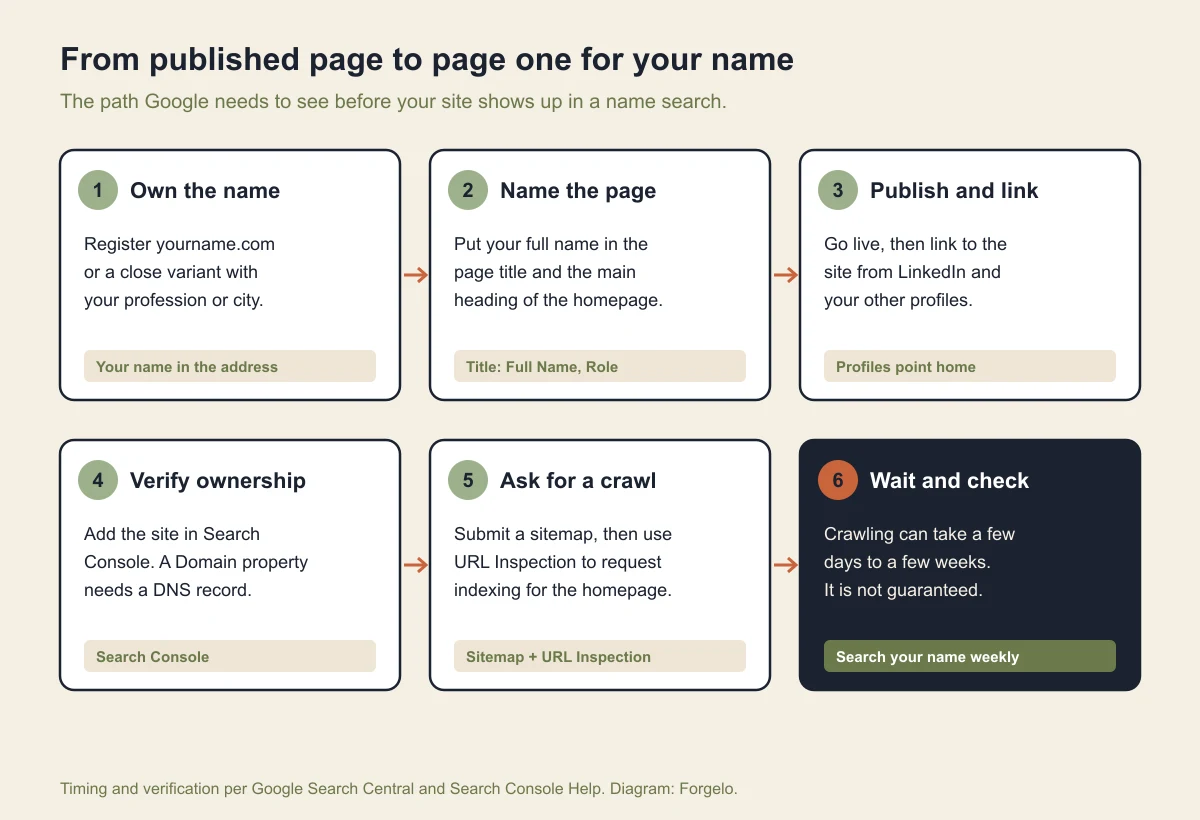
Be realistic about timing. Google's own documentation says crawling can take anywhere from a few days to a few weeks, and that requesting a crawl doesn't guarantee inclusion in search results at all. Requesting the same URL again won't speed it up either, because there's a quota. If nothing shows after a month, check that the page isn't blocked and that the title really contains your name.
If your name is very common, you're competing with namesakes, so be more specific. Add your profession and city to the title, and use the same name format everywhere, for example always "Jane M. Cooper" instead of mixing versions. Consistency is what lets Google tie your profiles and your site to one person.
Personal website cost: free vs paid
Before you decide, compare the options honestly. Here's a snapshot of the cost and trade-offs of each path for a simple personal website:
| Method | Rough cost | Time | Tech skill needed | Best for |
|---|---|---|---|---|
| Code it yourself (HTML) | Free, but a learning cost | Days to weeks | High | People who want to learn to code |
| Classic template builder | Free to a monthly fee | Hours to days | Medium | People happy to fiddle with menus |
| AI website builder | From about $9/month (free subdomain) | a few minutes | None | Most people |
| Hire a web designer | Hundreds to thousands, one-time | Weeks | None | Anyone needing fully custom work |
For a personal website, there's rarely a reason to spend thousands. Personal branding needs are standard: a clear page, a professional look, an easy way to be contacted. Big money makes more sense for a large online store or a complex system, not a digital business card. If you want to go deeper on the free versus paid question, our guide to SEO basics covers how to get found without overspending.
Tip: Start free to test, but don't stop there if this site matters to your career. A built-in subdomain is great for experimenting. Your own domain plus a clean look is what makes people take you seriously.
Common mistakes that make a personal website backfire
A bad personal website can do more damage than none at all. A few traps I see over and over:
- Too many empty pages. A menu of six pages where five say "coming soon" makes you look unfinished. One full page is better.
- Slow loading. A site weighed down by giant photos loses visitors before they see anything, and Google ranks it lower too. Compress your images, pick a fast platform.
- No way to get in touch. Strangely common. If people are impressed but can't figure out how to reach you, you lose them.
- Content that's out of date. An old job title, a stale portfolio, testimonials from three years ago. Your personal website should reflect who you are today, not who you were.
- Ignoring how it looks on a phone. Most people who Google your name do it from a phone. If the site is a mess on a small screen, that's the first impression they walk away with.
The good news is that all of these mistakes are easy to avoid if you use the right tool and stay focused on one goal. A personal website doesn't need to be grand. It just needs to be clear, fast, honest about who you are, and easy to find when someone types your name into Google. When you're ready, start building yours and check the pricing that makes it affordable to lock in your domain and look the part.