If you have something worth sharing, recipes, business tips, travel notes, or guides about your field, learning how to make a blog website is far easier than most people assume. You don't need to learn to code, you don't need to hire a developer, and you don't need a big budget upfront. All you really need is three things: the right platform, a clean structure, and a consistent writing habit. This guide walks through all three from scratch.
Before the details, let's be honest about one thing. Plenty of would-be bloggers get stuck for weeks comparing platforms and never publish a single article. The platform matters, but publishing something matters far more. So treat this guide as the fastest path to your first live post, not as a technical exam you have to pass first.
What you need to make a blog website
There are three basic pieces, and only one gets complicated if you choose wrong.
First, the platform your blog runs on. This is what shows your articles to the world. It could be a website builder, WordPress, or an AI website builder. This is your biggest decision, and we cover it in full below.
Second, a domain, which is your blog's address. It can be a free subdomain (like yourbrand.forgelo.com) or a custom domain you buy (like yourbrand.com). For a hobby blog, a free subdomain is fine. For a business blog, your own domain is far more credible and it stays yours if you switch platforms.
Third, hosting, where your blog's files live. The good news is that nearly every modern platform includes hosting automatically, so you never have to think about it. Only if you choose self-hosted WordPress do you need to arrange separate hosting.
Note: If this is your first time and you just want to write, don't waste energy worrying about servers or technical configuration. Choose a platform that handles all of that for you, and pour your effort into the actual writing.
Choosing a platform to make a blog website
This is the decision that shapes how smooth your journey will be. How to make a blog website that fits you depends heavily on how much technical time you're willing to spend. Here's an honest comparison of the four most common routes.
| Platform | Best for | Strengths | Weaknesses |
|---|---|---|---|
| AI website builder | Launching fast without hassle | Site ready in minutes, edit by typing, built-in SEO | Extreme customization is limited |
| Drag and drop builder | People who like arranging layouts | Visual control, lots of templates | Takes time to arrange, can get heavy |
| Self-hosted WordPress | People who need full flexibility | Highly customizable, thousands of plugins | You manage hosting, updates, security |
| Blogger / Medium (free) | People who just want to write | Free, works immediately | Limited branding, you're on rented land |
For most people who are serious about growing a blog but don't want to drown in technical work, an AI website builder is the sensible middle ground. You describe the blog you want, and the site is ready to publish in a short time.
When you later want a different look or a new section on the home page, you type the instruction instead of hunting through settings. If you're still weighing free versus paid routes, our guide on how to build a website with AI explains when a lightweight approach is enough and when to upgrade.
On the other end, if you genuinely enjoy tinkering, have spare time, and want control down to the smallest detail, self-hosted WordPress is still the king of flexibility. Just know that you become admin, developer, and writer all at once. Some people love that. For most busy business owners, it's exactly what makes their blog stall.

How to make a blog website from scratch, step by step
Now the practical part. Here's the order to make a blog website that works on any platform, arranged to get you live as fast as possible.
Decide your topic and who you're writing for. Before touching a platform, write one sentence: "This blog helps [who] with [what]." For example, "This blog helps small cafe owners craft their menu and attract customers." That focus saves you from a blog that covers everything and helps no one.
Pick and set up your platform. With an AI website builder, describe your blog in a sentence or two and let the site be generated. With another builder, pick a blog template and adjust it. With WordPress, install it and choose a theme.
Set up your core pages. Every blog needs at least: a home page (a list of recent articles), an About page (who you are and why you're worth reading), and a contact page. This foundation makes the blog feel like a home, not a random pile of posts.
Write and publish your first article. Don't wait for perfect. Pick one question your readers often ask, answer it fully, and hit publish. A first article that's live beats ten drafts sitting in a folder.
Connect a domain. If you're serious, attach a custom domain. If you're still experimenting, a free subdomain is enough to begin.
Register with Google. Create a Google Search Console account, verify ownership, and submit a sitemap. It's a small step people skip, yet it's how Google learns your blog exists.
If you're curious about the no-code route entirely, make a website without coding goes deeper into how beginners build complete sites just by describing what they want. On Forgelo, step 2 and step 4 meet in one place, because the site and its blog live in the same project, and publishing is a single click described in the publish your site help article.
Tip: Set a realistic launch target. Something like "Blog live with three articles in two weeks." A concrete deadline beats a vague "someday when I have time" that never arrives.
Connecting your own domain to the blog
Step 5 deserves a closer look, because it is the step people postpone longest. A custom domain is not required to start, but every link and mention you earn points at your address, so the sooner the address is yours, the more of that value you keep.
The process is the same on most platforms. You buy the domain from a registrar, the platform shows you one or two DNS records, and you add those records at the registrar. On Forgelo, custom domains are available from the Starter plan up, and the domain always stays registered to you.
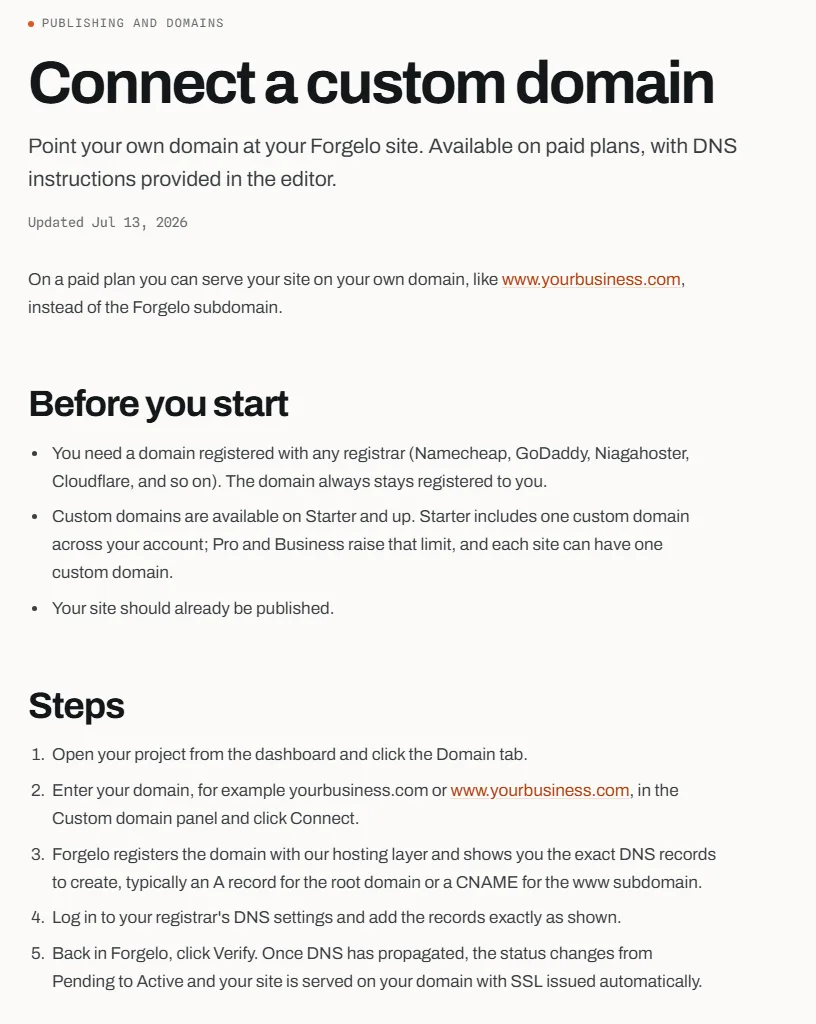
The full walkthrough is in the connect a custom domain guide. DNS changes usually show up within minutes, and the help article notes they can take up to 24 to 48 hours depending on the registrar. Until then, your blog keeps working on its free subdomain, so there is no downtime while you wait.
Structuring a blog people actually read
A messy blog sends people away even when the writing is good. Good structure is simple and boils down to a few rules.
Each article should have a clear title that promises one thing, an opening paragraph that gets to the point, subheadings to break up the reading, and a closing that invites the reader to do something. Avoid giant paragraphs. Eyes tire quickly reading a wall of text on a phone screen.
Use categories or topics to group articles. The cafe blog above might cover "Recipes," "Business Tips," and "Customer Stories." Grouping helps visitors find what they came for and makes the blog feel organized, even if your platform only shows a simple list.
Keep clear navigation at the top: menu links to home, the blog, about, and contact. Visitors should never get lost. If they can't tell where to go, they leave.
Finally, if your blog connects to a business, build in a conversion path: a contact form or a button that routes readers to reach you. With Forgelo, for instance, lead forms on the Starter plan and above can send enquiries straight to your WhatsApp, so an interested reader can start a conversation without losing momentum.
Writing posts with Forgelo's built-in blog
Many website builders treat the blog as an add-on. In Forgelo, every project already has a Blog area in its dashboard, so the site and its articles live together. You open the project, choose to write an article, and fill in a short form.
| Field in the editor | What it does | Why it matters for a blog |
|---|---|---|
| Title | The article headline | Promises one clear answer |
| Featured image and alt text | The cover shown on the article and in lists | Makes the blog list scannable and accessible |
| Summary | Used as the meta description and social preview | Shapes the snippet people see in search |
| URL slug | The address of the article, filled from the title | Keeps links short and readable |
| Article body | Headings, lists, quotes, links, and images | Gives structure that readers can skim |
| SEO title and hide from search | Optional search title and a noindex switch | Lets you tune search results per article |
Each article can stay a draft until you are happy with it, then go live as published. Published articles appear at yoursite/blog, and a latest-articles section on the home page, when your site has one, fills itself with the three newest posts.
The number of articles per site depends on the plan, which matters if you plan to publish weekly for years.
| Plan | Price per month | Articles per site | AI generations and edits per day |
|---|---|---|---|
| Free | $0 | 5 | 5 |
| Starter | $9 | 30 | 30 |
| Pro | $19 | 150 | 100 |
| Business | $39 | 1,000 | 300 |
The daily AI quota applies to building and editing the site by prompt, which uses a rolling 24-hour window. Prices and plan details are on the pricing page.
SEO basics so your blog gets found
Writing great articles nobody finds is like opening a shop in a dead-end alley. SEO (Search Engine Optimization) is how your articles surface when people search on Google. The good news is the basics aren't complicated.
Start with keywords. Before you write, imagine the exact phrase your reader types into Google. If you're writing about iced coffee, they might type "how to make palm sugar latte." Work that phrase naturally into your title and first paragraph.
Mind your title and meta description. The title should promise a clear answer. The meta description (the snippet in search results) should make people want to click. Don't mislead, but do make it compelling.
Protect your site speed. A slow blog gets abandoned before it loads, and Google notices. This is one reason a lightweight modern platform wins for beginners. If you want to go further, our website SEO basics sums up the factors that move the needle most.
Don't forget internal links. Linking related articles to each other keeps readers exploring longer and helps Google understand your blog's structure. A recipe article, for example, can link to your article on choosing coffee beans.
Some of the technical groundwork should come from the platform rather than from you. On Forgelo, every published site ships with page titles, meta descriptions, structured data, its own sitemap, robots.txt, responsive layouts, and SSL.
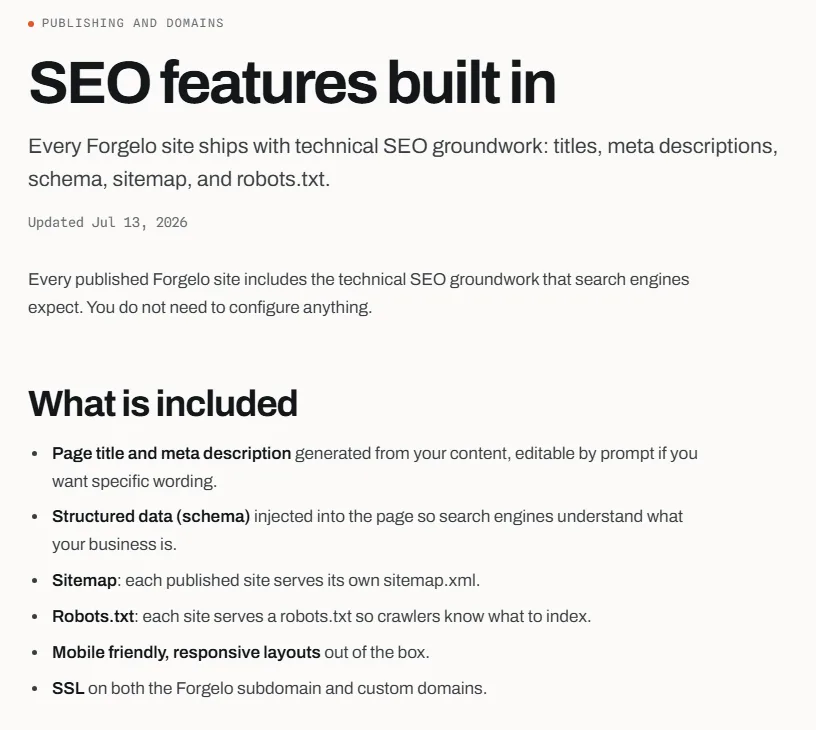
The SEO features built in article explains each item. If your blog supports a business rather than a hobby, our guide on how to build a business blog for SEO goes further into choosing topics that bring in customers.
Tip: Don't stuff keywords until sentences sound odd. Write for humans first, search engines second. Google is increasingly good at telling natural writing from forced writing.
The secret is not the platform, it's consistency
Here's the part few people say out loud. You can pick the most advanced platform, the prettiest design, and the cleanest SEO setup, but if you stop writing after three articles, your blog dies. Meanwhile, a blog on the simplest platform can grow huge if its owner publishes useful posts regularly for years.
This might be an unpopular take: choosing the "best" platform matters far less than people think. The weeks spent comparing tools would be better spent writing. Blogs grow from an accumulation of articles that answer real questions, not from shiny technical features.
So how do you stay consistent? A few things reliably help bloggers who last: set a realistic rhythm (one article a week beats a daily promise you break), keep a running list of ideas so you never face a blank screen, write in your own voice as if explaining to a friend, and celebrate a published post instead of waiting for everything to be perfect.
There's another reason an easy-to-edit platform wins for consistency: the lower the friction to publish, the more often you publish. If changing a paragraph means opening a clunky editor and waiting on slow loads, you'll put it off. If it takes one sentence to describe the change, you keep moving. Momentum is everything for a blog.
A 30-day plan for your first blog
Plans fail when they are vague, so here is a concrete first month. It assumes about two to three hours a week, which is realistic next to a job or a business.
| Week | Goal | Output by the end of the week |
|---|---|---|
| 1 | Set up | Blog live on a free subdomain with About and contact pages |
| 2 | First article | One article that answers your readers' most common question |
| 3 | Second article and Search Console | Second article live, sitemap submitted |
| 4 | Review and domain | Third article, a list of ten next ideas, custom domain if ready |
In week 1, keep the design decisions small. Pick a look you can live with and move on, because you can always change it later. In weeks 2 and 3, write the articles you would want to send to a customer or a friend who asks you a question. In week 4, look at what you published and ask which article you would be proudest to share. That one tells you what to write more of.
By the end of the month you have a live blog, three useful articles, and a list of ideas, which is more than most people who spend that month comparing platforms.
The bottom line
How to make a blog website is really three steps: pick a platform that doesn't give you headaches, set up a clear structure, and start writing without stopping. For most people who want to focus on the writing and not the plumbing, an AI website builder offers the fastest path from idea to first published article. For those who enjoy tinkering, WordPress stays flexible. Both can work.
The most important thing: don't get trapped in the planning phase forever. Pick one route today, publish something this week, and let your blog evolve as you learn. If you want to see how fast a blog can go live without touching code, try describing your idea in Forgelo and see the result. The best blog isn't the one that looks perfect on paper, it's the one that actually ships and keeps getting filled.