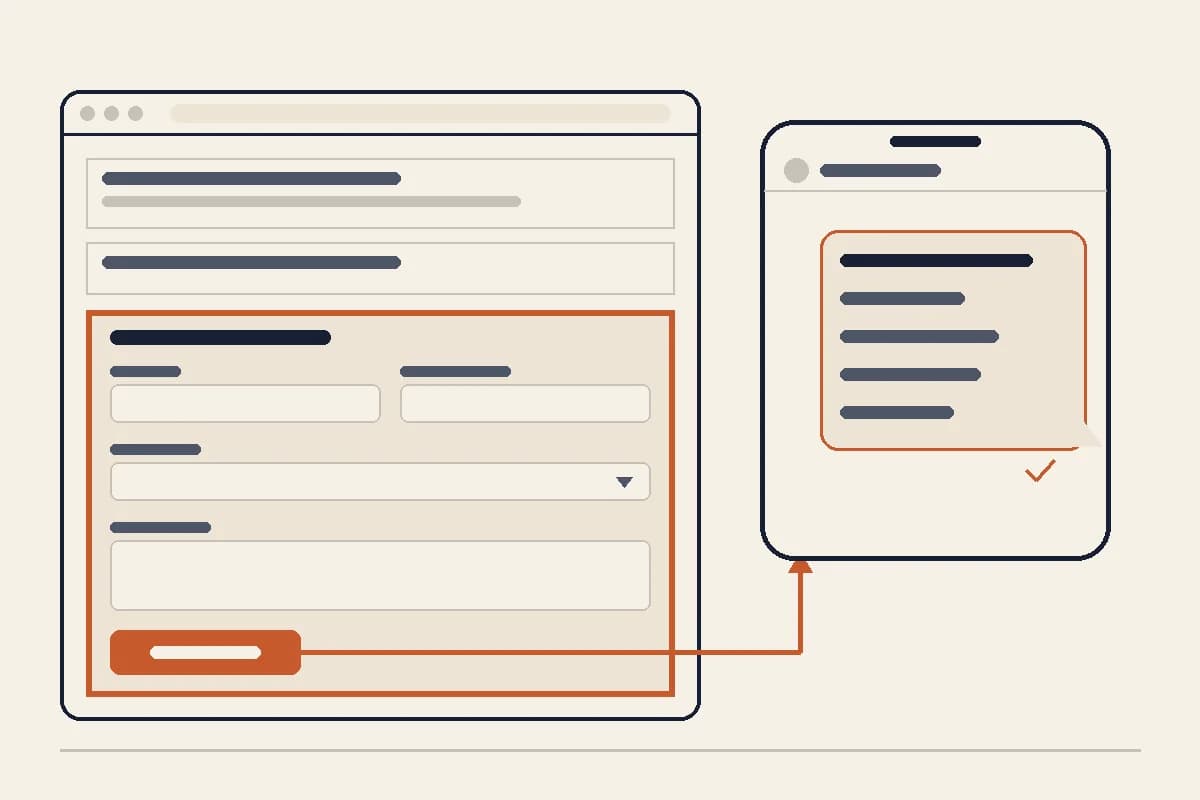
Short answer: to add a contact form to your AI website, describe the form you want in a prompt, including the fields and where the answers should go. In Forgelo that is one sentence, for example "Add a contact form with name, phone, service and message, and send it to WhatsApp 62812xxxxxxx". The AI adds a contact section with those fields, and when a visitor presses send, WhatsApp opens with your number and a message that already lists every answer. You can also send the form to email or to another page. Lead forms are included from the Starter plan.
The rest of this guide covers how the form actually delivers messages, which fields to ask for, and what to check before you share the site. Everything we say about Forgelo describes how the builder works today, and we point out the limits as well as the strengths.
How a contact form on an AI website delivers messages
Before writing a prompt, decide where you want enquiries to land. A Forgelo contact form has three delivery options, and each one behaves differently for your visitor:
| Delivery | What the visitor sees after pressing send | Best for |
|---|---|---|
| WhatsApp opens (the app on a phone, WhatsApp Web on a computer) with your number and a pre-filled message listing each answer | Local businesses and services that already reply to customers on WhatsApp | |
| The visitor's email app opens with your address, a subject line and the answers in the body | Businesses that work from an inbox, or B2B enquiries | |
| Redirect | The visitor is taken to a page you choose | Sending people to a booking tool, a calendar or a thank you page |
One thing to understand up front: the form does not save submissions in a separate dashboard inbox. It builds the message and hands it to WhatsApp or the visitor's email app. That keeps things simple (no new inbox to check), but it also means the visitor still has to press send inside WhatsApp or their email app. We come back to that in the testing checklist.
For most small businesses in markets where customers live on WhatsApp, the WhatsApp option converts best, because the conversation starts in the app where you already answer people. Our guide on turning visitors into WhatsApp leads explains why in more detail.
How to add a contact form with one prompt
Forgelo builds a site from one sentence and then lets you change any part of it by describing the change, section by section. A contact form is just another section, so you add it the same way.
If you are creating a new site, put the form in your first description:
A website for a home cleaning service in Surabaya. Include a contact form with name, WhatsApp number, service type (regular cleaning, deep cleaning, move out) and preferred date, sent to WhatsApp 62812xxxxxxx.
If your site already exists, send an edit prompt:
Add a contact section before the footer with name, phone, service and message fields. Send it to WhatsApp 62812xxxxxxx and add a floating WhatsApp button.
A few details make the prompt work first time:
- Write the number in international format, digits only. Country code plus number, no plus sign and no spaces. For Indonesia that means starting with 62, not 0. Our help article on WhatsApp lead forms shows the format.
- Name the fields you want. If you leave them out, the AI picks sensible defaults for your type of business, which you can change later.
- Say where it should go. WhatsApp, email (give the address) or a redirect link.
- Mention placement if it matters. "Before the footer" or "next to the map" is enough.
If you are still on the free plan, the AI will not add a form with input fields. It keeps your contact details and WhatsApp or phone buttons instead. Upgrading to Starter and sending the same prompt adds the form to the site you already have, without rebuilding the rest of the page.
Choose fields that bring real leads
The most common contact form mistake is asking for too much. Every required field is a small reason to give up. The second most common mistake is asking for too little, so the first message says "hi, how much?" and you spend three messages finding out what they need.
A Forgelo form supports these field types, so you can ask the right question in the right way:
- Text for names or short answers
- Email and phone fields for a way to reply
- Number for quantities, such as guests or square metres
- Date for a preferred appointment or event date
- Dropdown (select) for a fixed list, such as your services
- Message (a multi-line text area) for details
- Checkbox for a yes or no question, such as "I agree to be contacted"
Each field can be required or optional, can carry a placeholder hint, and can take the full row, half of it or a third, so short fields like name and phone can sit side by side.
A good starting set for most service businesses:
- Name (required)
- WhatsApp or phone number (required)
- Service, as a dropdown of what you actually sell (required)
- Preferred date, if you work by appointment (optional)
- Message (optional)
That is enough for a useful first reply, such as a price range and an available slot, instead of a round of questions. If you want to go further on qualifying questions, our guide to adding a WhatsApp form to your website lists questions that separate serious buyers from browsers.
To change fields later, edit only that section: "In the contact form, make the message field optional and add a dropdown for budget: under 1 million, 1 to 3 million, above 3 million." The rest of the page stays as it is.
Sending the contact form straight to WhatsApp
This is where an AI website with a lead form earns its keep. When the form is set to WhatsApp, pressing send opens a chat with your number, and the message is already written. It starts with an optional intro line and then lists each answer on its own line, labelled with the field name, for example:
Hello, I would like a quote. Name: Rina Phone: 62811xxxxxxx Service: Deep cleaning Preferred date: 2026-10-04
You can set three things in the same prompt:
- The intro line, such as "Hello, I would like a quote." It gives the message a natural opening so it does not read like a form dump.
- A floating WhatsApp button, which stays on screen for visitors who prefer to chat without filling anything in.
- The note after sending, such as "Thanks, we reply within an hour during business hours."
If the number is missing, the form tells the visitor that WhatsApp is not configured yet instead of failing silently. That is a reason to test before you share the link, not something you want customers to see.
Sending it to email or another page instead
WhatsApp is not the right channel for every business. If you handle enquiries from an inbox, ask for email delivery: "Send the contact form to hello@yourbusiness.com." The visitor's email app opens with your address, a subject line and the answers in the body.
Keep in mind that email delivery relies on the visitor having an email app set up on their device. That is normal for office computers, and less certain on some phones. If most of your traffic is mobile, WhatsApp or a redirect is usually the safer choice.
A redirect is useful when a different tool handles the next step, for example a booking calendar. The visitor fills in the form and is taken to the page you set.
If you have a physical location, the contact section also has a layout that shows a map next to the form. Ask for it with your address: "Show the contact form next to a map of Jalan Malioboro 52, Yogyakarta."
Check your contact form before you share the site
A form that looks right but does not deliver is worse than no form, because you never find out about the leads you lost. Spend five minutes on this after publishing:
- Open the published site on your phone, not only the preview, and fill in the form as a customer would.
- Confirm the message lands where you expect. For WhatsApp, check that the chat opens with your real number and that every answer appears. For email, check the address and subject.
- Replace any example number. If you generated the site without a real number, the AI fills in an example. Send an edit prompt: "Replace every WhatsApp number on the site with 62812xxxxxxx."
- Test on a computer too. WhatsApp opens in WhatsApp Web there, and you want that path to work as well.
- Read the labels as a stranger would. "Service" and "Preferred date" are clear. Internal jargon is not.
Once it works, put a short call to action near the top of the page that points down to the form, so visitors do not have to scroll to find it. Our overview of the AI website builder workflow explains how to adjust one section at a time without touching the rest.
Getting started
If you do not have a website yet, you can start free on Forgelo: describe your business in one sentence, get a complete draft within a few minutes, and change any section by describing it. When you are ready to collect enquiries, the Starter plan ($9 a month) adds WhatsApp lead forms, one custom domain and removes the Forgelo badge. If you are still comparing tools, our guide to the no-code website builder route covers what to expect from builders in general.
Where these details come from
- Forgelo plans and what each includes: forgelo.com/pricing, checked 28 September 2026
- WhatsApp number format for lead forms: Forgelo help, WhatsApp lead forms
- How WhatsApp click to chat links work: WhatsApp Help Center, How to use click to chat
- How email links open the visitor's email app: MDN, the anchor element and mailto links