Small business website hosting is the part of your website budget that is easiest to ignore and hardest to undo. The site you show customers lives on someone's server, and that choice decides how fast the pages load, who fixes things when they break, and how much you pay every year after the first one. The good news is that most small businesses need far less than the hosting sales pages suggest.
This guide walks through the four kinds of hosting you will actually be offered, the real prices behind the "from 1.99 a month" headlines, and a short checklist for picking a plan you will not regret in year two. Every price below comes from the providers' own pages, checked on 7 November 2026, with the source linked.
What small business website hosting actually does
Hosting is rented space on a computer that is always on and always connected. When someone types your address, their browser asks that computer for the pages, images, and scripts that make up your site, and the server sends them back. Without hosting, a website is just files on a laptop.
For a small business, hosting quietly carries four jobs:
- Serving pages quickly so visitors on a phone connection do not give up before the page appears.
- Keeping the site online around the clock, including nights and holidays when nobody is watching.
- Protecting the site with HTTPS, software updates, and backups you can restore after a mistake or an attack.
- Giving you an address through a connected domain, plus optional extras such as business email.
If you are new to the vocabulary, our explainer on domains and hosting for beginners covers how the address and the server fit together before you buy anything.
What hosting does not do is just as important. It does not design the site, write the copy, or update the pages when your opening hours change. Some hosting types hand you a bare server and expect you to do all of that. Others bundle the tools in. That difference, more than storage or bandwidth, is what separates the options below.
The four types of hosting you will be offered
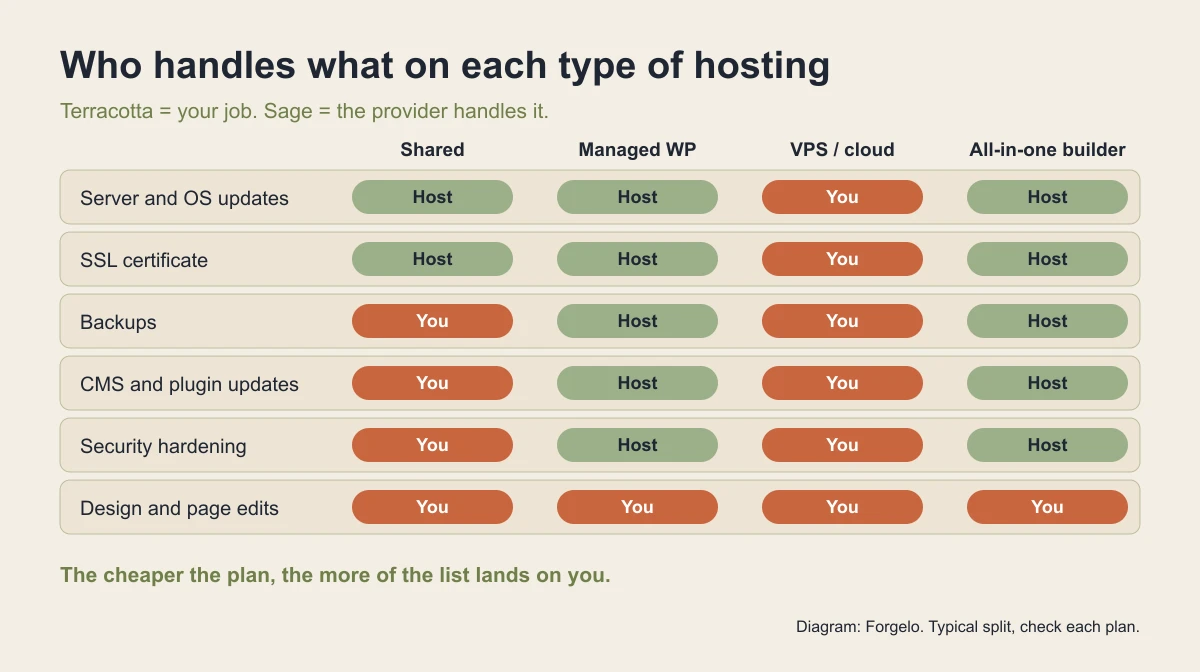
Almost every plan on the market falls into one of four buckets. They differ less in raw speed and more in how much of the upkeep lands on you.
| Hosting type | What you get | Who maintains it | Typical fit |
|---|---|---|---|
| Shared hosting | A share of one server with many other sites, plus a control panel | You maintain the site software, the host maintains the server | Brochure sites, small WordPress sites |
| Managed WordPress | Shared or cloud servers tuned for WordPress, with updates and backups handled | Host handles most upkeep, you handle content and design | Owners who want WordPress without the chores |
| VPS or cloud server | A virtual server with guaranteed CPU and memory | You or a developer handle everything | Custom apps, heavy traffic, special software |
| Builder-included hosting | Hosting bundled inside a website builder subscription | The platform handles servers, security, and updates | Owners who want a working site without any server work |
Shared hosting is the cheapest and the most common. It is fine for most small businesses, as long as someone keeps WordPress and its plugins updated. Managed WordPress costs more because the host takes over those chores. A VPS is a different category entirely: more power, more responsibility. Builder-included hosting skips the server conversation altogether, which is why many owners never realise they are paying for hosting at all.

Real prices: intro rates versus renewal rates
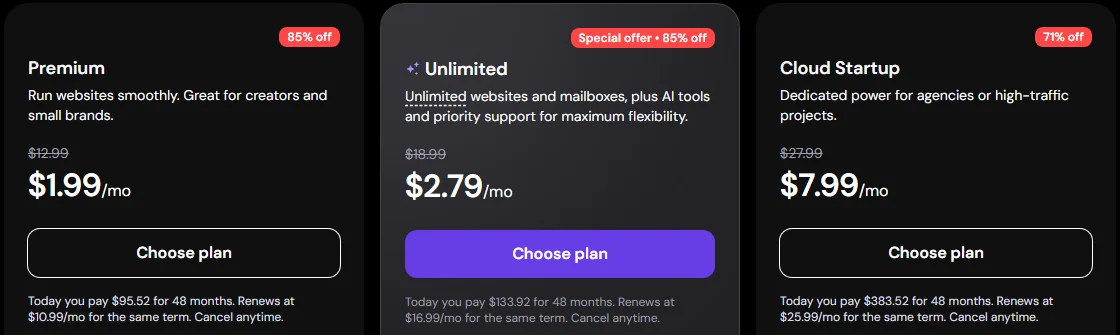
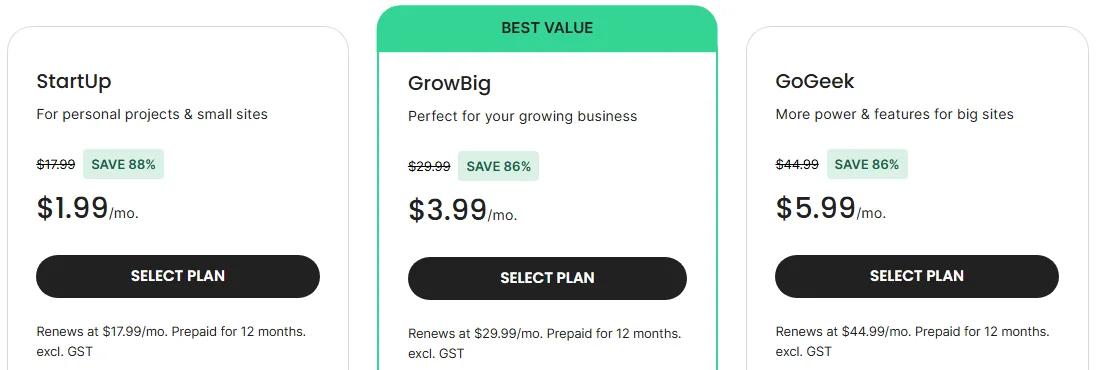
Hosting is sold almost entirely on the introductory price. The number in large type is a discounted monthly rate that usually requires you to prepay one to four years. The price that matters for your budget is the renewal rate, printed in small type under the button.
Here is what two of the best known hosts showed on 7 November 2026, during their Black Friday promotions.
Put side by side, the gap between the headline and the long-term cost is large:
| Plan | Intro price | Prepaid term | Renewal price | Websites |
|---|---|---|---|---|
| Hostinger Premium | $1.99/mo | 48 months ($95.52 upfront) | $10.99/mo | 3 |
| Hostinger Unlimited | $2.79/mo | 48 months ($133.92 upfront) | $16.99/mo | Unlimited |
| SiteGround StartUp | $1.99/mo | 12 months | $17.99/mo | 1 |
| SiteGround GrowBig | $3.99/mo | 12 months | $29.99/mo | Unlimited |
| Forgelo Starter (builder-included) | $9/mo | Monthly | $9/mo | 3 |
Sources: Hostinger web hosting, SiteGround web hosting, Forgelo pricing. Promotions change often, so treat these as a snapshot and recheck before you buy.
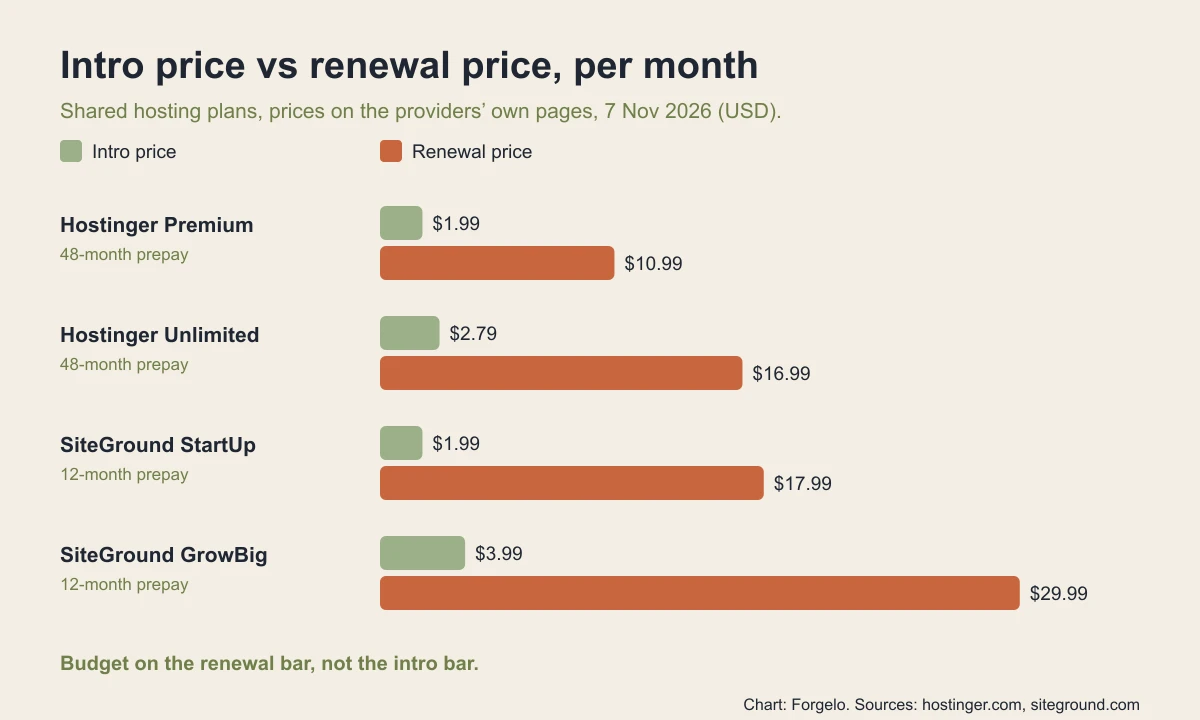
None of this makes the intro deals a trick. A four-year prepay at 1.99 dollars is genuinely cheap. The point is to compare plans on the same footing. If you plan to keep the site for five years, add up the prepaid amount plus the renewal months, and compare that total. For a broader look at what a whole site costs, our guide on how much a website costs breaks down the other line items.
The hidden costs that sit next to hosting
The hosting invoice is rarely the whole bill. Four extras catch small business owners most often.
The domain after year one. Many plans include a free domain for the first year. From year two you pay the registrar's normal renewal price. Keep the domain in your own name, not the developer's, so you can move it any time. If you are weighing a free address against your own, read custom domain vs free subdomain first.
Business email. Hosting plans often include mailboxes free for the first year, then charge per mailbox. Hostinger's page, for example, lists mailbox renewals at 0.59 dollars a month per mailbox on a 12 month term. That is small, but it adds up across a team.
Premium themes and plugins. A WordPress site on cheap hosting often needs a paid theme, a backup plugin, a security plugin, and a form plugin. Each has its own yearly license.
Your time. The cheapest hosting assumes someone updates the software, watches for broken plugins, and restores backups. If that person is you, count the hours. If you pay a developer, count the retainer.
This is why the "cheapest" plan is often not the cheapest site. Our breakdown of website costs for small businesses shows how these extras stack up over two years.
How to choose hosting for your small business
Most owners can decide in five questions. Answer them in order and stop when the answer is clear.
- Who will maintain the site? If nobody on your team will update software, rule out plain shared hosting and VPS. Choose managed WordPress or builder-included hosting.
- What does the site need to do? A few pages and a contact form fit anywhere. An online store with hundreds of products, a members area, or custom software points toward managed WordPress or a VPS.
- How much traffic do you expect? A local business with a few thousand visits a month is well inside every shared plan. Plan for more only when you have the numbers.
- What is your two-year budget? Compare the prepaid amount plus renewals, plus domain, email, and paid plugins. Do not compare intro prices.
- Can you leave easily? Check that you can export your content, keep your domain, and move without the host's permission.
If you want a simple rule: brochure site with no technical help, use builder-included hosting. Brochure site with a WordPress person on call, use good shared hosting. Store or heavy site, use managed WordPress. Custom application, use a VPS with a developer.
Before launch, run through our website go-live checklist so the hosting, domain, and HTTPS are all confirmed working on the day you announce the site.
When builder-included hosting is the better deal
For many small businesses, the right hosting decision is to not buy hosting separately at all. A hosted website builder bundles the server, HTTPS, updates, and backups into one subscription, and you edit the site through the builder instead of a control panel.
That trade has clear pros and cons:
| Separate hosting (shared or managed) | Builder-included hosting | |
|---|---|---|
| Monthly price | Low intro, higher renewal | Flat subscription |
| Maintenance | You or the host, depending on plan | Platform handles it |
| Flexibility | Install any software or plugin | Limited to builder features |
| Moving away | Copy files to a new host | Usually rebuild on the new platform |
| Skills needed | Some technical comfort | None beyond editing content |
With Forgelo, for example, hosting is part of every plan. The free plan publishes one site on a Forgelo subdomain with a small badge. Starter at 9 dollars a month lets you connect one custom domain and remove the badge, and Pro at 19 dollars a month covers ten sites and custom domains. You describe the business, the AI builds the site, and you edit sections by typing what you want changed. There is no server, plugin, or update to look after. The step by step for pointing your own address at the site is in our guide to connecting a custom domain.
The honest limit is flexibility. If you need a specific plugin, a custom booking system, or full control of the code, a builder will feel tight, and WordPress on managed hosting is the better home. If you mainly need a fast, clean site that explains what you do and collects enquiries, builder-included hosting removes a whole category of chores. For a wider view of that trade, see our guide to the AI website builder for small business.
Free hosting: when it is enough and when it is not
Free hosting exists and is useful for testing an idea, a personal portfolio, or a landing page you need for a week. For a business that wants to be taken seriously, free plans usually carry three costs: a platform address instead of your own domain, the provider's branding on your pages, and limits on storage, traffic, or support.
Our roundup of free website hosting lists the options that are actually worth using and the point where moving to a paid plan pays for itself. The same logic applies to free plans on builders, covered in free AI website builder and hosting.
A practical path many owners take is to start on a free plan to get the content and structure right, then upgrade to a paid plan with your own domain on the day you start promoting the site.
Mistakes to avoid when buying hosting
A few mistakes come up again and again with small business owners:
- Choosing on the intro price. Always compare the renewal price and the prepaid total.
- Letting someone else own the domain. Register it in the business name with an email you control.
- Buying a VPS "for speed". A well configured shared or managed plan is fast enough for a normal business site, and a VPS adds maintenance you may not have time for.
- Skipping backups. Make sure you can restore a backup yourself, without opening a support ticket.
- Ignoring support quality. When the site goes down on a Saturday, the response time matters more than the storage number.
Avoid these and almost any reputable host will serve a small business well. For a short list of what every small business site should include beyond hosting, see small business website essentials.
The short version
Small business website hosting is not about buying the biggest plan. It is about matching the hosting type to who will maintain the site, then comparing plans on the renewal price rather than the headline. Shared hosting fits most brochure sites if someone keeps the software updated. Managed WordPress takes those chores off your plate. A VPS is for custom builds. Builder-included hosting skips the server work entirely.
If you would rather not think about servers at all, see Forgelo's plans: hosting, HTTPS, and updates are included, and you can publish your first site free before you decide.