Short answer: the biggest difference between AI website builders is not how they generate the first draft. Every serious builder in 2026 turns a description into a plausible site within minutes. The sharpest difference is what happens on the second change: whether you finish the site in a drag and drop editor, on a design canvas, by chatting to a codebase, or by pointing at one section and describing what should be different. That editing model decides whether your site keeps getting updated or freezes at the day-one draft. Everything else (what the AI outputs, what is bundled, how AI use is billed) matters, but less.
We make one of these builders, so read the Forgelo parts with that in mind. Every claim about another product below is quoted from that company's own live page, checked on 26 September 2026, and listed at the end.
What actually differs between AI website builders?
Line the builders up and they differ on five things. Only one of them is invisible in a demo.
| Difference | What to ask | Why it matters |
|---|---|---|
| What the AI produces | A hosted website, a WordPress site, a design file, or an application codebase? | Decides who maintains it and how hard it is to move |
| How you change it after the draft | Drag and drop, design canvas, chat that rebuilds the project, or a prompt aimed at one section? | Decides whether you keep editing after week one |
| What is bundled | CRM, bookings, email marketing, a store, hosting? | Fewer tools to wire together, but a bigger bill |
| How AI use is metered | Monthly credits, a daily allowance, or no AI limit? | Decides what a heavy editing week costs |
| Who it is built for | Small businesses, designers, developers? | Every default in the product follows from this |
The first draft is where builders spend their marketing budget, and it is where they are most alike. Durable says it creates a site in around 30 seconds, Hostinger says you get "a first version in seconds," and Forgelo generates a complete multi-section site from one sentence, usually within a few minutes. Any of them produces a homepage that looks finished. The question a demo cannot answer is what the twentieth edit feels like.
The sharpest difference: what happens on the second change
Here is how each builder describes the step after generation, in its own words. Read the middle column, because that is where you will spend the next year.
| Builder | After the first draft | The unit you change |
|---|---|---|
| Hostinger | "Describe what you need to get a first version in seconds. Then customize every detail with the drag-and-drop editor." | A block, by hand |
| Durable | Step three is "Drag and drop editor, AI does the rest": you "control the layout, images, headings, fonts" | A block, by hand |
| Squarespace | "Drag, drop, resize, and arrange content on the responsive grid," and "Describe a custom element and Squarespace AI creates it" | A block on a grid, plus AI-made elements |
| Wix | "Customize anything by hand or with Aria, your built-in AI agent," with drag and drop "to fine-tune fonts, colors and styling" | Hybrid: AI agent plus hand editing |
| 10Web | Two options: "Chat with AI Co-Pilot" or "Use the Drag-and-Drop Editor," on a site "built on WordPress" | Hybrid, on WordPress |
| Framer | The agent "creates editable pages, sections, copy, and visuals," then you "keep refining in the conversation, or take over on the canvas" | Page or component, design led |
| Lovable, Bolt | Keep chatting; Lovable generates an application "backed by editable code" | The whole project or app |
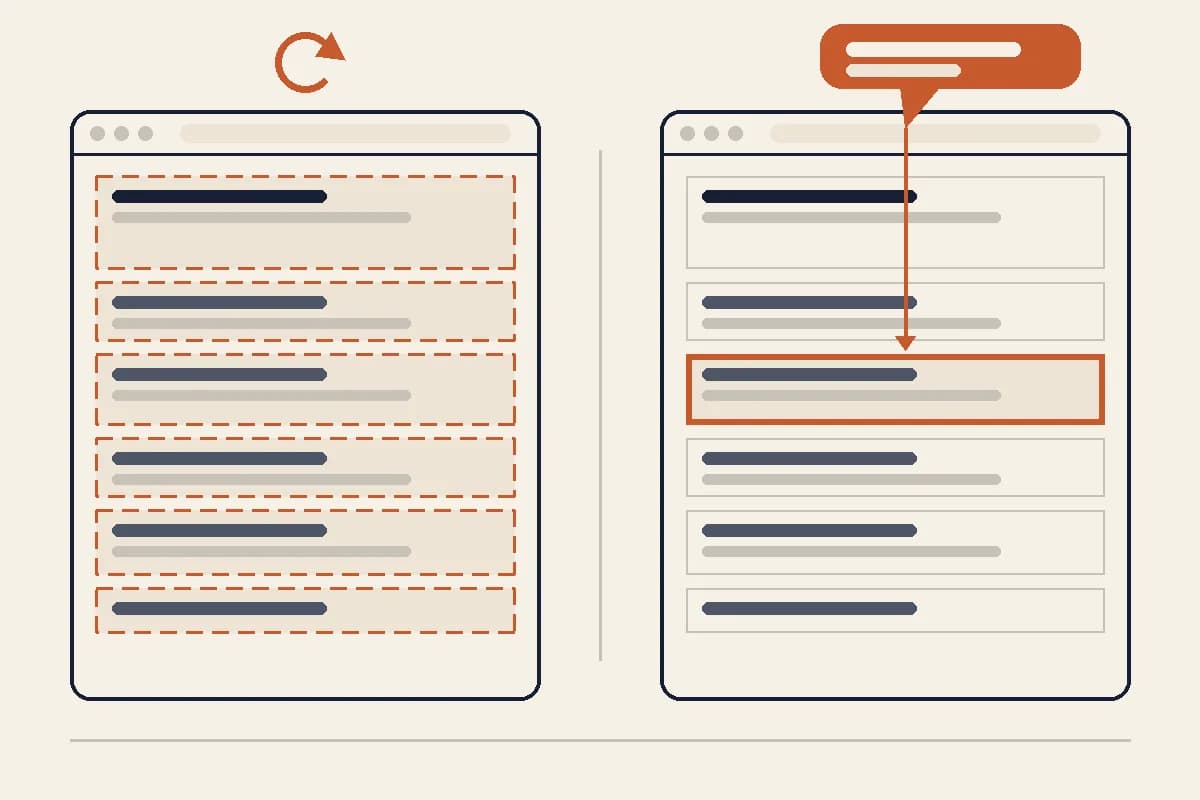
| Forgelo | Click a section, describe the change, and only that section is rebuilt | One section, by prompt |
Put simply, there are four editing models:
- AI draft, then hand editing. The AI writes version one and you take over with a drag and drop editor. Hostinger and Durable say this plainly. Great if you enjoy editors; a chore if you do not.
- AI plus a visual editor, side by side. Wix, 10Web and Squarespace mix an AI assistant with a traditional editor. Framer does the same with a professional design canvas. Powerful, but you are expected to be comfortable finishing the job visually.
- Chat that rebuilds a codebase. Lovable and Bolt are the most conversational tools of all, and they produce software. You own the code, and with it the deployment, the database, and the debugging.
- Prompt-native, section-level editing. You point at one section and describe the outcome. The builder rebuilds that section and leaves the rest of the page alone. This is the model Forgelo is built on.
None of these is wrong. They suit different people. But notice that only one of them keeps the whole workflow in plain language after launch, and only one of them limits every change to the part you asked about. For a deeper look at judging conversational editing specifically, see our guide to the AI website builder you edit by talking.
Why the editing model outlasts every other difference
A small business site is never finished. Prices change, a service gets added, a seasonal offer starts, a testimonial comes in, the phone number moves to WhatsApp. The site that wins is the one that is still accurate six months later, and that depends on one thing: how much effort and risk each small change carries.
Think of it as the blast radius of an edit.
- In a hand editing model, the blast radius is small but the effort is high. You find the block, change it, check spacing, check mobile, publish. Each edit is a little project, so edits get postponed.
- In a whole project rebuild, the effort is low but the blast radius is the entire site. You ask for a better services section and the hero, the testimonials and the wording you already approved can shift with it. After two or three surprises, people stop asking for changes.
- In a section-level prompt model, both are small. You describe the change, one section is rebuilt, and five sections do not move. Because asking is cheap and safe, you keep asking.
That is why we call it the sharpest difference. Generation speed, template count and AI model names are the things that change every quarter. How a builder treats your second, tenth and fiftieth change is designed into its architecture, and it decides whether the site stays alive. In Forgelo a site is a document of sections, and an edit replaces one section and re-renders it; our guide to editing a website section by section shows what that looks like in practice.
The other differences that still matter
The editing model is the sharpest difference, not the only one. Three others can rule a builder in or out before you ever reach it.
What the AI produces. Most AI website builders publish and host the site for you. 10Web is different in that its sites are "built on WordPress," which suits you if you want the WordPress plugin ecosystem. App builders are different again: Lovable describes a working application with "frontend, backend, database, authentication, and integrations," and a codebase that "can be synced to GitHub, GitLab, or Bitbucket." That is ideal if you need software, and unnecessary weight if you need a business website. We compare that route directly in Forgelo vs v0 and Bolt.
What is bundled. Durable positions itself as an all-in-one growth platform with an "integrated CRM," bookings, and AI-driven email campaigns. Wix brings a large app ecosystem and strong ecommerce. Forgelo stays focused: built-in SEO basics on every site, lead forms that route to WhatsApp, a free subdomain, and a custom domain from Starter up. If you already run your CRM elsewhere, a bundle is extra cost; if you run nothing yet, it can save setup time. See Forgelo vs Durable and Forgelo vs Wix for the head to head view.
How AI use is metered. Some builders meter AI work in monthly credits, and Lovable prices its plans by credits too. Forgelo uses a daily allowance instead: 5 AI generations and edits a day on Free, 30 on Starter, 100 on Pro and 300 on Business, refilling on a rolling 24-hour window. Edits count toward it, so check the allowance against how often you expect to change the site. Our AI website builder pricing guide compares the real plan prices and billing traps.
Which kind of AI website builder fits you?
Match the builder to the job rather than to the demo.
- You run a service business and want a clear site you can keep current without learning an editor. A section-level prompt builder fits best. That is Forgelo's lane: describe the business in one sentence, publish the same day, then change any section by describing it.
- You want a big store, bookings across staff, or a large app marketplace. Wix has a decade of integrations behind it.
- Design is the product and you want pixel-level control. Framer's canvas with an AI agent is built for designers.
- You want WordPress and the plugins that come with it. 10Web generates WordPress sites.
- You want the CRM, bookings and email in the same product as the site. Durable bundles them.
- You need logins, dashboards, or custom application logic. That is software; Lovable, Bolt or a developer is the right route.
If you are still mapping the category, our complete AI website builder guide explains how these tools work, and the no-code website builder guide puts AI builders next to template and drag and drop tools. For a ranked shortlist, see the best AI website builders, including the places where we are not the best pick.
How to see the difference yourself in 15 minutes
Feature tables flatten exactly the difference that matters. A short hands-on test does not. Run this on two builders with your real business, not the demo prompt.
- Generate a draft from your actual business description. Is the copy about you, or could it describe any business in your industry?
- Ask for one specific change to one section. For example: "Rewrite the services section for small clinics, three services, one sentence each."
- Check the rest of the page. Did the hero change? Did approved wording drift? This single check reveals the editing model faster than any sales page.
- Give it a real fact. Add an exact price or opening hours and confirm the builder keeps your number rather than inventing a neighbouring one.
- Look at the published page. One clear headline, a title tag, a meta description, and a sitemap. Our website SEO basics guide lists the rest.
- Send yourself a test enquiry. If it lands somewhere nobody checks, the site is decoration.
Whichever builder you still want to use after step three is usually the right one.
Getting started
If the section-level model sounds like how you would actually work, you can start free on Forgelo: describe your business in one sentence, get a complete draft within a few minutes, publish on a free subdomain the same day, and change any section by describing it. Paid plans are $9, $19 and $39 a month for Starter, Pro and Business when you want your own domain and more sites. The features page shows the editing loop end to end.
Where these claims come from
Each quote above was checked on the vendor's own page on 26 September 2026:
- Hostinger: hostinger.com/website-builder
- Durable: durable.com/ai-website-builder
- Squarespace: squarespace.com/website-design
- Wix: wix.com/ai-website-builder
- 10Web: 10web.io/ai-website-builder
- Framer: framer.com/features/ai
- Lovable: docs.lovable.dev/introduction
- Bolt: bolt.new
- Forgelo: forgelo.com/pricing and forgelo.com/features